How to Reduce Form Abandonment for Services and Rescue Lost Enquiries
Learn how to reduce form abandonment services with multi-step forms, trust signals & smart follow-up to rescue lost enquiries.
By Growth Kings. Published . 17 min read.

How to Reduce Form Abandonment for Services and Rescue Lost Enquiries
If you're getting traffic but not enough qualified calls, learning how to reduce form abandonment services rely on is one of the fastest wins you can get. I see this constantly with established service businesses: great SEO, decent ads, then a leaky enquiry form that quietly throws away 60-80% of potential leads.
Unlike ecommerce, you don't lose a £50 basket. You lose a £5,000 roofing job, a £12,000 legal retainer, or a recurring commercial cleaning contract. That's what makes fixing this so valuable — you don't need more traffic, you need to stop wasting the intent you already have.
In this guide, I'll break down what your form abandonment rate service websites typically see, what causes friction, and the practical fixes that actually move the needle: multi-step enquiry forms, form friction and trust signals, and abandoned enquiry follow up that rescues leads without being creepy.
Key Takeaways
| What You Need to Know | Action to Take |
|---|---|
| Form abandonment rate service websites often runs 60-80% — higher than most owners expect | Track form starts vs. completions in GA4 to get your baseline this week |
| Service forms abandon for different reasons than checkouts: perceived commitment, privacy fear, unclear next steps | Cut fields to essentials, make phone optional, clarify response time |
| Multi-step enquiry forms with conditional logic convert better for high-consideration services | Start with easy questions, show progress, qualify gradually |
| Form friction and trust signals decide completion in seconds, especially on mobile | Add reviews, team photos, pricing ranges, and sub-3-second load speed |
| Most lost enquiries are rescuable with consent-based follow-up and after-hours help | Add partial-entry capture, exit-intent save, and AI assistant for nights/weekends |
What Is Form Abandonment Rate on Service Websites and Why Is It So High?
Your form abandonment rate is simple: the percentage of people who start your enquiry form but never hit submit.
Formula: (Form Starts - Form Completions) / Form Starts x 100
If 100 people start your “Get a Quote” form and 28 submit it, your abandonment rate is 72%.
How to calculate and benchmark your form abandonment rate for services
You can measure this in under 30 minutes:
- GA4 + Tag Manager: Fire one event on
form_start(first field interaction) and one onform_submit(successful submission). Build a funnel exploration to see drop-off by step. - Form tools: Typeform, Jotform, Gravity Forms, HubSpot and Zoho all report starts, views, and completions natively. Use field-level drop-off to see exactly which question kills people.
- Session replay: Tools like Microsoft Clarity or Hotjar show rage-clicks, validation loops, and mobile layout breaks.
What is a good number? For context, the average documented online cart abandonment rate is 70.19% based on 49 different studies, according to Baymard Institute’s cart abandonment research. Service enquiry forms don’t have a single universal benchmark, but in my experience auditing service sites, 55-70% is common for short contact forms, and 70-85% is common for long quote forms with uploads and phone requirements.
Don’t chase a vanity “industry average.” Your baseline and your cost-per-qualified-enquiry are what matter.
Why service enquiry forms abandon differently than ecommerce checkouts
Ecommerce abandonment is often about price, shipping, or just browsing. Service abandonment is about perceived risk and commitment.
When someone fills in a service form, they’re thinking: “If I submit this, will I get hounded by sales calls for weeks?” “Will they judge my budget? Do I even know what to ask for?” “Why do they need my phone, address, and project photos just to give me a ballpark?”
Intent is higher, but anxiety is higher too. That’s why generic checkout advice — “just shorten the form” — falls flat for services. You need to qualify and reassure at the same time.
Salesforce Research found that 88% of customers say the experience a company provides is as important as its products or services, reported in Salesforce’s State of the Connected Customer research. For services, your form is the experience. A clunky, demanding form signals what working with you will feel like.
The true cost of lost enquiries for established service businesses
Let’s make it tangible. If you spend £3,000/month on Google Ads driving 400 form views, with a 25% start rate (100 starts) and 75% abandonment (25 completions), you’re paying £120 per enquiry.
Cut abandonment to 55% (45 completions from the same 100 starts) and your cost drops to £66 per enquiry — with zero extra ad spend. Same math applies to SEO traffic you’ve worked months to earn.
The biggest leak I see is after-hours. Plumbers, law firms, clinics, and home services get 30-50% of form views at night and weekends. No callback promise, no chat alternative, no instant acknowledgement? They bounce to the competitor with click-to-call.
If your overall conversion feels soft, start wider before you zoom in. This breakdown of why your conversion rate is low and the 9 overlooked funnel gaps is a useful companion to a form audit.
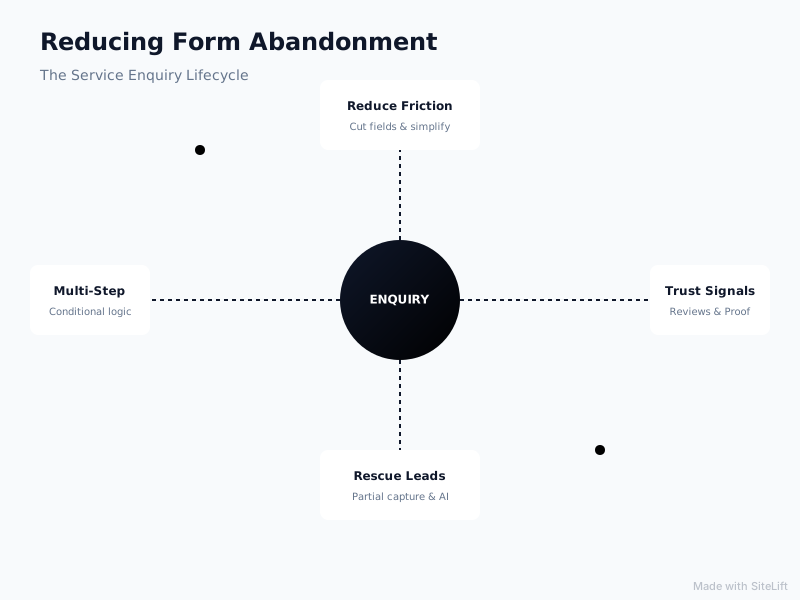
Infographic by SiteLift
What Causes Form Friction and Kills Enquiry Conversions?
Form friction is anything that makes the visitor think, type, wait, worry, or second-guess. Most service forms don’t have one big problem. They have seven small ones stacked together.
Are you asking for too much, too soon?
This is the number one killer. I regularly see “contact us” forms asking for full name, company, phone, budget, timeline, address, project details, file upload, and how they heard about you — all required.
Specific friction drivers:
- Mandatory phone number: Huge drop-off point. People fear instant sales pressure.
- File uploads too early: “Upload plans/photos” feels like homework before they know if you’re a fit.
- Account creation or multi-page commitment: Baymard found that 26% of US online shoppers have abandoned a checkout in the past quarter solely because the site wanted them to create an account, detailed in Baymard’s cart abandonment reasons analysis. The service equivalent is forcing newsletter opt-ins, portals, or lengthy pre-qualification before any value.
- Open-ended “tell us about your project” boxes: Intimidating when blank. Guided choices work better.
Pro Tip: Make phone optional on first submit and ask for it on step two after you’ve earned a micro-yes. You’ll get more total callable leads than by demanding it upfront.
Does your form look risky, slow, or confusing on mobile?
Over 60% of service form views I see are mobile. Yet most forms are still designed desktop-first.
Watch for:
- Slow load: Google found that 53% of mobile site visits are abandoned if a page takes longer than 3 seconds to load, according to Think with Google’s mobile page speed benchmarks. Heavy form builders, CAPTCHAs, and uncompressed hero images push you over that cliff.
- Tiny fields, poor contrast, keyboard that doesn’t switch to numeric/email mode
- Aggressive validation: red error walls on submit with no inline guidance
- Old-school CAPTCHA or “select all traffic lights” puzzles
- No progress indicator on long forms, no save-and-resume
The Nielsen Norman Group’s web form usability guidelines have shown for years that inline validation, clear error messages, and logical tab order dramatically reduce user struggle. Most service sites still violate the basics.
Lack of clarity on what happens next after submit
Vague CTAs like “Submit” or “Send” create anxiety. The visitor wonders: Will I get a quote? A sales call? In 5 minutes or 5 days? Is this binding?
If your button doesn’t promise a specific, low-risk outcome, and there’s no text explaining response time, privacy, and next steps, high-intent people hesitate — then leave.
For a deeper look at message mismatch from ad to form, read this guide on fixing high click-through rate but low conversion.
How to Reduce Form Abandonment Services With Multi-Step Enquiry Forms and Smart Design?
This is where how to reduce form abandonment services get right actually differs from ecommerce best practices. For high-consideration services, longer can convert better — if you structure it right.
Why do multi-step enquiry forms convert better for services?
Multi-step enquiry forms break one intimidating wall of fields into 3-5 small, conversational steps. Psychologically, once someone answers step one, they want to finish.
What works for services specifically:
- One idea per screen: Step 1: What service do you need? Step 2: Where and when? Step 3: How should we contact you?
- Low-threat first question: Start with a click, not typing. “What are you looking for?” with 3-4 visual buttons gets momentum.
- Progress bar + step labels: “Step 2 of 4: Project details” reduces uncertainty.
- Conditional logic: Show boiler installation questions only if they picked boiler, not to everyone. You qualify without overwhelming.
- Progressive profiling: Ask name + email first, then phone + details on thank-you page or in follow-up. Don’t demand everything to start a conversation.
I’ve seen law firms, solar installers, and home care providers lift completions 25-40% just by moving from a 12-field single page to a 4-step flow with the same questions reordered.
What are the best practices for shorter, smarter service enquiry forms?
You don’t always need multi-step. Sometimes smart single-step wins, especially for urgent services like locksmiths or emergency plumbing.
Use this checklist:
- Cut to 3-5 fields max for first conversion: name, email/phone (one, not both required), service, postcode, message (optional)
- Mark optional fields clearly. Make only 2-3 required.
- Use smart defaults, autofill, and input masks. Enable browser autocomplete for name, email, tel.
- Replace open text with dropdowns, radio buttons, and date pickers where possible
- Validate inline as they type, with friendly language: “Looks like an extra digit slipped in — mind checking?”
- Offer alternatives right under the form: click-to-call, WhatsApp, “Prefer to talk? Call [number]” and live chat
Pro Tip: Run a 5-second field audit: for every field, ask “Would I still get a qualified lead without this right now?” If yes, move it to step two, CRM enrichment, or the discovery call.
How to optimize for mobile, speed, and accessibility?
- Single column layout, minimum 48px tap targets, 16px+ font to prevent iOS zoom
- Sticky mobile CTA that scrolls to form, plus click-to-call button fixed in header
- Lazy-load form scripts, remove render-blocking plugins, compress images — aim for under 3 seconds on 4G
- Label every field visibly (not placeholder-only), ensure keyboard navigation and screen-reader labels, maintain 4.5:1 contrast
- Test on a real mid-range Android, not just your iPhone Pro. That’s where forms break.

How Do Trust Signals and Clear Value Propositions Increase Form Completions?
When someone doesn’t know you, form friction and trust signals decide the outcome. People don’t abandon just because forms are long — they abandon because the risk of submitting feels higher than the reward.
Which trust signals matter most next to a service enquiry form?
Don’t bury proof on a separate testimonials page. Put it within eyeshot of the form:
- Star rating + review count (“4.9 from 320+ local homeowners”) with Google/Yelp/Trustpilot logo
- 2-3 short, specific testimonials with name, location, and outcome
- Before/after photos or one-line case results (“Boiler replaced in 1 day, £340/yr saved”)
- Accreditations, licenses, insurance, guarantees (Gas Safe, Bar Association, HIPAA-compliant, etc.)
- Real team photo, not stock. Caption with “You’ll hear from Sarah within 2 business hours”
- Privacy microcopy under button: “No spam, no cold calls. We’ll only contact you about your enquiry.”
- Secure site cues and professional design — no broken images or outdated copyright
If you want a full breakdown, this guide on website trust signals for service companies shows exactly where to place them for maximum lift.
How to reduce anxiety with transparency on process, pricing, and response time?
High-ticket services lose leads to “mystery process” fear. Fix it with radical clarity:
- Headline that promises an outcome, not a form: “Get a fixed quote in 24 hours — no obligation”
- 3-step visual: 1. Tell us about the job (2 mins) → 2. Get options & transparent range → 3. Book when ready
- Pricing ranges even if you can’t give exacts: “Most loft conversions we do run £35k-£55k depending on spec”
- Response promise with owner: “We reply within 2 business hours, Mon-Fri 8am-6pm. After hours? Our assistant will confirm instantly.”
- No-obligation language near CTA: “Free assessment. No pushy sales calls — we hate that too.”
That one paragraph often does more than redesigning the whole page.
How to use microcopy, social proof, and guarantees effectively?
Microcopy is the small text that whispers “you’re safe, you’re almost done.”
Swap this → for that:
- “Submit” → “Get My Free Quote”
- “Phone*” → “Mobile (optional — for faster response only)”
- “Describe your project*” → “Briefly, what’s going on? 1-2 sentences is perfect. e.g. ‘Boiler leaking, 3-bed house in Leeds’”
- Error: “Invalid input” → “Hmm, that email looks incomplete — is there a typo after the @?”
- Helper under email: “We’ll send your quote summary here. Never shared.”
Add a guarantee where you can: free reschedule, fixed-price promise, workmanship warranty. For services, certainty beats cleverness.
How to Reduce Form Abandonment Services by Rescuing Abandoned Enquiries With Follow-Up and AI?
Even great forms lose 40-60% of starters. Learning how to reduce form abandonment services businesses face means accepting that and building a rescue system. Completion optimization gets you more leads; rescue gets back the rest.
What is abandoned enquiry follow up and how to set it up compliantly?
Abandoned enquiry follow up means re-engaging people who started but didn’t finish — but only with proper consent.
Compliant setup:
- Consent-first capture: Ask email early in step 1 or 2 with clear language: “Enter email to save progress and get your summary. We’ll nudge you if you get interrupted — opt out anytime.” Don’t secretly track and spam.
- Partial-entry save: Tools like HubSpot, ActiveCampaign, Jotform, and Gravity Forms can save partial entries. Trigger an internal CRM alert for high-value partials.
- Speed-to-lead: Call or personally email within 5-15 minutes during hours for high-intent services. After that, conversion drops fast.
- Simple 3-touch sequence:
- 30-60 mins: Helpful nudge — “Looks like you didn’t finish — want me to save your spot? Reply with a good time to call.”
- Day 2: Value + alternative — short video, pricing guide, or “Prefer WhatsApp? Message here.”
- Day 5-7: Break-up — “Should I close your file, or keep your quote open?”
Always include easy opt-out, honor GDPR/PECR/CAN-SPAM/CASL depending on your market, and never add abandoned emails to a general newsletter without separate consent.
How can exit-intent, retargeting, and email/SMS rescue lost leads?
Not everyone will give email upfront. Layer these safety nets:
- Exit-intent on form pages: “Wait — want a ballpark before you fill this in? Download our 2026 pricing guide + get 10% off assessment.” Keep it helpful, not desperate.
- Retargeting: Show testimonial-led ads to form viewers who didn’t convert: real faces, specific outcomes, “Still need help with [service]? Get response in 2 hours.” Cap frequency to avoid stalking.
- Callback widget: “Enter number, we’ll call in 15 mins” converts anxious mobile users who hate forms.
- Human follow-up script that works: “Hi [Name], it’s Sarah from [Company] — saw you were looking at [service]. Totally fine if timing’s off, just wanted to check if you wanted a quick ballpark or should I close this out? No pressure either way.” Short, human, easy to say no to.
SMS can work brilliantly for home services and clinics, but only with explicit opt-in. One SMS + one email is enough. More feels like pressure.
How do AI-powered conversational assistants capture after-hours enquiries?
This is where most established firms bleed leads without realizing it. Your best prospects research at 9pm, 11pm, Sunday morning. Your office is closed.
AI-powered assistants don’t replace you — they hold the conversation until you’re back:
- Greet on form or pricing pages: “Looking for a quick estimate? I can check availability and get you a ballpark in under a minute.”
- Answer FAQs instantly: pricing ranges, service areas, timelines, insurance, what to prepare
- Qualify gently: service type, location, urgency, budget range — then book directly into your calendar
- Hand off cleanly: summarize transcript + contact into your CRM, flag hot leads for morning callback, set expectations: “Sarah will confirm your slot by 9am.”
The key is tone: helpful concierge, not robot interrogator. Limit to 3-4 qualifying questions, always offer human escape: “Want to just talk to a person? Leave your number here.”
This fits the practical philosophy I advocate: fix clarity, trust, and follow-up before you pay for a full rebuild. More examples of that approach are in these 8 website optimization examples that doubled service enquiries and this playbook on website conversion rate optimization without a redesign.
My Take: Stop Buying Traffic to Fill a Leaky Bucket
I’ll be blunt because I’ve watched too many good businesses do this backwards.
Most service owners I talk to want more traffic, better rankings, more ads. But when I look at their analytics, they’re already getting enough interested visitors — they’re just asking those visitors to jump through hoops, wait three days for a reply, and trust a faceless form with zero proof nearby.
In my view, form optimization isn’t a design tweak. It’s respect. Respect for the fact that choosing a solicitor, a surgeon, a builder, or an accountant is stressful. People aren’t abandoning because they’re lazy. They’re abandoning because at the exact moment you asked for trust, you didn’t give them a reason to give it.
If I had to prioritize with a limited budget, I’d do this in order: first, make the form stupidly easy and fast on mobile. Second, put a human face and a clear promise next to it. Third, add a rescue net for nights and busy moments. Only then would I spend another pound on traffic.
You don’t need more leads. You need to stop losing the good ones you already earned.
Get More From the Traffic You Already Have
You don’t need a six-month rebuild to fix this. Most of the wins above — fewer fields, better microcopy, trust next to the form, partial-entry alerts — can be shipped in a week or two.
That’s exactly how we work at growth-kings.com. We help established service businesses turn existing visits into qualified enquiries with practical website optimization for clarity and trust, better search visibility, and AI-powered assistants that capture and qualify after-hours enquiries so nothing slips through.
If your form feels like a bottleneck, start with a focused audit, not a redesign. Fix the friction, prove the lift, then scale what works.
FAQ
What is a good form abandonment rate for service websites?
There’s no single official benchmark, but most short service contact forms I audit abandon at 55-70%, and long quote forms with uploads or mandatory phone fields often hit 70-85%. Rather than chasing an average, get your own baseline (starts vs. completions in GA4) and aim to improve it by 10-15 points first. For services, qualified completions matter more than raw completions.
How do multi-step enquiry forms reduce form abandonment for services?
They lower perceived effort by showing one small question at a time, starting with easy clicks instead of typing, and using a progress bar to create momentum. Conditional logic means people only see relevant questions, so a complex service feels simple. You can also ask for email early to save progress, then qualify gradually without scaring people off.
What are the biggest causes of form friction on service websites?
Too many required fields (especially phone), file uploads too early, slow mobile load, confusing validation and CAPTCHA, and no clarity on what happens after submit. On top of that, psychological friction — no reviews, generic “Submit” buttons, and fear of spam or sales pressure — stops high-intent visitors from finishing.
How can I follow up on abandoned enquiries without violating privacy rules?
Only follow up when you have clear consent. Ask for email early with transparent language about saving progress and sending reminders, and always offer easy opt-out. Don’t add partial entries to mass newsletters. Store partial data securely in your CRM, limit follow-up to 2-3 helpful touches, and follow GDPR in the UK/EU, plus PECR, CAN-SPAM or CASL rules where applicable. When in doubt, ask your legal advisor.
Should I shorten my form or add qualifying questions to get better leads?
Do both, in sequence. Shorten the first conversion to the minimum needed to start a conversation — name, one contact method, service, and location. Then use multi-step logic or post-submit follow-up to qualify for budget, timeline, and urgency. You’ll get more total enquiries and better qualification than by forcing a 12-field interrogation upfront.
— growth-kings.com
Want this working on your own site?
Tell us what’s working, what’s stuck and what you want to improve. We will reply personally.