Why Your Service Business Website Is Leaking Leads (And How to Fix It Without a Full Redesign)
Learn website conversion rate optimization for service businesses to fix leaks, capture more enquiries and boost leads without a redesign.
By Growth Kings. Published , updated . 15 min read.

Why Your Service Business Website Is Leaking Leads (And How to Fix It Without a Full Redesign)
If you’re getting traffic but not enough enquiries, you don’t have a traffic problem. You have a conversion problem. And website conversion rate optimization for service businesses is how you fix it — without tearing everything down and starting over.
I see this pattern constantly with established firms: solid reputation, decent rankings, steady visitors, but the phone stays quiet. The site looks fine, yet it doesn’t explain clearly what you do, who it’s for, or what to do next. Visitors get confused, bounce, and call a competitor who made it easier.
This guide breaks down exactly where service websites leak leads, how to run a simple conversion rate audit, and which high-impact fixes will help you turn website visitors into clients faster.
What Is Website Conversion Rate Optimization for Service Businesses?
Website conversion rate optimization for service businesses is the process of increasing the percentage of website visitors who take a revenue-generating action — usually an enquiry form fill, phone call, booking, or live chat conversation.
For services, a “conversion” isn’t a checkout. It’s a hand-raise: I’m interested, please contact me. That makes the entire approach different from e-commerce.
According to HubSpot, the average conversion rate for professional service websites typically ranges between 2% and 5%, based on HubSpot’s landing page conversion benchmarks. If you’re getting 1,000 visits a month and converting at 1%, that’s 10 leads. Move to 3% with the same traffic, and you triple your pipeline without spending more on ads.
Lead Generation vs. E-Commerce CRO: Key Differences
Most CRO advice online is written for Shopify stores. That’s why it fails service businesses.
Here’s the core difference:
| Factor | E-commerce CRO | Service Business CRO |
|---|---|---|
| Primary conversion | Add to cart, checkout | Form fill, call, booking, chat |
| Decision driver | Price, images, reviews, shipping | Trust, expertise, clarity, responsiveness |
| Sales cycle | Minutes | Days to weeks, often needs human follow-up |
| Biggest friction | Checkout steps, shipping costs | Vague messaging, long forms, slow response |
| Proof that works | Star ratings, product videos | Case studies, before/after results, guarantees, team photos |
To improve service website leads, you don’t need urgency timers and upsell popups. You need to answer three questions in seconds: Can you solve my problem? Can I trust you? What should I do next?
The High Cost of the Full Website Redesign Myth
When leads dry up, agencies love to sell a full rebuild. It sounds decisive, but it’s often the most expensive way to avoid diagnosing the real issue.
A redesign can reset years of SEO equity, break internal links, change URL structures, and tank the pages that were actually working. I’ve seen firms spend $15k-$30k for a prettier site that converts worse because no one fixed the messaging, offer, or follow-up.
A smarter approach? Keep what’s working and optimize what’s not. If your site already ranks and loads reasonably well, targeted improvements to headlines, calls-to-action, forms, and trust signals will outperform a rebuild 9 times out of 10. That’s exactly what conversion-focused websites for service businesses are built to do — make you easier to understand, easier to trust, and easier to contact.
Pro Tip: Before you approve a redesign, ask: Which specific conversion friction will this redesign remove? If the agency can’t name it, don’t sign.
Why Is Your Service Website Leaking Leads?
Most service sites don’t have one big problem. They have five small leaks that add up to a dry pipeline. Here are the three I find on almost every conversion rate audit.
Vague Value Propositions Above the Fold
You have about five seconds. If a visitor can’t tell what you do, who you do it for, and where you do it, they leave.
Common culprits:
- Hero headline like “Welcome to Excellence in Solutions” that says nothing
- Stock photo instead of real work, real team, or real outcome
- No clear next step — just a navigation bar with 9 options
- Jargon: “holistic end-to-end synergistic paradigms” instead of “Bookkeeping for plumbers in Austin”
Fix the fold first. A strong service hero follows this formula: [Outcome] for [Ideal Client] in [Location] + Low-commitment CTA + Proof.
Example: “Emergency Drain Repair for Sydney Homeowners — Same-Day Service. 4.9 Stars from 800+ Reviews. [Check Availability]”
Research from Forrester shows that a well-designed user experience and optimized interface can raise a website's conversion rate by up to 200%, as summarized in Forrester’s research on UX and conversion impact. Clarity is design. It’s not about colors, it’s about cognitive ease.
High-Friction Contact Forms and Poor Mobile UX
This is where you lose ready-to-buy visitors. They decided to contact you, then your form talked them out of it.
Watch for:
- 9-field “Request a Quote” forms asking for budget, address, how you heard about us, and life story
- No micro-copy: no “We reply within 2 business hours” or “No spam, no pushy sales call”
- Phone number buried in footer, not clickable on mobile
- Slow mobile load, buttons too small, sticky headers covering forms
- CAPTCHAs that fail three times
On mobile, which is now over half of service searches, every extra field cuts completion. Ask for name, phone or email, and one open-ended “How can we help?” field. You can qualify later. Your job on the website is to start the conversation, not finish the intake.
If you want a deeper checklist, this breakdown of 11 reasons your website isn’t converting enquiries into clients covers the fixable patterns we see most.
Missed After-Hours Enquiries and Slow Follow-Up Times
Here’s the silent killer: most service enquiries happen when you’re not working.
Evenings, weekends, lunch breaks — that’s when homeowners, patients, and business owners finally have time to research. If your site says “fill out this form and we’ll get back to you Monday,” they’ll contact the competitor with instant booking or instant answers.
Speed matters enormously. According to Harvard Business Review, companies that attempt to contact potential leads within an hour are nearly 7 times more likely to qualify the lead than those that wait even an hour later, as detailed in HBR’s study on the short life of online sales leads. After 60 minutes, your lead is ice cold.
Pro Tip: Audit your last 20 leads. Note day/time they enquired vs. when you replied. If the gap is over 4 hours, you don’t need more traffic — you need faster capture.

How to Conduct a Conversion Rate Audit on Your Service Website?
You don’t need expensive tools to fix low converting website issues. You need 2-3 hours and a willingness to look at your site like a stressed first-time visitor.
Here’s a DIY conversion rate audit process I use with clients.
Analyzing Heatmaps and Session Recordings
Install Microsoft Clarity (it’s free) or Hotjar. After 1-2 weeks of data, look for:
- Rage clicks: People repeatedly clicking non-clickable elements. That’s a broken expectation.
- Dead scrolls: 70%+ of visitors never scroll past the hero. Your above-the-fold is failing.
- Form abandonment: Recordings show users starting your form, hesitating on a specific field, then leaving. Remove or optionalize that field.
- Mobile vs. desktop gaps: If desktop converts but mobile doesn’t, it’s UX, not offer.
Don’t over-analyze. Watch 15-20 recordings of visitors who didn’t convert. Patterns emerge fast.
Evaluating Message Clarity and Visual Hierarchy
Open your homepage on your phone. Can you answer in 5 seconds:
- What service is this?
- Who is it for?
- Why should I trust them over others?
- What’s the one action I should take?
Checklist to run:
- H1 headline: Is it outcome-focused, not brand-focused?
- Subheadline: Does it handle the #1 objection (price, timing, risk)?
- Primary CTA: Is there only one main action above the fold? Is it repeated every screen-length?
- Trust markers near CTA: Reviews, years in business, license numbers, guarantee badges
- Visual hierarchy: Is the CTA button high-contrast? Is the phone number visible without scrolling?
If you offer multiple services, each service needs its own dedicated page with specific proof. A generic “Services” page rarely converts. Specificity builds confidence, which is critical if you want to improve search and AI visibility for service businesses at the same time.
Testing Conversion Pathways and Technical Friction
Now test like a customer:
- Submit your own form on mobile and desktop. Time how long it takes. Did you get a confirmation? Did you get an email?
- Click to call from mobile. Does it work?
- Check page speed with PageSpeed Insights. If Largest Contentful Paint is over 3 seconds on mobile, compress hero images and remove autoplay video.
- Check for broken scripts: chat widget overlapping form, cookie banner blocking CTA, popups firing immediately.
- In Google Analytics 4, check Engagement Rate by landing page and device. Low engagement + high traffic = message mismatch.
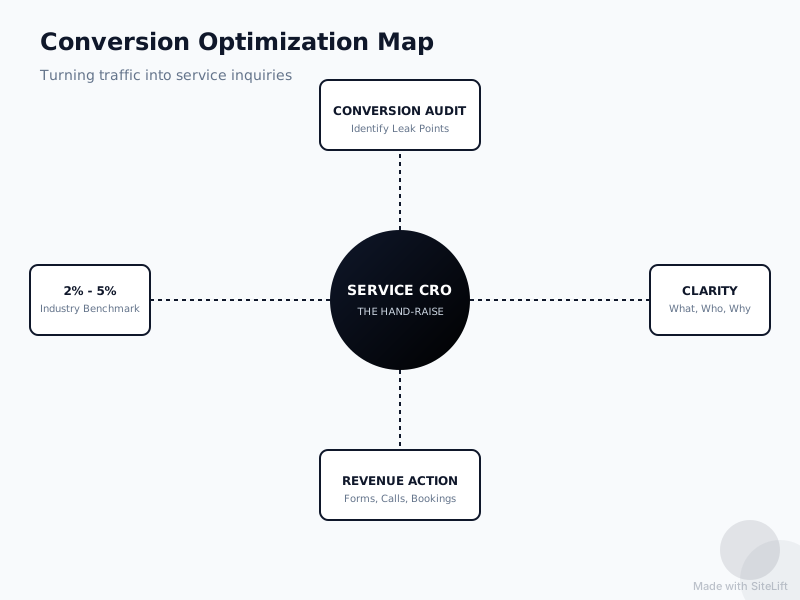
Infographic by SiteLift
Document the top 5 frictions. Don’t fix 30 things. Fix the 5 that block money.
How Does Website Conversion Rate Optimization for Service Businesses Fix Low Conversions Without a Redesign?
This is where incremental CRO beats a rebuild. Small, reversible changes to messaging and flow often lift enquiries 30-80% in 60 days — with zero downtime.
Refining CTAs to Offer Low-Commitment Next Steps
“Contact Us” and “Submit” are conversion killers. They sound like work and commitment.
Swap them for low-friction, value-led next steps:
- Instead of “Contact Us” → “Get My Fixed Quote” / “Check Availability” / “Book Free 15-Min Assessment”
- Instead of “Submit” → “Request Callback” / “Send My Enquiry”
- Add reassurance micro-copy under the button: “Replies within 2 hours on weekdays • No obligation”
Place the same primary CTA in 3-4 places: hero, after proof, after pricing/process, and sticky on mobile. Secondary CTAs (like “See Our Work” or “Read Reviews”) should be visually quieter.
The goal is to lower perceived risk. A free estimate feels safe. A vague contact form feels like entering a sales funnel.
Deploying AI Conversational Assistants for 24/7 Qualification
Forms are passive. AI assistants are active.
An AI conversational assistant can greet after-hours visitors, answer common questions (pricing ranges, service areas, timelines), collect name + phone + need, qualify based on your criteria, and book directly into your calendar or notify you instantly.
Why this works for services: people don’t want to “submit a ticket.” They want to know: Do you handle my problem? How much roughly? When can you come? An assistant answers that at 10:47pm on Sunday when your office is closed.
This doesn’t replace humans — it hands over to a human with context. The best setups say: “I’m the digital assistant for [Business]. I can check availability and get you a callback first thing tomorrow. What’s the issue?” Then it summarizes and routes the qualified lead.
If response speed is your leak, this is the highest-ROI fix. You capture the lead at peak intent instead of hoping they wait until morning.
Placing Social Proof and Trust Signals Where They Matter Most
Most service sites hide testimonials on a “Testimonials” page no one visits. Move proof to decision points.
Strategic placement rules:
- Next to hero CTA: Star rating + review count + “Licensed & Insured” badge
- Next to pricing: 2-3 short testimonials that mention value, not just niceness (“Fixed in 2 hours, price as quoted” beats “Great guys!”)
- Next to form: Guarantee, privacy note, real team photo, response-time promise
- Service pages: Before/after photos, case study snippet with outcome numbers, logos of areas served or client types
Use specific proof. “Helped 340+ homeowners in Manchester clear blocked drains in under 90 minutes last year” converts better than “Trusted and reliable.”
How Do You Measure and Maintain Improved Conversion Rates?
CRO isn’t a one-time project. It’s a loop: measure → hypothesize → test → keep winners.
Setting Up Event Tracking in Google Analytics 4
You can’t improve what you don’t measure. In GA4, set up these key events using Google’s guide to GA4 event tracking:
generate_lead— form submission success page viewphone_click— tap on tel: linkbooking_complete— scheduler confirmationchat_started— AI assistant or live chat engagement
Then track:
- Lead conversion rate: total leads / total sessions by channel and landing page
- Form completion rate: form starts vs. completions
- Response speed: time from enquiry to first human reply (track in CRM, not GA4)
- Traffic quality: conversion rate by source. SEO traffic that converts at 4% beats social traffic at 0.5%.
Review monthly. If a page gets traffic but converts under 1.5%, it goes on your fix list.
Implementing Continuous A/B Split Testing
Don’t test button colors first. Test big levers:
- Headline: outcome vs. service name
- Offer: “Free Quote” vs. “Free 15-Min Assessment + Fixed Quote”
- Form length: 7 fields vs. 3 fields
- Proof: no reviews vs. reviews + guarantee next to CTA
- CTA placement: static vs. sticky mobile CTA
Run one test at a time for at least 2 weeks or 300-500 visitors per variant. Use Google Optimize alternatives like VWO, or even a simple before/after comparison if traffic is low. Keep winners, roll back losers, document everything.
Consistency beats cleverness. A 0.5% lift every month compounds to double the leads in a year.
Key Takeaways: Stop the Leaks Before You Rebuild
| Leak Area | Quick Diagnosis | High-Impact Fix Without Redesign |
|---|---|---|
| Unclear messaging | 5-second test fails on mobile | Rewrite H1 for outcome + client + location, one clear CTA |
| Form friction | Recordings show abandonment on long forms | Cut to 3 fields, add reply-time micro-copy, make phone tappable |
| Slow follow-up | Reply gap >1 hour | Add AI assistant for 24/7 capture + instant alerts |
| Weak trust | Testimonials hidden on separate page | Move stars, guarantees, case snippets next to CTAs |
| No measurement | No GA4 lead events | Track calls, forms, bookings; A/B test headlines and offers monthly |
If you only do three things this week: clarify your hero, simplify your form, and add instant after-hours capture. That alone will help you turn website visitors into clients more reliably than any new theme.
My Take: Why I’d Never Recommend a Redesign First
I’ll be blunt: most redesign pitches I see are about making the agency money, not making you money.
I’ve audited dozens of service sites where the design was perfectly fine. The problem was always human stuff — confusing copy written for insiders, a form that asked for too much too soon, no proof where anxiety spikes, and no one answering at 8pm when buyers are actually shopping.
I’m a big believer in boring CRO. Change the headline to say what you actually do. Show a real face. Promise a fast reply — then actually reply fast. Add a helpful assistant that qualifies while you sleep. Measure it.
Full rebuilds have their place — ancient tech, security issues, truly broken mobile. But if your site ranks, loads okay, and looks professional, don’t burn it down. Fix the leaks first, bank the extra enquiries, then decide if you still want a new look. You’ll make that decision from profit, not panic.
— growth-kings.com
How Growth Kings Helps You Get More Enquiries Without Guesswork
If you want an outside eye, this is what we do every day at growth-kings.com. Growth Kings helps established service businesses turn visits into qualified enquiries with clearer websites, better search visibility, and AI assistants that hand over to a human.
You don’t need a six-month rebuild to see movement. Start with a focused review of your messaging, conversion paths, and follow-up speed — then implement scoped, fixed-fee improvements.
Explore our services to see how website clarity, search visibility, and AI enquiry handling fit together, or dig into the specific leak that’s costing you most right now.
FAQ
What is a good conversion rate for a service business website?
For most lead-generation service sites, 2% to 5% is a healthy benchmark, according to HubSpot’s conversion data for professional services. That means 2-5 enquiries per 100 visitors. Below 2%, you likely have messaging or friction issues. Above 5%, you’re doing exceptionally well — focus on driving more qualified traffic rather than tweaking the site.
How is CRO for a service business different from e-commerce CRO?
E-commerce CRO optimizes for instant checkout — product images, cart flow, shipping. Service CRO optimizes for trust and contact — clear value proposition, proof, simple forms, and fast follow-up. Service sales cycles are longer and almost always need a human conversation, so your website’s job is to start that conversation, not close the deal.
Why shouldn't I just redesign my entire website to get more leads?
A full redesign is expensive, slow, and risky. It can hurt SEO rankings, break working pages, and still leave the real problems — vague messaging, long forms, slow response — untouched. Incremental website conversion rate optimization for service businesses fixes the actual friction points faster, cheaper, and measurably, without downtime.
How can AI conversational assistants increase website conversions?
They capture and qualify leads when you can’t — nights, weekends, busy periods. Instead of a static form that says “we’ll reply Monday,” an assistant answers FAQs, collects details, checks fit, and books a callback instantly. That speed dramatically increases your chance to qualify the lead while intent is high.
How long does it take to see results from conversion rate optimization?
Simple fixes like headline rewrites, form simplification, and CTA changes can lift enquiries in 2-4 weeks. Deeper tests around offers, proof placement, and AI qualification typically show clear results in 60-90 days. Unlike SEO, which compounds over months, CRO wins show up as soon as the next visitor lands.
Want this working on your own site?
Tell us what’s working, what’s stuck and what you want to improve. We will reply personally.