Homepage Content That Converts: Structure, Trust and CTAs for Service Enquiries
Turn website visits into leads. Learn how to write homepage content with proven headlines, trust signals, and CTAs for service businesses.
By Growth Kings. Published , updated . 11 min read.

Homepage Content That Converts: Structure, Trust and CTAs for Service Enquiries
Most service business websites treat their homepage like an online business card. They fill it with corporate speak, vague promises of "quality service," and a generic contact form buried at the bottom of the page. Then they wonder why steady traffic fails to generate actual client inquiries.
Rethinking your homepage content isn't about blowing up your brand or launching a costly six-month website redesign. It is about organizing your messaging so immediate visitors understand who you help, why they should trust you, and what exact step to take next. Research from the Nielsen Norman Group shows that users often leave web pages within 10–20 seconds and typically read only about 20–28% of the text on a page. If your core value proposition isn't clear instantly, you are losing qualified leads to faster competitors.
In this step-by-step guide, you will learn how to plan, write, and structure high-converting homepage content designed specifically for B2B and professional service businesses.
What Do You Need Before You Rewrite Your Homepage Content?
Before drafting a single headline, gather the core assets and data required to align your copy with real prospective clients.
Prerequisites Checklist
- 1 Ideal Client Profile (ICP): Identify the exact business owner or manager you want to attract (and the specific problem keeping them up at night).
- 1 Primary Enquiry Goal: Decide on the single primary action you want 80% of qualified visitors to take (e.g., booking an initial discovery call, requesting an audit, or submitting project specs).
- 3–5 Proof Assets: Collect real client logos, high-impact case study metrics, and verified review snippets.
- Voice-of-Customer (VoC) Data: Pull actual phrases, complaints, and desired outcomes directly from sales call notes, client emails, and third-party review platforms.
Audit Your Baseline Performance
Take 15 minutes to review your Google Analytics 4 (GA4) and Search Console data. Look specifically at your homepage's bounce rate, average engagement time, and top landing page traffic sources. If 70% of your visitors land on desktop versus mobile, your visual structure needs to reflect that balance without compromising mobile site speed or scannability.
Step 1: How Do You Write a Homepage Headline for Services That Converts in 5 Seconds?
Your hero section has one main job: keep the visitor on the page long enough to evaluate your offer. A strong homepage headline for services passes the "5-second test" by eliminating ambiguity immediately.
Proven Homepage Headline Formula for Service Businesses
Avoid vague statements like "We Drive Digital Transformation" or "Excellence Delivered Daily." Instead, use a structured formula that links a concrete outcome to your prospective client:
[Primary Desired Outcome] for [Target Client] + Without [Major Friction Point or Fear]
Headline Examples:
- Commercial HVAC Servicing for Regional Warehouses — Without Unplanned Operational Downtime.
- Turn Website Traffic Into Qualified Service Enquiries — Without Paying for an Unnecessary Site Redesign.
- Outsourced Accounting for Growing Law Firms — Without the Overhead of a Full-Time CFO.
Supporting Subheadline and Hero CTA Placement
Pair your main headline with a 1–2 sentence subheadline that clarifies how you deliver that result. Keep this under 30 words.
Directly beneath your subheadline, place your primary call to action button alongside a micro-trust signal (such as "Rated 4.9/5 by 120+ local firms" or "No credit card required").
[ Hero Section Wireframe ]
------------------------------------------------------------------
[ H1: Headline focused on client outcome ]
[ Subheadline: 2 sentences explaining your unique service approach ]

[ Primary CTA Button ]  -->  [ Micro-Trust Signal: "4.9/5 Stars from 80+ Reviews" ]
------------------------------------------------------------------
Pro Tip: Never start your homepage headline with "We are..." or "Welcome to...". Your prospect does not care about your company history yet; they care about solving their immediate business problem.
Step 2: How Should You Structure Service Homepage Copy to Guide Visitors to Enquire?
A successful service homepage copy structure acts like an efficient sales interview. It takes the visitor by the hand, answers their unspoken objections in logical order, and guides them toward an enquiry.

Recommended Service Homepage Copy Structure From Hero to Footer
- Hero Section: Clear headline, subheadline, hero visual, and primary CTA.
- Social Proof Bar: Row of recognized client logos, industry certifications, or review badges.
- Problem & Agitation Section: 3 short bullet points highlighting the client's current pain points.
- Service Snapshot: Clear overview of your core service offerings with links to detailed subpages.
- How It Works (3-Step Process): Simple sequence demystifying what happens after they reach out.
- Detailed Case Study / Proof Snippet: Specific project results showcasing before-and-after metrics.
- About / Differentiator Section: Brief narrative on why your service approach works better than traditional alternatives.
- FAQ Teaser: Accordion section answering 3–4 common sales objections (pricing, timeline, scope).
- Final CTA Banner: Strong closing offer repeating the primary action step.
- Footer: Essential links, full contact details, and privacy information.
Write for Visual Hierarchy and Mobile Scanning
Keep paragraphs between 2 and 4 sentences. Break heavy text blocks using benefit-led subheadings, bold lead-ins for bullet points, and clean visual cards.
When introducing your team or company background in section 7, avoid corporate boilerplate. Linking out to a dedicated About Us page lets interested visitors dig deeper without cluttering your core conversion path. Furthermore, ensuring your site architecture connects logical topics improves both user experience and search performance, as covered in our guide to website structure optimization.
Step 3: Which Homepage Trust Signals Turn Skeptical Visitors Into Qualified Enquiries?
Trust is the single biggest hurdle in selling high-ticket services online. According to Stanford University's Web Credibility Research, 75% of users admit to making judgments about a company's credibility based on its website design and presentation.
Reviews, Results, Credentials and Guarantees
To turn passive readers into active leads, integrate multiple tiers of homepage trust signals across your entire layout:
- Quantitative Proof: Concrete figures like "Over $14M saved for clients" or "Average response time under 15 minutes."
- Client Testimonials: Full quotes accompanied by real client names, headshots, and company roles.
- Third-Party Validation: Independent review ratings from platforms like Google Business Profile or Trustpilot. Data from BrightLocal shows that the vast majority of consumers read online reviews before selecting a local service provider.
- Risk Reversals: Clear guarantees, contractual assurances, or zero-obligation trial offers.
| Trust Signal Type | Best Homepage Placement | Primary Conversion Impact |
|---|---|---|
| Client Logos & Badges | Immediately below Hero section | Establishes instant industry authority |
| Rating Summaries (Stars) | Adjacent to Primary CTA buttons | Reduces immediate click friction |
| Case Study Snippets | Middle of page (after Service Overview) | Proves technical capability |
| Team Photos & Credentials | Near About section | Humanizes the service offer |
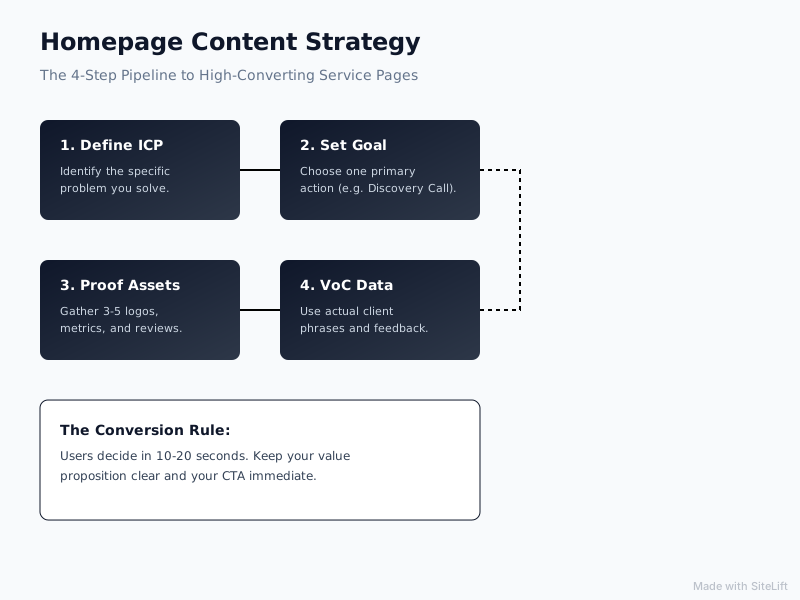
Infographic by SiteLift
Step 4: How Do You Create a Homepage Call to Action That Gets Clicked?
A weak or confusing homepage call to action ruins great homepage copy. If visitors are forced to guess what happens after clicking a button, they won't click it at all.
Primary vs. Secondary CTAs for Service Enquiries
Maintain a strict CTA hierarchy on your homepage. Limit yourself to one primary CTA goal (e.g., "Schedule a Call") and repeat it 3 to 4 times down the page.
Use a secondary, low-friction CTA (e.g., "View Our Pricing" or "Download Case Study") for visitors who aren't ready to commit to a phone meeting right away. According to research published by HubSpot, personalized calls-to-action perform 202% better than standard, generic prompts.
[ Primary CTA: High Intent ]          [ Secondary CTA: Low Intent ]
"Book Your 15-Minute Audit"    vs.    "Explore Packages & Pricing"
(Stands out visually in primary color)  (Outline or secondary link style)
If your sales model relies on straightforward pricing structures, guiding visitors toward a clear service pricing page helps filter out unqualified leads early in the funnel.
Frictionless Form Design and After-Hours Capture
When a user clicks your CTA, keep the process as painless as possible:
- Limit form fields to 3–4 essential questions (Name, Business Email, Phone Number, Core Need).
- Add a sticky navigation header or a fixed mobile bar so the primary button is visible while scrolling.
- Implement an automated AI conversational assistant to field inquiries that arrive outside regular office hours, capturing valuable leads while your competitors are offline.
Pro Tip: Replace generic button copy like "Submit" or "Contact Us" with action-oriented phrases that declare the immediate benefit, such as "Claim My Strategy Review" or "Get an Instant Estimate."
Step 5: How Do You Optimize Homepage Content for SEO Without Hurting Conversions?
Writing compelling copy that pleases both prospective clients and search engine crawlers requires balance. You do not need to stuff your page with hundreds of repetitive keywords to rank.
Smart Keyword Placement
Incorporate your primary keyword phrase—homepage content—naturally within:
- The page
<title>tag and Meta Description. - The main H1 headline or immediate introductory text.
- At least two H2 subheadings where contextually appropriate.
- Naturally in body paragraphs at a comfortable, readable density (1–2%).
Incorporate secondary phrases like homepage headline for services, homepage trust signals, and homepage call to action in your subheadings and bullet points.
Technical Performance and Schema Markup
Page speed directly influences lead generation. Research from Think with Google indicates that 53% of mobile visits are abandoned if a page takes longer than 3 seconds to load.
To maintain high rankings without losing mobile conversions:
- Compress all client logos and hero images into next-gen formats (.webp).
- Implement
LocalBusinessorProfessionalServiceSchema markup in your site header to give search engine engines structured data on your services, service areas, and ratings. - Ensure button tap targets are large enough for effortless mobile navigation.
Why Isn't Your Homepage Content Converting? Common Pitfalls and Quick Fixes
If your homepage gets steady traffic but fails to generate qualified emails or calls, use this quick troubleshooting framework to diagnose and fix the issue.
Troubleshooting Checklist
| Symptom | Root Cause | 15-Minute Fix |
|---|---|---|
| High bounce rate (>70%) within 5 seconds | Headline is vague or uses internal jargon | Replace H1 with the outcome-focused formula from Step 1. |
| High scroll depth but zero CTA clicks | Primary CTA button blends into page background or uses weak copy | Change button to a high-contrast color and update text to action verbs. |
| Low conversion rate on mobile devices | Contact forms are hard to complete or CTA is pushed far down the page | Add a simple sticky bottom bar featuring a single "Call Now" or "Book" button. |
| Frequent enquiries from unqualified leads | Value proposition is too broad or pricing expectations are hidden | Add explicit target audience criteria (e.g., "For firms generating $1M+") in the subheadline. |
If you are running dedicated paid ad campaigns, sending paid traffic to a general homepage is often less efficient than using specialized pages. Read our guide on conversion rate optimization landing page strategies to learn when to use custom landing pages instead.
What Does High-Converting Homepage Content Look Like When Finished?
When your homepage optimization is complete, every section works together as a cohesive conversion funnel:
- 0–5 Seconds: The visitor reads a punchy, outcome-focused headline and knows instantly if your service is right for them.
- 5–30 Seconds: They scroll past real client logos, clear service cards, and simple 3-step delivery processes that remove uncertainty.
- 30+ Seconds: They see transparent review metrics, direct case study results, and an inviting, low-friction enquiry path.
Next Steps and Continuous Testing
Track your baseline metrics for 30 days after making these copy and structure updates. Key performance indicators (KPIs) to track include CTA button click-through rate, form submission completion rate, and qualified lead pipeline velocity.
At growth-kings.com, we specialize in turning existing service business websites into dependable enquiry engines. Rather than pushing for unnecessary design overhauls, we refine your messaging structure, implement clear trust signals, and deploy smart conversion features that turn current traffic into measurable revenue.
— growth-kings.com
FAQs About Homepage Content That Converts
What should be included in homepage content for a service business?
Essential homepage content includes a clear value-proposition headline, a supporting subheadline, a social proof section (client logos/reviews), a service overview, a simple 3-step operational process, visual trust markers, and prominent primary calls to action above and below the fold.
How do you structure a service homepage to generate enquiries?
Structure the page logically from high-level positioning to direct conversion: Hero Section with primary CTA > Social Proof Bar > Problem Agitation > Service Snapshot > 3-Step Process > Case Study Snippets > About/Differentiation Section > Objection-handling FAQs > Final Call to Action.
What is a good homepage headline for services?
A high-converting service headline states the specific business outcome you deliver for a targeted client segment without an industry pain point. For example: "Predictable Lead Generation for Commercial Contractors — Without Relying on Shared Lead Directories."
How many calls to action should a homepage have?
Your homepage should focus on one primary enquiry goal (e.g., "Schedule a Consultation"), repeated 3 to 5 times as a user scrolls down the page. You may include one secondary, lower-commitment CTA (such as downloading a guide or viewing pricing) for visitors earlier in the buying cycle.
How long should homepage content be for SEO and conversions?
Effective service homepage content usually ranges between 600 and 1,200 words. This provides enough copy depth for search engines to understand your topical relevance while keeping the layout scannable, fast-loading, and visually engaging for human visitors.
Want this working on your own site?
Tell us what’s working, what’s stuck and what you want to improve. We will reply personally.