Enquiry Form vs Booking Calendar for Services: Which Books More Qualified Jobs?
Enquiry form vs booking calendar services compared. Discover which books more qualified jobs and how to boost conversions fast.
By Growth Kings. Published . 13 min read.

Enquiry Form vs Booking Calendar for Services: Which Books More Qualified Jobs?
If you're running an established service business, you've felt this tension: you want more bookings, but not just more bookings. You want the right bookings. That's exactly why the enquiry form vs booking calendar services debate matters so much right now.
Do you let prospects book straight into your diary and risk a week full of tyre-kickers? Or do you gate everything behind an enquiry form and risk losing hot leads while you sleep?
I've seen both setups win — and both fail spectacularly. The difference is never the tool itself. It's whether the tool matches your deal size, your scoping complexity, and your capacity to follow up fast.
At a Glance: Enquiry Form vs Direct Booking
Here's the short version for busy owners:
| Criteria | Traditional Enquiry Form | Direct Booking Calendar |
|---|---|---|
| Key Features | Custom fields for budget, timeline, scope; conditional logic; manual review before contact | Real-time availability, instant confirmation, automated reminders, pre-booking questions |
| Pricing | Free to low-cost (built into most CMS / form builders) | Free basic plans; £10-£20/user/month for qualification, routing, and reminders |
| Pros | Maximum control; filters out poor-fit jobs; captures detailed scoping info; protects billable hours | Highest scheduling velocity; captures intent at peak; eliminates email ping-pong; works 24/7 |
| Cons | Response lag kills conversions; high abandonment if too long; requires fast manual follow-up | Calendar clutter; higher no-shows; attracts free-advice seekers; disrupts delivery workflow |
| Best For | High-ticket, bespoke services (£2k+ projects, legal, agencies, specialist contractors) | Productized, repeatable services (audits, assessments, maintenance visits, consultations with fixed scope) |
Bottom line from my work with service firms: forms protect your time, calendars accelerate your pipeline. Most high-value businesses need a hybrid of both.
Why Lead Capture Mechanics Dictate Service Profitability
The High Cost of Empty Consultations and Dead Leads
For a salon, an empty slot is annoying. For a specialist contractor, agency, or advisor, an unqualified 45-minute discovery call is expensive. You've prepped, you've travelled or Zoomed in, you've written a proposal — and then you hear: "Oh, we only have £300 budgeted."
That isn't a conversion problem. That's a lead capture problem.
Raw form submissions mean nothing if they never turn into scoped, budgeted, sales-ready jobs. If you want to understand why, read our breakdown of qualified vs unqualified leads differences and the 5-point filter to stop tyre-kickers.
Balancing Friction: Lead Volume vs. Lead Readiness
This is the core trade-off in the enquiry form vs booking calendar services decision:
- Remove all friction and you'll get more bookings, but less context. Anyone can grab 30 minutes.
- Add qualification friction and you'll get fewer conversations, but they'll be far more likely to close.
Your job isn't to maximise leads. It's to maximise qualified pipeline value per hour of your time.
Enquiry Form vs Booking Calendar Services: How We Judge Them
Before we pick a winner, let's agree on how to score them. I judge any intake system for service businesses on four things:
1. Conversion Velocity & Scheduling Friction
How fast can a motivated visitor go from "I'm interested" to "We're speaking"? Every extra step and every hour of delay costs you.
According to the Harvard Business Review, vendors that contact prospective leads within one hour are nearly seven times more likely to have a meaningful conversation than those who wait even an hour longer. You can read the full breakdown in Harvard Business Review's study on the short life of online sales leads.
That one stat explains why forms lose so many deals overnight.
2. Lead Qualification & Pre-Screening Depth
Can you qualify leads before booking? Can you capture budget, timeline, location, decision-maker status, and project scope before you commit calendar space?
3. Show-Up Rates & Prospect Intent
A booked call that no-shows is worse than no lead at all. It blocks time you could have spent on delivery.
4. Operational Overhead & Calendar Protection
How much admin does this create? Who chases, confirms, reschedules, and filters? For high-value consultants and contractors, calendar protection is profitability.
Option 1: The Traditional Enquiry Form for Service Businesses
The classic "Tell us about your project" form is still the workhorse for high-ticket services. And for good reason.
The Strengths: Complete Control, Custom Scoping, and Asynchronous Vetting
With a well-built form, you decide exactly what information earns a callback. Budget range? Must-have. Timeline? Must-have. Photos, postcode, company size? All filterable.
You can review asynchronously, prioritise the £15k extension over the £200 repair, and reply with a tailored response instead of walking in blind. No other tool gives you that level of control for bespoke scoping.
For complex work, this is gold. You avoid giving free scoping advice on a call that was never going to close.
Pro Tip: Use a 2-step form: Step 1 asks for contact + one qualifying question (service needed), Step 2 asks for budget and timeline. You'll get higher completion than a single long form.
The Weaknesses: Response Lag, Email Ping-Pong, and Abandonment
Here's where traditional forms bleed revenue: speed.
Data published by Chili Piper reveals that traditional form-fill response processes result in up to a 50% drop-off between form submission and an actual scheduled meeting, largely due to the back-and-forth delay. See more in Chili Piper's analysis of form-to-meeting drop-off.
I've audited service sites where the owner replies in 2-3 days. By then, the prospect has already booked with three competitors. The form didn't fail — the follow-up system did.
Long forms also hurt. Research by HubSpot indicates that reducing the number of form fields from four to three can increase form conversion rates by nearly 50%. Full details are in HubSpot's conversion benchmarks on form field numbers and friction.
Enquiry Form Best Practices for Maximum Qualification
If you stick with forms, don't settle for name/email/message. That invites spam.
Follow these enquiry form best practices I recommend to clients:
- Ask 4-6 fields max: name, email/phone, service type, budget range (dropdown), timeline (dropdown), + one open text box
- Use conditional logic: if they select "Commercial > £10k", show extra scoping questions; if "Small repair", keep it short
- Set expectations instantly: "We reply within 4 business hours. Urgent? Call [number]."
- Trigger instant auto-response + internal Slack/email alert. Speed is everything.
- Add social proof beside the form — reviews, guarantees, response-time promise
For a full teardown, check our 21-point website optimization checklist to turn visits into qualified enquiries.
Option 2: Direct Online Booking Calendars for Service Businesses
Online booking for service businesses feels magical when it works. A prospect lands at 11pm, picks Tuesday at 10am, gets a confirmation and a Zoom link. No emails. No missed calls.
Tools like Calendly, Cal.com, and HubSpot Meetings have made this the default for coaches, clinics, and trades.
The Strengths: Instant Gratification and Elimination of Scheduling Friction
When intent is high, speed wins. Direct booking captures that "yes, let's talk now" moment without forcing the prospect to wait for you.
Automated confirmations, SMS reminders, and rescheduling links also slash admin. No more "Does Thursday work? No? How about Friday?" threads. Calendly's own research on automated qualification workflows and meeting distribution shows how pre-booking routing can send enterprise vs. SMB leads to different calendars automatically.
For productized services — fixed-price audits, boiler services, initial assessments — this is perfect. Low scoping variability means you don't need a 20-minute vetting process.
The Weaknesses: Calendar Clutter, Tire-Kickers, and Escalated No-Show Rates
Here's my honest take after watching agencies switch to open calendars: your calendar will get abused.
Free strategy calls attract free-advice seekers. Students, competitors, and dreamers with no budget will happily take 30 minutes because there's zero cost to them. I've seen consultants go from 5 qualified calls a week to 15 bookings with only 3 qualified — plus a 20-30% no-show rate.
That disrupts delivery, kills deep work, and burns out your team. Service booking calendar conversion looks great on paper (more bookings!) until you measure show-up rate and close rate.
Pro Tip: Never offer a naked calendar link. Gate it behind 3 mandatory qualification questions — budget, timeline, and decision-maker status — and auto-disqualify anyone below your threshold with a polite redirect to resources.
Optimizing Service Booking Calendar Conversion with Gated Intake
If you use direct booking, you must add gates:
- Require work email + phone number for SMS reminders
- Ask: "What is your budget range?" Make it required. No range = no booking.
- Add a paid deposit for free consultations that historically no-show. Even £25 refundable cuts no-shows dramatically.
- Send 24-hour + 1-hour reminders with one-click reschedule
- Limit bookable slots to 2-3 days out to keep intent hot and protect focus time
Without these, you're not streamlining sales. You're crowdsourcing interruptions.
Enquiry Form vs Booking Calendar Services: Head-to-Head Comparison
Neither tool in its default form is perfect for high-value services. Here's how they stack up on the metrics that actually drive revenue.
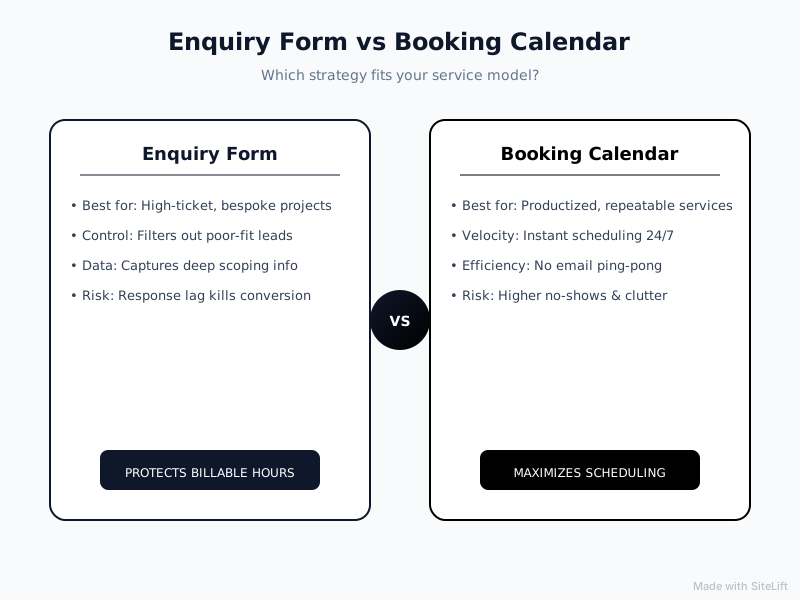
Infographic by SiteLift
At-a-Glance Comparison Matrix
| Evaluation Metric | Enquiry Form | Booking Calendar | Winner |
|---|---|---|---|
| Raw Conversion Rate | 2-5% typical; drops as fields increase | 20-40% higher click-to-book vs. form-fill when intent is high | Calendar |
| Qualification Rigor | Excellent — unlimited custom logic, file uploads, budget filters | Weak by default; strong only with gated intake + routing | Form |
| Speed to Conversation | Slow — depends on manual follow-up; 50% drop-off risk | Instant — prospect self-schedules in under 60 seconds | Calendar |
| Show-Up Rate | Higher — prospect has invested effort + had human interaction | Lower — low commitment bookings drive 20-30% no-shows without reminders/deposits | Form |
| Operational Drag | High if manual; low with automation | Low admin, but high cost of unqualified calls | Tie |
| Customer Experience | Feels thorough but slow; frustrating after-hours | Feels modern and instant; frustrating if they get sold to without context | Calendar for simple, Form for complex |
Analysis: Which Mechanism Truly Delivers Qualified Revenue?
If you measure only bookings, calendars win. If you measure qualified revenue per hour spent selling, enquiry forms still win for anything bespoke.
That's why most top-ranking articles miss the point. They compare SaaS demo tools or salons where every booking is equal. For established service businesses — agencies, legal/financial advisors, specialist contractors, technical consultancies — every booking is not equal. One qualified £12k project beats twenty £150 tyre-kicker calls.
In my opinion, the out-of-the-box calendar is overrated for high-ticket services. I love the UX, but I've watched too many founders celebrate a full diary while their pipeline value collapses. An unfiltered diary is not a growth asset. It's a liability.
What actually wins is qualification plus velocity. Which brings us to the decision framework.
Which Should You Choose? Decision Framework for Service Businesses
Forget one-size-fits-all. Use your average contract value (ACV) and scoping complexity:
When to Stick with an Enquiry Form (High Ticket, Bespoke Scoping)
Stick with a smart enquiry form if:
- Your ACV is £2,000+ or projects vary wildly in scope
- You need photos, site visits, or custom quotes before you can talk pricing
- You have limited sales capacity (you or one closer) and must protect billable time
- Compliance matters — legal, financial, medical — and you need intake details first
Upgrade it with conditional logic lead routing: route £10k+ leads to your personal inbox + SMS alert, route small jobs to a junior estimator or a nurture sequence.
If you're getting clicks but few enquiries, start with our guide on fixing high click-through rate low conversion for service websites.
When to Adopt a Direct Booking Calendar (Productized Services, Low Variable Scoping)
Go direct booking if:
- Your service is productized: fixed scope, fixed price, repeatable delivery
- Your ACV is under £500 and volume matters more than vetting
- You have admin support or automation to confirm, remind, and backfill no-shows
- Speed is your differentiator — emergency trades, clinics, tax deadlines
Even then, always add gated intake questions and deposits to defend your diary.
The Modern Hybrid: Two-Step Dynamic Booking and Conversational Lead Qualification
Here's what I now recommend to most established firms: don't choose. Combine.
The 2-step hybrid flow:
- Prospect completes a short 4-field qualification form (service, budget, timeline, postcode)
- If qualified, they instantly see your live calendar and book. If not qualified, they get a polite redirect to pricing guides, DIY resources, or a low-ticket offer.
Add conversational AI on top and it gets even better. An AI assistant can ask those scoping questions naturally at 10pm, check budget fit, answer FAQs, and only drop a booking link when the lead is sales-ready. No response lag, no calendar spam.
We cover the tooling for this in 7 website conversion optimization tools that help service firms capture qualified enquiries 24/7.
This hybrid gives you form-level qualification with calendar-level velocity. That's how you qualify leads before booking without losing them to a faster competitor.
Our Verdict: Stop Counting Bookings, Start Protecting Pipeline
If you sell bespoke, high-trust services, an unfiltered booking calendar will fill your week and empty your profit. If you sell simple, urgent, repeatable services, a slow enquiry form will starve you of volume.
For most established service businesses I work with, the winner is: qualified instant booking.
Keep the enquiry form as your front door, but make qualification instant and make scheduling immediate for those who pass. Measure success not by meetings booked, but by qualified jobs quoted and show-up rate.
Start by auditing your current intake: How fast do you respond? What % no-show? What % are actually qualified? Fix those three numbers and your choice becomes obvious.
Turn Website Visits Into Qualified Jobs — Without Rebuilding Your Site
At growth-kings.com, we help established service businesses do exactly this: tighten messaging for clarity and trust, fix form friction, and add AI-powered assistants that qualify after-hours inquiries and book only the right prospects straight into your diary.
No full rebuilds. No empty ranking promises. Just practical improvements that turn more of the traffic you already have into revenue you can forecast.
If your calendar is full of dead calls — or your inbox is full of silence — let's fix your intake flow first.
FAQ
Does adding a direct booking calendar increase website conversion rates?
Yes, usually. Removing the back-and-forth of email scheduling lifts click-to-book rates, especially after hours and on mobile. But raw bookings can mislead. Without qualification gates, you'll also increase unqualified calls and no-shows. Track qualified bookings and show-up rate, not just total bookings.
How can I prevent unqualified leads from booking up my calendar?
Gate your calendar. Require budget range, timeline, and location before showing availability. Use conditional routing to send low-fit leads to resources instead of your diary, require work email + SMS for reminders, and consider a small refundable deposit for free consults. Limit availability to 2-3 days out.
What is an acceptable no-show rate for online service bookings?
For free discovery calls with no gates, 20-30% no-shows are common. With SMS reminders, qualification questions, and deposits, aim for under 10%. If you're consistently above 15%, your intake is too open or your reminders are too weak.
Should high-ticket B2B service businesses use direct scheduling tools?
Not openly. High-ticket B2B deals need scoping before conversation. Use a hybrid: a short qualification form first, then reveal a private scheduling link only to qualified prospects. This protects partner time while still offering instant booking to serious buyers.
What is the hybrid approach between an enquiry form and a booking calendar?
It's a two-step flow: Step 1 qualifies (budget, timeline, scope via form or conversational AI), Step 2 schedules (live calendar shown instantly only if qualified). You get the vetting power of an enquiry form with the speed of a booking calendar, available 24/7 without manual follow-up.
— growth-kings.com
Want this working on your own site?
Tell us what’s working, what’s stuck and what you want to improve. We will reply personally.