7 Website Conversion Optimization Tools That Help Service Firms Get More Enquiries
Discover the 7 best website conversion optimization tools to help service firms capture qualified enquiries, reduce form friction, and convert 24/7.
By Growth Kings. Published , updated . 15 min read.

7 Website Conversion Optimization Tools That Help Service Firms Get More Enquiries
Most service business websites suffer from a silent revenue leak: they attract visitors, but those visitors leave without filling out a contact form or booking a discovery call. Research published by HubSpot shows that the average conversion rate for B2B service landing pages sits between 2% and 5%, meaning over 95% of your paid and organic traffic walks away without taking action.
Deploying the right website conversion optimization tools allows you to identify where prospective clients get confused, remove friction from enquiry forms, and engage leads before they click over to a competitor. According to digital customer experience research from Forrester, a well-designed user experience and optimized lead journey can increase website conversion rates by up to 200%.
To help you get more qualified inquiries from your existing web traffic without forcing a costly complete website overhaul, we evaluated dozens of platforms based on setup speed, lead quality impact, and suitability for high-ticket service sales. Below are the 7 best tools for service businesses today.
Why Service Businesses Need Specialized Website Conversion Optimization Tools
E-commerce websites optimize for low-friction, impulse checkouts—adding a $40 product to a shopping cart requires minimal deliberation. Service firms operate in an entirely different universe. Whether you run a consulting firm, an engineering group, an agency, or a corporate advisory service, your sales cycle requires trust, clear positioning, and high-intent engagement.
+-----------------------------------------------------------------------+
|                       THE SERVICE CONVERSION GAP                      |
+-----------------------------------------------------------------------+
|  E-Commerce Funnel:     Ad Click ---> Add to Cart ---> Buy ($40)      |
|                                                                       |
|  Service Business:      Ad Click ---> Evaluate Trust ---> Form Fill   |
|                         ---> Discovery Call ---> Proposal ---> Close  |
+-----------------------------------------------------------------------+
When prospective clients visit your site, they do not want to add services to a cart; they want proof that you can solve their specific problem. Service-focused website conversion optimization tools must solve three distinct challenges:
- Unclear Value Statements: Visitors leave within five seconds if they cannot immediately grasp what you do and who you serve.
- Form Hesitation: Standard multi-field contact forms scare away busy executives who do not want to be spammed by aggressive sales teams.
- After-Hours Drop-Off: High-intent decision-makers often research service providers outside standard office hours. If they cannot get answers immediately, they leave.
Analyst firm Gartner reports that 60% of B2B buyer interactions occur before a buyer ever speaks to a direct sales representative. If your website fails to answer critical questions or capture buyer intent during those early research touchpoints, your sales team never even gets the chance to pitch.
Evaluation Criteria: How We Chose the Top CRO Tools for Service Firms
Not all conversion software fits professional service sites. Enterprise-grade testing suites often require dedicated engineering teams, while basic e-commerce plugins focus heavily on discount popups and abandoned cart emails.
We filtered our recommendations using criteria tailored specifically for established service businesses:
- Ease of Implementation: Can you deploy the tool using a simple script tag without blowing up your site's codebase or requiring a full rebuild?
- Friction Reduction: Does the tool help uncover exact friction points in your contact funnel, such as confusing copy or broken form fields?
- Lead Qualification Capability: Does it filter out tire-kickers so your sales team spends time only with genuine prospective clients?
- Trust & Social Proof Enhancement: Does it strengthen authority signals directly on key decision pages?
If you are currently trying to diagnose why your traffic isn't converting into booked consultations, review our breakdown of the reasons your website isn’t converting enquiries into clients alongside these tool choices.

1. Hotjar – Best for Heatmap and Behavior Analytics
Hotjar is one of the most effective heatmap and form analytics tools available for visualising how visitors navigate your service landing pages. Instead of relying on raw traffic statistics, Hotjar lets you watch real session recordings to pinpoint exactly where prospects stall or bounce.
+-----------------------------------------------------------------------+
|                         HOTJAR INSIGHT SNAPSHOT                       |
+-----------------------------------------------------------------------+
|  [ Click Map ]   --> Identifies non-clickable elements visitors tap   |
|  [ Scroll Map ]  --> Shows how far prospects read before dropping off  |
|  [ Recordings ]  --> Highlights form field hesitation and friction    |
+-----------------------------------------------------------------------+
Key Features for Service Pages
- Visual Heatmaps: Color-coded click, movement, and scroll maps reveal whether visitors actually see your primary "Request a Quote" or "Book a Strategy Call" buttons.
- Session Recordings: Play back anonymous user journeys to see if prospects run into broken links, awkward mobile layouts, or confusing navigation menus.
- On-Page Feedback Widgets: Prompt visitors who spend more than 45 seconds on your pricing or service pages with a simple poll: "Is anything missing on this page?"
How It Helps Increase Enquiries
If your service page suffers from high drop-off rates, Hotjar shows you why. You might discover that 70% of mobile users never scroll far enough to see your client testimonials, or that visitors repeatedly click on a plain-text heading expecting it to be an interactive service breakdown. Fixing those visual hurdles converts existing traffic into active leads instantly.
Pricing & Best Use Case
- Pricing: Free basic tier available; paid plans start at ~$32/month.
- Best For: Mid-sized service businesses that want fast, visual proof of where visitors drop off on service overview pages.
2. VWO (Visual Website Optimizer) – Best for A/B Testing Service Copy and CTAs
VWO allows service businesses to run A/B split tests on headlines, call-to-action (CTA) button copy, contact form layouts, and trust badges without writing custom code or modifying core web pages.
Key Features for Service Pages
- Visual Editor: Point-and-click interface to rewrite headlines, switch out hero images, or reorder page sections on live service pages.
- Conversion Goal Tracking: Set specific goal triggers for form submissions, phone link clicks, or external calendar bookings.
- Smart Segmentation: Run distinct split tests for traffic coming from paid search ads versus organic LinkedIn traffic.
How It Helps Increase Enquiries
Minor tweaks to high-intent service messaging yield massive swings in lead volume. Testing a clear headline like "We Manage Your IT Infrastructure for a Fixed Monthly Fee" against a vague corporate slogan like "Empowering Next-Gen Digital Transformation" often doubles enquiry submissions. VWO gives you definitive statistical proof before committing to permanent copy changes.
Pricing & Best Use Case
- Pricing: Free starter plan for basic testing; enterprise plans scale with visitor volume.
- Best For: Growing service providers running paid ad campaigns who need to test landing page messaging to lower customer acquisition costs.
3. Formstack – Best for Lead Form Analytics and Friction Reduction
Contact forms are the ultimate bridge between a passive website reader and an active sales opportunity. Formstack specializes in optimizing forms and analyzing user behavior inside form fields, making it an essential piece of lead capture software for services.
+-----------------------------------------------------------------------+
|                        FORMSTACK FIELD ANALYTICS                      |
+-----------------------------------------------------------------------+
|  Field: "Company Revenue" -------> 68% Drop-off (High Friction!)      |
|  Field: "Work Email" ------------> 4% Drop-off  (Low Friction)       |
|  Action: Convert "Company Revenue" to optional dropdown menu.         |
+-----------------------------------------------------------------------+
Key Features for Service Pages
- Field-Level Analytics: Identifies which specific form fields cause users to hesitate, abandon the form, or clear their entry.
- Conditional Logic: Dynamically shows or hides questions based on previous answers, keeping initial form layouts short and clean.
- A/B Form Testing: Test multi-step forms against single-page contact forms to find the optimal balance between lead volume and lead quality.
How It Helps Increase Enquiries
If your contact form asks for telephone numbers, project budgets, company revenue, and street addresses upfront, prospective clients will walk away. Formstack pinpoints high-friction questions so you can remove unnecessary fields, switch to multi-step qualifying flows, and recapture lost enquiry leads.
Pricing & Best Use Case
- Pricing: Starts around $50/month.
- Best For: High-ticket consulting, legal, financial, or B2B firms that require detailed lead qualification data without tanking form conversion rates.
4. Growth Kings AI Enquiry Assistant – Best for 24/7 Lead Qualification
Traditional contact forms are passive: they sit quietly waiting for a user to type out a message. The Growth Kings AI Enquiry Assistant acts as a dynamic, 24/7 conversion channel designed specifically for professional service firms.
+-----------------------------------------------------------------------+
|                  AI ENQUIRY ASSISTANT CONVERSION FLOW                 |
+-----------------------------------------------------------------------+
|  Visitor arrives after-hours with specific technical query           |
|  --> AI answers immediately using company knowledge base              |
|  --> AI pre-qualifies lead (budget, scope, timeline)                  |
|  --> AI books consultation or routes qualified brief to sales team     |
+-----------------------------------------------------------------------+
Key Features for Service Pages
- Custom Knowledge Base Integration: Taps directly into your brand documentation, service guides, and case studies to give human-level answers to complex client questions.
- Automated Qualification Scenarios: Screens incoming prospects against your ideal client profile (budget thresholds, target industry, project timeline) before passing them along.
- Human Handoff Architecture: Seamlessly routes high-value, hot leads directly to your sales team's inbox or calendar, while gracefully capturing key contact details after business hours.
How It Helps Increase Enquiries
Decision-makers often conduct partner research outside normal working hours. If an executive visits your site at 9:00 PM with a urgent project need, an static contact form offers no immediate relief. An AI enquiry assistant for conversions answers their immediate technical or operational questions on the spot, builds instant credibility, and secures their contact details before they navigate to a competitor's site.
Pro Tip: Never use generic, unconstrained AI bots for service sales. Ensure your AI assistant relies on strict corporate guardrails so it answers questions accurately, qualifies leads against your specific service requirements, and hands off to your team cleanly.
Pricing & Best Use Case
- Pricing: Custom fixed-fee setup and ongoing maintenance plans tailored for established service businesses.
- Best For: Established firms wanting to capture after-hours inquiries, qualify sales traffic automatically, and reduce manual response delay.
5. Typeform – Best for Interactive Lead Capture Software for Services
Typeform transforms standard contact forms into engaging, one-question-at-a-time interactive surveys. This conversational interface feels less like an interrogation and more like a helpful initial consultation.
Key Features for Service Pages
- One-Touch Interface: Displays single questions cleanly on screen, dramatically reducing visual clutter and cognitive load.
- Logic Jump Routing: Directs respondents down personalized question paths depending on their budget selection or service requirements.
- Brand Customization: Seamlessly matches your company fonts, custom color palettes, and brand guidelines for a polished agency look.
How It Helps Increase Enquiries
Replacing a crowded, 8-field contact page with an interactive diagnostic flow regularly boosts completion rates. Because prospects view only one question at a time, they build momentum through the flow. By the time they reach the final email capture step, they are fully invested in receiving their personalized project estimate or consultation response.
Pricing & Best Use Case
- Pricing: Free tier available; paid plans start at ~$25/month.
- Best For: Agencies, boutique service firms, and specialized consultants who want to pre-qualify project scopes while providing an premium user experience.
6. TrustPulse – Best for Real-Time Social Proof & Trust Building
High-ticket service decisions carry inherent perceived risk for buyers. TrustPulse leverages social proof popups to display real-time client engagement across your website without disrupting the reading experience.
+-----------------------------------------------------------------------+
|                      TRUSTPULSE PROOF NOTIFICATION                    |
+-----------------------------------------------------------------------+
|  [ Notification Bubble ]                                              |
|  "A Director in London just booked an Audit Consultation"             |
|  [ 2 minutes ago ] - Verified by TrustPulse                           |
+-----------------------------------------------------------------------+
Key Features for Service Pages
- Real-Time Activity Feeds: Shows discreet notifications when visitors complete contact forms, download whitepapers, or schedule discovery calls.
- Actionable Analytics: Tracks which pages and messages trigger the highest click-through and conversion rates.
- Custom Display Rules: Controls exactly where, when, and how often trust notifications appear so they never annoy high-intent executive visitors.
How It Helps Increase Enquiries
Prospective clients want to know that other reputable firms trust your services. Seeing an unobtrusive notification showing that someone in their industry or geographic region recently booked a consultation reduces perceived purchasing risk and creates subtle FOMO (fear of missing out), prompting them to take immediate action.
Pricing & Best Use Case
- Pricing: Starts at ~$5/month.
- Best For: B2B service firms seeking a low-cost, quick-to-install method for displaying immediate authority and recent client activity.
7. Unbounce – Best for Custom Service Landing Pages and Popups
When running targeted paid search or social ad campaigns, sending traffic directly to your primary corporate homepage usually wastes ad spend. Unbounce lets you build dedicated, high-converting landing pages tailored to single service offers.
Key Features for Service Pages
- Drag-and-Drop Builder: Create mobile-responsive landing pages optimized for enquiry capture without needing developer help.
- Smart Traffic Optimization: AI-driven routing automatically sends incoming visitors to the specific landing page variant most likely to convert them based on their location and browser context.
- Popups and Sticky Bars: Trigger targeted lead capture popups when a user displays exit intent on specific service pages.
How It Helps Increase Enquiries
By aligning your ad copy perfectly with a dedicated, single-purpose landing page, you eliminate distracting top-navigation links and competing choices. If your Google Ad promises "Corporate Tax Restructuring for Mid-Market Firms," sending that user to an Unbounce landing page focused exclusively on tax restructuring dramatically elevates enquiry conversion rates compared to a generic homepage.
Pricing & Best Use Case
- Pricing: Starts at ~$99/month.
- Best For: Service firms running dedicated Google Ads, LinkedIn Ads, or meta ad campaigns that require quick, isolated landing page variations.
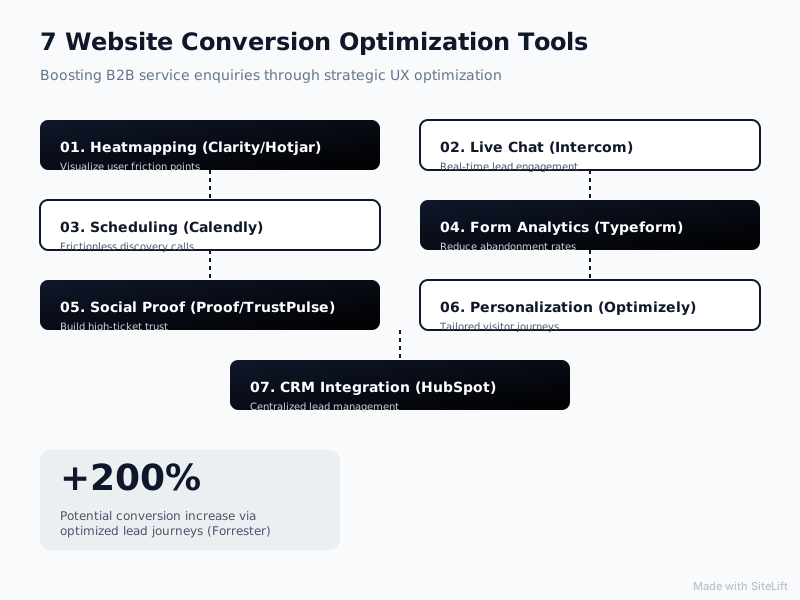
Infographic by SiteLift
Comparison Matrix: Which CRO Tool Fits Your Growth Stage?
Choosing the right mix of website conversion optimization tools depends on your current web traffic levels, team size, and immediate conversion bottlenecks. The evaluation matrix below summarizes how these seven options stack up side by side:
| Tool | Category | Primary Focus Area | Setup Effort | Ideal Business Stage |
|---|---|---|---|---|
| Hotjar | Behavior Analytics | Heatmaps & Session Recordings | Low (Script tag) | All stages needing conversion insights |
| VWO | A/B Split Testing | Headline & CTA Copy Optimization | Medium | Established firms running paid campaigns |
| Formstack | Form Analytics | Field-Level Friction Reduction | Medium | Firms with complex, multi-field lead forms |
| Growth Kings AI | Conversational Lead Capture | 24/7 AI Lead Qualification | Fixed Implementation | Established firms seeking high-intent leads |
| Typeform | Interactive Lead Capture | Multi-Step Lead Qualification | Low | Agencies, advisors & boutique practices |
| TrustPulse | Social Proof | Trust Signals & Activity Popups | Very Low | Service sites needing immediate trust boosters |
| Unbounce | Landing Page Builder | Campaign-Specific Service Pages | Medium | Firms running active Google or LinkedIn Ads |
How to Get Started with Website Conversion Optimization Tools
Buying software tools will not magically fix a website that lacks clear value positioning, trust elements, or persuasive service copy. Before adding complex software plugins to your tech stack, tackle these fundamental optimization steps:
+-----------------------------------------------------------------------+
|                    THE CRO IMPLEMENTATION ROADMAP                     |
+-----------------------------------------------------------------------+
|  Step 1: Clarify Value Proposition & Core Positioning                 |
|  Step 2: Install Behavior Analytics (Hotjar) to Find Friction         |
|  Step 3: Streamline Lead Capture (Formstack / Typeform)               |
|  Step 4: Automate 24/7 Qualification (Growth Kings AI Assistant)      |
+-----------------------------------------------------------------------+
1. Fix Your Foundation Before Buying Software
If your primary headline fails to explain what clear business outcome you deliver, no interactive form or popup popup will save your conversion rate. Spend time clarifying your core messaging first. Make sure your offer value is clear above the fold, backup claims with real client case studies, and clearly explain what happens after a prospect submits an enquiry.
2. Build a Lean, Fast Tech Stack
Avoid installing half a dozen heavy JavaScript tags on your website simultaneously. Loading too many tracking scripts degrades site speed, frustrates mobile users, and damages organic search rankings. Start with one diagnostic tool (like Hotjar) to uncover friction, combined with one dynamic conversion mechanism (like an interactive form or an AI enquiry assistant).
3. Partner with Service CRO Experts
If your team lacks the internal bandwidth to analyze session recordings, run split tests, write persuasive landing page copy, and configure custom AI assistant workflows, consider working with a dedicated partner.
At Growth Kings, we focus exclusively on helping established service businesses turn existing web traffic into predictable, highly qualified enquiries. Instead of pushing for unnecessary, expensive site rebuilds, we implement targeted improvements—optimizing core pages for clarity and trust, enhancing search visibility, and deploying automated conversion-focused web upgrades that make your business easier to understand, easier to trust, and easier to contact.
We believe that most service websites do not suffer from a lack of traffic—they suffer from a lack of clarity, high form friction, and an inability to convert after-hours interest. Fixing those three leaks yields far higher ROI than launching a complete website redesign every two years.
— growth-kings.com
Frequently Asked Questions
What is the difference between e-commerce CRO tools and CRO tools for service businesses?
E-commerce CRO tools focus on cart abandonment, product checkout funnels, cross-sells, and quick purchasing incentives. Service business CRO tools focus on building authority, clarifying complex value propositions, reducing lead form drop-offs, and qualifying potential clients before booking strategy or sales calls.
How do heatmap and form analytics tools help increase enquiry form fills?
Heatmap and form analytics tools visually demonstrate how visitors interact with your web pages. They reveal if critical call-to-action buttons are hidden below the fold, if mobile visitors miss key trust badges, or if specific form fields (such as mandatory phone numbers or budget questions) cause prospects to abandon your contact form before submitting.
Can an AI enquiry assistant replace standard contact forms on service websites?
While an AI enquiry assistant can handle conversations, answer immediate questions, and pre-qualify prospective clients 24/7, it works best alongside simplified traditional contact options. Offering both an interactive AI assistant and a clean, low-friction contact form accommodates different visitor preferences without sacrificing lead capture opportunity.
How many website conversion optimization tools should a service firm use at once?
Most established service firms need only two or three core conversion tools. A lean tech stack usually includes one behavior analytics tool (like Hotjar) to diagnose user friction, alongside one interactive lead capture tool (like Typeform or an AI enquiry assistant) to convert high-intent traffic. Using too many software scripts at once slows down website loading speeds and degrades user experience.
Want this working on your own site?
Tell us what’s working, what’s stuck and what you want to improve. We will reply personally.