Redesign Website SEO Checklist: Relaunch Without Losing Rankings or Enquiries
Complete redesign website seo checklist. Protect your Google rankings, prevent traffic drops, and preserve inbound enquiries during a website relaunch.
By Growth Kings. Published , updated . 15 min read.
Redesign Website SEO Checklist: Relaunch Without Losing Rankings or Enquiries
There is a quiet panic that every business owner feels two weeks after launching a brand-new website. The staging site looked breathtaking, the stakeholders approved every page, and the agency celebrated a flawless design deployment. Then, the organic performance numbers come in. Search impressions plunge, keyword positions disappear from page one, and inbound phone calls suddenly stop. Managing redesign website seo requires a delicate balance between design upgrades and technical preservation. Without a clear strategy, even a minor URL tweak can wipe out years of search equity overnight.
A website relaunch should accelerate your business growth, not cripple your inbound sales pipeline. If you treat SEO as an afterthought to visual aesthetics, search engines will treat your new site like a brand-new, untrusted domain.
Here is the exact framework we use to execute an seo-friendly website redesign that preserves hard-earned rankings, protects legacy backlinks, and keeps qualified enquiries flowing into your business from day one.
Redesign Website SEO: Executive Summary
| Relaunch Phase | Primary Objective | Critical Deliverables | Risk Level If Ignored |
|---|---|---|---|
| 1. Audit & Benchmark | Map existing site assets and traffic drivers | URL inventory crawl, rank benchmarking, content gap analysis | Catastrophic (Loss of priority pages) |
| 2. Staging & Dev | Build search-friendly structure off index | Password/header protection, 1:1 redirect map, Core Web Vitals audit | High (Accidental staging indexing) |
| 3. Pre-Launch Test | Verify technical integrity and UX pathways | Redirect chain test, tag validation, conversion form end-to-end test | High (Broken leads and 404 loops) |
| 4. Switch & Launch | Execute seamless DNS roll-over | Robots.txt update, XML sitemap submission, console validation | Medium (Crawl delays) |
| 5. Post-Launch Audit | Resolve immediate indexation issues | Live crawl audit, Search Console error tracking, log file review | Critical (Unnoticed rank drops) |
Why Does Redesign Website SEO Fail? (And How Traffic Collapses)
When a website relaunch tanks organic search performance, it is almost never because Google dislikes your new color scheme or modern typography. Traffic collapses because structural signals that search engine algorithms rely on to rank your content were altered, disconnected, or completely deleted during development.
[Old High-Ranking Page] ---> (URL Changed / No Redirect) ---> [404 Error Page]
                                                                    │
                                                                    ▼
                                                    [Google Drops Page Index]
                                                                    │
                                                                    ▼
                                                    [Backlinks & Authority Lost]
The Hidden SEO Risks of Visual-First Redesign Projects
Most web design agencies build for human eyes first and search engine crawlers second. During a visual overhaul, designers frequently simplify navigation menus, combine multiple thin pages into long single pages, or alter site taxonomies to fit clean, minimalist aesthetics.
When you delete an old service page or alter its web address without telling search engines where that authority went, you break the connection to external websites linking to you. Every external link pointing to your site carries domain authority and trust. If a legacy link points to a page that now yields a 404 error, that ranking strength evaporates immediately.
Common Technical Pitfalls That Erase Search Visibility
- Missing 301 Redirects: Leaving old URLs to dead-end into 404 pages instead of mapping them permanently to new equivalent pages.
- Indexing the Staging Server: Forgetting to block search engine bots from crawling the temporary development environment, causing duplicate content penalties across Google’s index.
- Stripping Search Intent Content: Replacing detailed, high-value written copy with brief headlines and visual icons that offer zero context to search engines.
- Altering Heading Hierarchies: Wiping out H1, H2, and H3 tag structures that signal primary topics and long-tail keyword relevance.
- Canonical Tag Misconfigurations: Leaving staging environment self-referential canonical tags on live production pages after launch.
How Traffic Drops Directly Impact Qualified Enquiries
For service-based companies, organic search isn't just a vanity metric—it is the direct engine for inbound enquiries. When high-intent search phrases lose visibility, top-of-funnel visitors vanish.
If your core service page drops from position 2 to position 18, you don't just lose traffic; you lose high-intent potential clients who were actively searching for a solution. When inbound traffic drops, monthly sales enquiries drop alongside it, stalling revenue growth while team members scrambled to figure out what broke behind the scenes.
If you are currently deciding whether your current site needs a total tear-down or targeted performance tweaks, read our breakdown on website redesign vs optimization comparison before making an expensive mistake.
Pre-Launch Phase: Redesign Website SEO Audit and Benchmarking
Before a developer writes a single line of code or a designer creates a layout mockup, you must document every technical asset and ranking driver on your current website.

Crawling and Mapping Existing URL Architecture
You cannot preserve what you haven't tracked. Your first operational step is running a full crawl of your current site to generate a complete URL inventory.
Use a dedicated desktop crawling application like the Screaming Frog SEO Spider to index every accessible page. Export a comprehensive spreadsheet that captures:
- Full URL pathways (including trailing slashes and subdirectories)
- Page titles and meta descriptions
- Primary heading tags (H1 and H2)
- Existing canonical tags and robots directive settings
- Current HTTP status codes (200 OK, 301 Redirects, 404 Errors)
- Inbound internal link counts per page
[Target Site] ──> [Screaming Frog Crawl] ──> [Data Export: URLs, Meta, Status Codes]
                                                            │
                                                            ▼
                                                [Master URL Mapping Sheet]
This export forms your master audit document. Treat this file like gold; it is your baseline safety net throughout the entire migration project.
Benchmarking Top-Performing Pages and Priority Keywords
Not all web pages carry equal business value. Use Google Search Console and Google Analytics 4 to flag your primary revenue drivers over the past 12 months.
Identify the top 20% of your URLs that account for 80% of your organic search traffic and conversion actions. Document the exact primary and secondary keywords these pages rank for, along with their average search positions.
Pro Tip: Pay close attention to high-converting "bottom-of-funnel" pages. Even if a niche service page only gets 50 visits a month, if those visits produce five high-value sales enquiries, preserving that page's exact search intent and URL structure is far more critical than protecting a high-traffic blog post.
Configuring a Staging Site That Search Engines Cannot Index
Development takes place on a temporary staging domain (e.g., staging.yourwebsite.com or a temporary server IP). If search engines discover and index this staging environment before launch, they will flag your site for severe duplicate content issues.
To prevent search bots from indexing your staging site, implement password protection at the server level using HTTP Basic Authentication. If password protection is not feasible, enforce strict non-indexation headers across the development environment.
Do not rely solely on a standard robots.txt Disallow: / directive. While robots.txt tells bots not to crawl a page, Google can still index URLs if they discover links pointing to them elsewhere. Instead, configure your staging web server to return an HTTP response header that explicitly forbids indexing:
X-Robots-Tag: noindex, nofollow
Development Phase: How to Build an SEO-Friendly Website Architecture
Building a launch-ready, search-optimized platform requires syncing your site structure, content presentation, and technical infrastructure seamlessly.
Constructing a Seamless 301 Redirect Mapping Strategy
If your URL paths change during a site rebuild—such as moving from domain.com/our-services/plumbing to domain.com/services/residential-plumbing—you must implement 301 permanent redirects.
A 301 status code tells search engines, "This content has permanently moved to a new address. Please transfer all accumulated search ranking authority, external backlinks, and index metrics to the new target URL."
Follow these explicit rules when creating your website migration seo checklist mapping sheet:
- Map 1:1 wherever possible: Always redirect an old page to its closest exact contextual match on the new site.
- Avoid catch-all redirects: Never redirect all old, retired URLs to your new homepage. Google treats blanket homepage redirects as soft 404s, stripping away accumulated backlink authority.
- Eliminate redirect chains: Ensure old URLs point directly to the final live destination. Redirecting Page A -> Page B -> Page C degrades crawl efficiency and slows down load times.
| Legacy URL | Planned Target URL | Redirect Type | Context Match |
|---|---|---|---|
/commercial-repair |
/services/commercial-repair |
301 Permanent | Exact Match |
/about-our-team |
/about |
301 Permanent | High Match |
/old-2021-promo |
/services |
301 Permanent | Category Match |
Preserving On-Page Content Signals and Heading Hierarchies
A major cause of ranking loss during a site relaunch is silent content reduction. Designers often cut text blocks to achieve a sleek layout, unintentionally removing key semantic signals that search engine algorithms rely on to determine keyword intent and topic depth.
To preserve rankings during redesign, verify that every redesigned landing page retains:
- Primary keywords within the main H1 heading tag.
- Supporting secondary and semantic keyword variations across subheadings (H2, H3).
- Core textual depth, client testimonials, service summaries, and FAQs that established topical authority originally.
- Internal cross-links that connect contextual service pages to supporting educational blog articles.
If you are refining your overall search design framework, implement the core concepts detailed in our guide to SEO web design principles to strike an optimal balance between technical indexing and user presentation.
Optimizing Core Web Vitals and Mobile Responsiveness
Google evaluates user experience signals through Core Web Vitals—focusing heavily on Largest Contentful Paint (LCP), Interaction to Next Paint (INP), and Cumulative Layout Shift (CLS).
Core Web Vitals Thresholds for Launch:
├── LCP (Largest Contentful Paint): ≤ 2.5 seconds  [Good]
├── INP (Interaction to Next Paint): ≤ 200 ms       [Good]
└── CLS (Cumulative Layout Shift):   ≤ 0.1         [Good]
Site loading speeds directly dictate how well visitor traffic converts into actionable business opportunities. Research by Portent shows that a website that loads in 1 second has a conversion rate 3x higher than a site that loads in 5 seconds. Furthermore, according to Google, mobile page load speed improvements of just 0.1 seconds can increase conversion rates by up to 8.4% for retail and service-oriented sites.
Before pushing a new site structure live, test your staging templates directly inside Google PageSpeed Insights. Ensure layout scripts, oversized media assets, and third-party tracking tags are fully compressed and defer non-critical javascript execution.
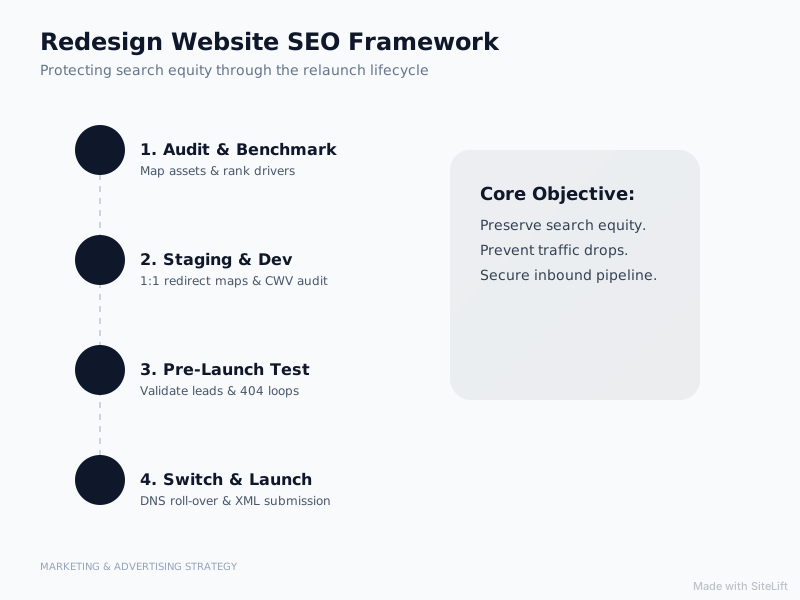
Infographic by SiteLift
Launch & Post-Launch Checklist: How Do You Verify SEO Performance?
The physical switch to a new website server takes minutes, but the technical verification process takes constant vigilance over the first 30 days.
[DNS Switch Executed] ──> [Remove Staging Noindex] ──> [Submit New XML Sitemap]
                                                                  │
                                                                  ▼
                                                      [Post-Launch Crawl Audit]
                                                                  │
                                                                  ▼
                                                      [30-Day GSC Monitoring]
Executing the Switch and Validating Robots.txt & Sitemap Files
When DNS points to the new live server host:
- Remove Server-Level Blocking: Disable HTTP password protection and remove all
X-Robots-Tag: noindexheader rules applied during staging. - Update the
robots.txtFile: Verify that your liverobots.txtfile permits search engine crawlers to access all critical styling files, scripts, and content paths. - Generate and Upload XML Sitemaps: Ensure your new platform generates a clean XML sitemap listing active, status-200 URLs. Submit this URL through your official Google Search Console portal immediately.
Conducting Immediate Post-Launch Crawls and Redirect Audits
Do not assume your developer implemented redirects and tags perfectly during the live migration. Run a full crawl on the live domain using Screaming Frog as soon as DNS propagation completes.
Review the live crawl output against your original pre-launch baseline export:
- Confirm that every legacy URL successfully triggers a 301 status code and lands at its intended live location.
- Verify that canonical tags point to live HTTPS URLs rather than old staging addresses.
- Confirm that global tracking codes (Google Tag Manager, GA4, pixel scripts) trigger correctly across all device formats.
Pro Tip: Use your crawling tool's list mode to upload your original CSV of legacy URLs. Run a batch crawl against those old addresses. If any show a 404 status code, 500 server error, or loop back to themselves, fix those redirect rules immediately before Google re-indexes the pages.
Monitoring Google Search Console for Crawl Errors and Indexing Status
Check your Google Search Console dashboard daily for the first two weeks following a relaunch. Pay extra attention to:
- Page Indexing Reports: Look out for sudden spikes in "Not Found (404)" or "Soft 404" designations.
- Crawl Stats: Ensure Googlebot experiences no HTTP 500 server errors or connection timeouts.
- URL Inspection Tool: Test primary service landing pages individually to verify Google renders content and layout elements correctly on mobile devices.
Official developer documentation, migration protocols, and index handling directives are available directly inside the Google Search Central documentation.
How Can Service Businesses Safeguard Enquiries and Conversions During a Relaunch?
Preserving organic rankings protects website traffic, but design usability converts that traffic into paid client engagements. If your technical SEO migration succeeds, but your user experience makes finding contact options confusing, total monthly enquiries will still drop.
                  ┌──> [Clear UX & Strong Messaging] ──> [High Enquiries]
                  │
[Organic Traffic] ┤
                  │
                  └──> [Broken Forms & Weak CTAs]    ──> [Lost Leads]
Preserving High-Converting Touchpoints and Contact Forms
A full visual redesign often changes page hierarchy, hero layout structures, and contact form placements. Never force prospective clients to guess how to take action.
- Keep contact forms accessible above the scroll fold on key commercial service pages.
- Ensure phone numbers use clickable
tel:HTML parameters for mobile visitors. - Test lead capture forms thoroughly across desktop, tablet, and mobile displays to ensure submit actions complete without script conflicts or database errors.
Integrating Automated Conversational Assistants for Immediate Lead Capture
When launching a redesigned website, user navigation behavior changes as returning clients and new visitors adapt to the updated menu structure.
Deploying intelligent conversational tools helps bridge navigation gaps during site updates. Incorporating automated lead capture assistants ensures after-hours questions receive instant responses, pre-qualifying prospective prospects even while traffic patterns adapt post-launch.
[Site Visitor] ──> [Asks Question Post-Relaunch] ──> [AI Assistant Qualifies] ──> [Lead Logged]
Review our full breakdown on building a comprehensive strategic website plan for service growth to integrate automated engagement directly into your sales workflow.
Auditing UX Clarity Alongside Technical SEO Performance
Never compromise clear communication for flashy design trends. Parallax scrolling features, heavy video backgrounds, and artistic navigation menus often create unnecessary friction.
Prioritize straightforward header navigation, bold value propositions, clear social proof markers, and prominent contact options. A functional, high-speed layout that presents clear services consistently wins more client business than an overly complex visual portfolio.
Editorial Perspective: Why Structural Optimization Beats Total Rebuilds Every Time
At Growth Kings, we frequently meet business owners convinced that a total site teardown is the only way to double inbound lead volume. In reality, launching a full ground-up rebuild is often like taking a sledgehammer to solve a minor plumbing issue.
When you scrap an established site to launch a modern design, you burn down years of search authority, legacy URL equity, and user familiarity. Design agencies love selling comprehensive rebuilds because they command higher fees, but business owners bear the underlying risk when organic lead generation stalls post-launch.
Surgical site optimization almost always delivers a faster, safer return on investment. Updating messaging, streamlining conversion paths, accelerating server speed, and refining page layouts on an established platform preserves search trust while dramatically boosting lead rates.
If your foundation requires a full rebuild, execute it with extreme technical precision. But if your legacy domain already holds valuable rankings, focus on performance optimization over stylistic teardowns.
If you need a clear blueprint to revamp your platform without risking your search traffic or lead volume, explore how growth-kings.com helps established businesses build high-converting, search-resilient web systems.
— growth-kings.com
FAQ
How long does organic traffic take to recover after a website redesign?
When you follow a comprehensive website migration seo checklist and implement exact 301 redirect mappings, temporary traffic fluctuations usually resolve within 2 to 6 weeks. During this window, Google recrawls redirected URLs, updates index entries, and recalculates domain link equity across your updated structure.
Why did my website lose Google rankings after a redesign?
Rank drops after a relaunch typically stem from missing 301 redirects, altered URL paths, removed copy that carried semantic keyword value, unindexed staging environments, or altered H1-H3 heading structures. Run an immediate post-launch technical crawl to locate broken links or indexing errors.
What is a 301 redirect map and why is it critical for website migration?
A 301 redirect map is a structured spreadsheet that pairs every legacy URL on your old site with its corresponding address on your new platform. It serves as an explicit set of instructions for search engine crawlers, preserving domain authority and ensuring visitors never encounter 404 error pages.
Can I redesign my website without changing any URLs?
Yes, keeping your existing URL structures, slug directories, and permalinks intact is the single best way to minimize SEO risk during a relaunch. If your current URL architecture is clean, logical, and mobile-friendly, retain those exact paths on your new platform to maintain your current search indexing.
How do I prevent search engines from indexing my staging website?
Protect your staging site using HTTP Basic Authentication (password protection) at the server level, or configure your web server response headers to include X-Robots-Tag: noindex, nofollow. Avoid relying solely on robots.txt disallow rules, as search engines can still index exposed staging URLs under specific conditions.
Want this working on your own site?
Tell us what’s working, what’s stuck and what you want to improve. We will reply personally.