Redesigning vs. Optimizing: When Is a New Website Actually Necessary for Growth?
Website redesign vs optimization compared on cost, SEO risk & ROI. Discover when to fix vs rebuild and grow faster.
By Growth Kings. Published , updated . 12 min read.

Redesigning vs. Optimizing: When Is a New Website Actually Necessary for Growth?
If your enquiries have stalled, you've probably Googled the same debate I hear from every service business owner: website redesign vs optimization. Should you tear it all down and start fresh, or fix what you already have?
I've watched companies spend $30,000 and six months on a beautiful rebuild that tanked their leads. I've also seen a few focused tweaks double qualified enquiries in 30 days. The difference wasn't budget. It was diagnosis.
This is a pragmatic, ROI-first breakdown of when to rebuild a business website — and when improving existing website ROI is the faster, safer path to growth.
Website Redesign vs Optimization: At a Glance
Before we go deep, here's the short answer for busy owners. A redesign means structural change: new CMS, new architecture, new design system. Optimization means iterative improvement: clearer messaging, faster pages, better conversion paths on your current foundation.
| Criteria | Full Website Redesign (Rebuild) | Continuous Website Optimization (Refine) |
|---|---|---|
| Key Features | New CMS/theme, new sitemap & URLs, full visual rebrand, content rewrite | CRO, copy clarity, speed fixes, mobile UX, trust signals, AI enquiry assistants |
| Pricing | High upfront: typically $8k–$50k+ for service SMEs, plus copy, SEO migration, QA | Low incremental: fixed-scope sprints, often 10-20% of rebuild cost to start |
| Timeline | 2–6+ months with content delays and revisions | Days to weeks per win; compounding results |
| Pros | Fixes deep technical debt, enables pivot, modern stack | Preserves SEO equity, faster ROI, test-and-learn flexibility |
| Cons | High SEO risk, long opportunity cost, scope creep | Won't fix obsolete CMS or broken business model |
| Best For | Obsolete platform, security issues, total rebrand/pivot | Established sites with traffic but weak conversion |
Pro Tip: If your site already gets steady traffic from Google or referrals, default to optimization first. You don't have a traffic problem — you have a conversion problem.
How to Evaluate Your Website's True Needs
Don't let an agency decide for you based on their portfolio. In any honest website redesign vs optimization analysis, judge both options against the same four criteria.
1. Financial Cost and Resource Allocation A rebuild isn't just design fees. Add copywriting, photography, CRM integrations, QA, SEO redirects, and staff time for feedback loops. Optimization, by contrast, lets you fund cost effective website upgrades in priority order — headline first, then speed, then lead capture.
2. Time-to-Market and Opportunity Cost Every month spent in staging is a month of lost enquiries. For service businesses, a six-month rebuild can mean hundreds of missed after-hours searches going to competitors. Optimization ships in weeks, so you learn and earn while you improve.
3. SEO Equity and Organic Search Risk Your rankings, backlinks, and indexed pages are assets. Google's own documentation on site moves with URL changes warns that migrations require careful mapping, redirects, and monitoring — even then, fluctuations are normal. If you don't need new URLs, why take the risk?
4. Conversion Rate and User Experience (UX) Potential Visitors don't buy because your site is flashy. They buy because it's instantly clear, credible, and easy to contact. According to the Nielsen Norman Group's research on how users read on the web, users often leave web pages in 10-20 seconds. That means clarity beats creativity.

Option 1: Full Website Redesign – When to Rebuild a Business Website
A true redesign is the nuclear option. We're not talking about a new homepage hero. We're talking about migrating CMS platforms, restructuring your sitemap, rewriting URL patterns, and overhauling visual identity all at once.
When the Rebuild Makes Sense
There are times when to rebuild a business website is the right call:
- Your CMS is obsolete or unsupported. If you're stuck on a legacy proprietary builder, an ancient Joomla install, or a hacked-together theme no developer will touch, patching is throwing money away.
- Fundamental business pivot. You've shifted from generalist to specialist, merged companies, or changed your service area completely. Your information architecture no longer fits.
- Unfixable technical debt. Core Web Vitals failing despite optimization, mobile layout broken beyond CSS fixes, critical security vulnerabilities, or no SSL / integration capability.
- Brand liability. Your current design actively destroys trust — think 2012 stock photos, broken links, and copy that describes what you used to do.
Analyzing the Rebuild Against Our Criteria
Cost: High and lumpy. Even a lean WordPress rebuild for a service firm runs into five figures once you include strategy, copy, and SEO migration. Enterprise or custom builds go far higher.
Time: Slow. Expect 8-20 weeks minimum, often longer when feedback stalls. During that time, your live site stays underperforming.
SEO Risk: Significant. Change URLs, navigation, internal linking, and page speed all at once and Google has to relearn your site. Without meticulous 301 mapping and Search Console monitoring, you can lose years of equity overnight.
Conversion Potential: High if strategy leads design. A rebuild done around visitor psychology — clear value proposition, proof, frictionless contact — can lift results. But pretty alone doesn't convert. I've seen stunning redesigns perform worse because they buried the phone number and enquiry form under animation.
If you do rebuild, do it through a conversion lens. Our approach to conversion-focused websites for service businesses is a good benchmark: easier to understand, easier to trust, easier to contact — not just easier on the eyes.
Option 2: Continuous Website Optimization for Cost Effective Website Upgrades
Optimization is the iterative approach. You keep your CMS, URLs, and SEO equity, and you systematically remove friction that stops visitors from enquiring.
Think: sharper headlines, proof above the fold, sticky call buttons, 2x faster load times, simplified forms, and 24/7 lead capture without changing your site structure.
What Optimization Actually Includes
- Messaging clarity: One clear promise in the first screen, written for humans. Who you help, what outcome you deliver, where you operate, and what to do next.
- Trust architecture: Reviews, case results, team photos, guarantees, and process steps placed where doubt happens.
- Technical performance: Image compression, caching, script cleanup, mobile layout fixes. According to Google's mobile page speed industry benchmarks, the probability of a mobile bounce increases by 32% as page load time goes from 1 second to 3 seconds. Speed is a conversion feature.
- Conversion Rate Optimization (CRO): A/B testing headlines, CTAs, form length, and offer framing. For deeper page-speed diagnostics, use Google's official PageSpeed Insights documentation before you assume you need a new theme.
- Conversational AI: An AI assistant that answers FAQs, qualifies visitors, and books calls after hours — layered on top of your existing pages.
Analyzing Optimization Against Our Criteria
Cost: Low and controllable. You can sequence cost effective website upgrades by impact. A headline + hero rewrite and speed sprint often costs a fraction of a rebuild and pays for the next sprint.
Time: Fast. Most high-impact wins ship in 1-3 weeks. You keep generating leads while you test.
SEO Risk: Minimal. You're preserving URLs and improving engagement signals like bounce rate and time on page — both of which support rankings rather than jeopardizing them.
Conversion Potential: Very high for sites with existing traffic. If 1,000 people visit monthly and 1% enquire, lifting to 2-3% via clarity and trust doubles or triples pipeline without spending more on ads. That's the core of improving existing website ROI.
Pro Tip: Record five sales calls and steal your customers' exact words for your homepage headline. Clarity converts better than cleverness every time.
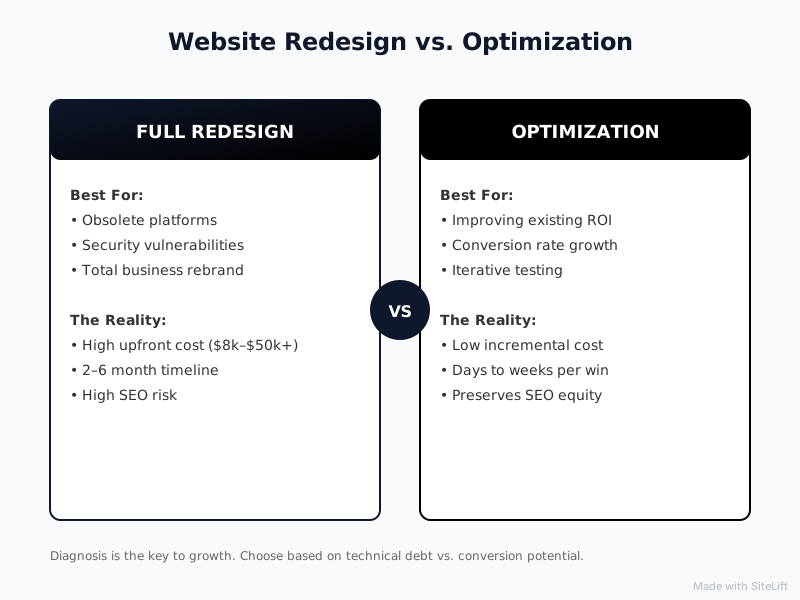
Infographic by SiteLift
Which Should You Choose? Signs Your Website Needs Fixing vs. a Full Rebuild
Here's my practical decision framework. Be brutally honest about which list sounds like you.
Clear Signs Your Website Needs Fixing (And Can Be Saved)
These are classic signs your website needs fixing, not replacing:
- You get traffic but few enquiries — people visit, then vanish
- Your homepage doesn't say what you do in under 5 seconds
- Mobile layout is clunky, buttons are tiny, forms are painful
- Pages load slowly, especially on phones
- No reviews, case studies, or team photos visible above the fold
- After-hours visitors have no way to get answers or book
- Content is outdated but your WordPress / Webflow / HubSpot setup is still solid
If that list hits home, start with optimization. I break down many of these exact issues in 11 reasons your website isn't converting enquiries into clients. Almost all are fixable without a migration.
Choose optimization if: You have domain authority, steady traffic, and a functional CMS, but weak messaging, slow speed, or poor lead capture.
Unmistakable Indicators That a Full Rebuild Is Your Only Option
- CMS is end-of-life, unsupported, or can't support SSL, redirects, or integrations
- Site was hacked, penalized, or has massive duplicate / thin content problems tied to structure
- You need custom functionality (portals, configurators, multi-location architecture) your stack can't handle
- Rebrand or pivot makes 70%+ of current pages irrelevant
- Every small change breaks something — developers refuse to work on it
Choose redesign if: The foundation itself blocks growth, security, or credibility, and patching costs more than rebuilding right.
How to Maximize ROI Without Starting Over
This is where I get opinionated. In my experience, most service businesses don't need a new website. They need a clearer website that follows up faster.
Here's the sequence I recommend for improving existing website ROI in 90 days:
1. Fix the first 10 seconds. Rewrite your hero to answer: Who is this for? What result do you get? Why trust you? What's next? Add a real photo, a star rating, and one primary CTA. Remember, users leave in 10-20 seconds if they don't see relevance.
2. Make speed and mobile non-negotiable. Compress images, remove slider plugins and unused scripts, enable caching. Test on a mid-range Android phone on 4G, not just your office MacBook. That 32% bounce jump from 1 to 3 seconds is real money for plumbers, lawyers, clinics, and agencies.
3. Add 24/7 capture without changing structure. Most enquiries happen when you're busy or closed. A conversational AI assistant can answer pricing, service area, and availability questions, then qualify and route the lead to your inbox or calendar. You don't need new pages — you need your current pages to work harder after hours.
4. Prove, then polish. Add one case study with numbers, three detailed reviews, and a simple 3-step process. Only then worry about fonts and animations. Trust lifts conversion more than trends.
I prefer this approach because it's reversible and measurable. If a headline test fails, we roll it back in minutes. If a full redesign fails, you're stuck explaining a $25k dip in leads to your team.
Website Redesign vs Optimization Verdict: My Take After Years in Growth
So, website redesign vs optimization — which wins?
For most established service businesses with traffic and a workable CMS, optimization wins on ROI, speed, and risk. It preserves your SEO equity, fixes the clarity and trust issues that actually stop enquiries, and funds itself.
Choose a full rebuild only when the platform, security, or business model forces it. And if you rebuild, rebuild for conversion, not awards.
Don't ask "does my site look old?" Ask "does my site make it blindingly obvious what to do next — and does it capture the lead when I'm not there to do it?" Answer that, and growth gets a lot cheaper.
If you want a straight answer on which camp you're in, the team at growth-kings.com specializes in exactly that triage — practical website improvements, search visibility, and AI assistants that turn existing visits into qualified enquiries, without pushing an unnecessary rebuild. Browse their services to see what a scoped, fixed-fee sprint looks like.
FAQ
How much does a complete website redesign cost compared to ongoing optimization?
A full redesign for a service SME typically runs from high four figures to $50k+ once you include strategy, copy, integrations, and SEO migration. Ongoing optimization is incremental — you might spend 10-20% of that to fix messaging, speed, and conversion paths first, then reinvest from the extra enquiries. Optimization spreads cost and proves ROI at each step, while a redesign demands most of the budget upfront before you know if it converts.
Will a website redesign hurt my existing Google rankings?
It can, if not managed carefully. Changing URLs, navigation, content, and site speed all at once forces Google to re-evaluate your pages. Follow Google's site-move best practices with full 301 redirect mapping, consistent internal links, and Search Console monitoring. If your rankings drive leads today, that's a strong argument to optimize first and preserve what you've earned.
How do I know if my current website platform is holding my business growth back?
Ask three questions: Can you publish and edit easily? Can you implement redirects, SSL, speed fixes, and CRM/calendar integrations? Will a developer still support your theme/plugins? If the answer is no, pages break on every update, or you can't meet Core Web Vitals after proper optimization, your CMS has become technical debt. That's one of the few valid triggers for a rebuild.
What are the first signs that my website needs fixing rather than a complete rebuild?
Traffic without enquiries, vague headlines, slow mobile load times, hidden contact options, and missing proof (reviews, cases, photos) are all fixable. If your CMS is modern and your domain has authority, these signs your website needs fixing point to clarity, speed, and trust upgrades — not a new site from scratch.
Can I improve my conversion rates without changing my website's visual design?
Absolutely. Most lifts come from invisible or subtle changes: clearer copy, stronger offers, shorter forms, sticky call buttons, faster loads, and after-hours AI chat for qualification. You can often double enquiries while keeping your brand and layout intact. Design polish helps, but clarity and follow-up speed drive the numbers.
— growth-kings.com
Want this working on your own site?
Tell us what’s working, what’s stuck and what you want to improve. We will reply personally.