How to Improve Quote Request Forms to Get More Qualified Enquiries
Learn how to improve quote request forms to increase conversions & get qualified enquiries with smart fields, trust & follow-up.
By Growth Kings. Published . 15 min read.

How to Improve Quote Request Forms to Get More Qualified Enquiries
If you're getting traffic but not enough good-fit enquiries, learning how to improve quote request forms is often the fastest lever you can pull. For most established service businesses, the problem isn't volume — it's friction, vague questions, and zero trust at the exact moment someone is ready to ask for pricing.
I see this pattern constantly: a solid service, decent rankings, a contact page that technically works, but a quote form that asks for too much, explains too little, and follows up too slowly. The fix isn't a full rebuild. It's quote request form optimization focused on clarity, smart qualification, and fast follow-up.
This guide breaks down exactly how to do that — from field count and microcopy to qualifying questions, trust signals, mobile UX, and measurement.
Key Takeaways
| Focus Area | What to Do | Why It Matters |
|---|---|---|
| Friction | Cut to 4-6 essential fields, use inline validation and smart defaults | Lowers abandonment and helps increase quote form conversions |
| Qualification | Ask budget range, timeline, location, and scope with clicks not typing | Filters out tire-kickers without scaring away good leads |
| Structure | Use multi-step + conditional logic for complex services | Makes long forms feel short and personal |
| Trust & UX | Add response-time promise, privacy note, testimonials, mobile-first design | Makes visitors comfortable sharing details for high-ticket services |
| Follow-up | Instant confirmation + <1 hour human follow-up, AI after-hours cover | Turns more submissions into qualified sales conversations |
Bottom line: You don't need more traffic to get more qualified enquiries. You need a clearer path from I'm interested to here's my project details — and a fast, human response on the other side.
Why Do Most Quote Request Forms Fail to Convert Visitors Into Enquiries?
Most quote forms weren't designed. They accumulated. Someone added a field for the sales team, another for operations, another "just in case," and suddenly you're asking for a life story before you've earned an email address.
For service businesses, that gap between traffic and qualified enquiries is painful because each lost lead could be worth thousands.
What are the most common friction points that kill quote form completions?
Here are the conversion killers I audit first:
1. Too many required fields. Every extra field adds cognitive load. Research from the Baymard Institute's research on checkout and form usability puts average abandonment around 70% for checkout flows, and while a quote form isn't a checkout, the lesson holds: friction kills intent.
2. Vague labels and CTAs. "Submit," "Send," or "Name" with no context. Visitors wonder: Submit to whom? What happens next? When will I get pricing?
3. No expectation-setting. No word on response time, what the quote includes, or whether it's free. For high-ticket services, silence feels risky.
4. No trust near the decision point. The form sits alone on a bare page with no reviews, no real photos, no privacy reassurance.
5. Painful mobile experience. Tiny inputs, dropdowns that are hard to tap, pages that crawl. Google found that 53% of mobile site visits are abandoned if a page takes longer than 3 seconds to load, which is exactly why fast quote forms matter.
If your form lives on a slow, cluttered page, you're losing people before they even start typing.
How does a poor quote request experience attract unqualified leads?
This is the part most generic advice misses. A bad form doesn't just reduce volume — it wrecks quality.
When you ask only "Name, Email, Message," you invite vague messages like "need quote pls" with no budget, timeline, or scope. Your team wastes hours chasing ghosts.
When you ask for everything with no guidance, good-fit buyers bounce because they’re busy, while price-shoppers with lots of time persist.
Quote request form optimization isn't about getting more submissions. It's about getting more right-fit submissions you can actually quote and close.
Pro Tip: Audit your last 20 quote submissions. If more than half are missing budget, timeline, or scope, your form isn't qualifying — it's just collecting.
How to Improve Quote Request Forms: Core Best Practices for Higher Conversions?
This is where we get practical on how to improve quote request forms without overcomplicating things. Think clarity first, then cleverness.
How many fields should your quote form have?
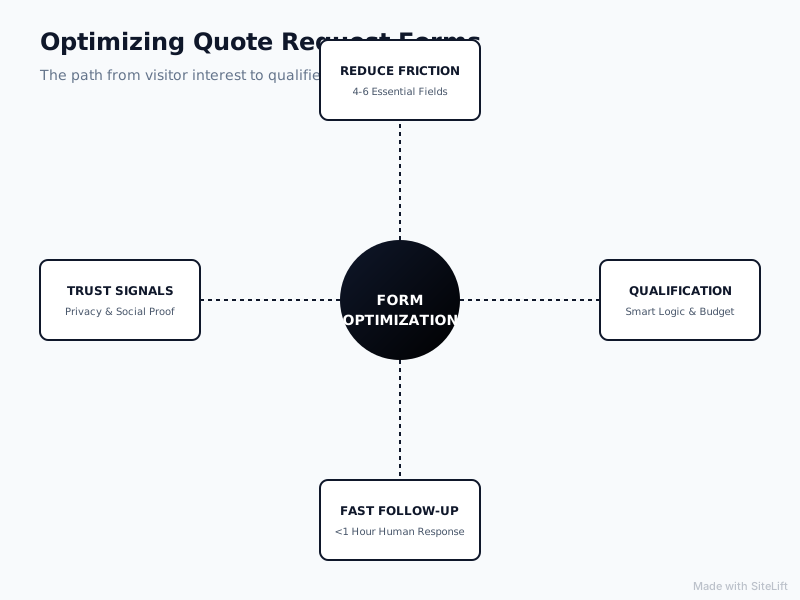
Start with 4-6 fields on step one. That's the sweet spot for most services.
Essential starter fields:
- Name
- Email or phone (ask for one as required, the other as optional)
- Service needed (dropdown or radio)
- Location / service area
- Brief project description (with helpful placeholder)
Everything else — budget, timeline, photos, company size — belongs on step two or via conditional logic.
Guidance from the Nielsen Norman Group's evidence-based form design guidelines consistently shows that clear labels, visible constraints, and forgiving inputs outperform long, intimidating forms. HubSpot has also shared similar findings in its research on lead capture forms and field reduction — fewer fields typically lift conversion, but you have to balance that against lead quality.
If you serve multiple services, don't use one giant form. Use conditional logic to show only relevant follow-ups.
How to write clear labels, microcopy and CTAs that drive action?
Microcopy is your silent salesperson. Swap generic language for specific, reassuring language:
- Instead of "Submit" → "Get My Free Quote" or "Request Pricing in 24 Hours"
- Instead of "Message" → "Tell us about your project (2-3 sentences is perfect)"
- Under email field → "We’ll only use this to send your quote. No spam, ever."
- Above the button → "Free, no-obligation quote. Response within 1 business day."
Use inline validation (green check as they type, friendly red hint if something's wrong), auto-formatting for phone numbers, and smart defaults like pre-selecting the most common service.
Pro Tip: Put your CTA promise in first person. "Get My Quote" consistently feels more personal than "Get Your Quote" or "Submit" — test it.
Should you use single-step vs multi-step quote forms?
Both can work. Here's how to choose:
| Form Type | Best For | Pros | Cons |
|---|---|---|---|
| Single-step (4-6 fields) | Simple services: cleaning, pest control, basic repairs | Fast, low friction | Hard to qualify complex projects |
| Multi-step (2-3 steps) | High-ticket / custom: remodeling, legal, HVAC install, agencies | Feels easier, allows qualification | Needs progress bar and smart logic or people drop off |
For most established service firms, I recommend a hybrid: Step 1 captures contact + service, Step 2 asks 2-3 qualifying questions for quote forms, Step 3 confirms and sets expectations.
Always show a progress indicator ("Step 1 of 3 — 30 seconds"), allow Back without losing data, and never ask for the same info twice.

What Qualifying Questions Should You Ask to Get More Qualified Enquiries?
This is the core of service quote form best practices: qualify without interrogating.
The goal is to filter for budget, timeline, and fit using clicks, not essays.
Which qualifying questions filter budget, timeline and fit without adding friction?
Use closed-ended inputs — radio buttons, dropdowns, sliders — wherever possible. They’re faster on mobile and far easier to analyze.
Copy-paste examples that work for almost any service business:
1. Budget range (radio buttons) Under $1,000 / $1,000–$3,000 / $3,000–$10,000 / $10,000+ / Not sure yet — need guidance
Framing "Not sure yet" as acceptable keeps good leads from bouncing while still flagging true budget mismatches.
2. Timeline (dropdown) ASAP / Within 2 weeks / 1-2 months / Just researching
This alone can prioritize your follow-up queue.
3. Location / service area (dropdown or zip field with validation) Essential if you have travel limits. Prevents out-of-area quotes.
4. Project scope (conditional checkboxes) For a remodeler: Kitchen / Bathroom / Addition / Whole home For an agency: New website / Redesign / SEO / Ads + landing pages
5. Decision-maker status (radio) I'm the decision-maker / I need approval / I'm researching for someone else
6. Photos or details (optional file upload) "Upload 2-3 photos (optional but gets you a faster, more accurate quote)"
Notice what we didn't do: ask for open-text budget ("What's your budget?") — that creates anxiety. Ranges feel safe.
How to use conditional logic to personalize the quote journey?
Conditional logic means the form adapts based on answers. If someone selects "Emergency repair," skip the budget question and ask for availability + phone. If they select "Full installation," show timeline, property type, and photo upload.
Example flow for an HVAC company:
- What do you need? [Repair / Replacement / Maintenance]
- IF Repair → How urgent? + System age + Preferred contact
- IF Replacement → Property size + Current system type + Timeline + Budget range
This is how you increase quote form conversions and quality at the same time — shorter perceived effort, richer data.
How to balance lead quality vs lead volume?
You have to choose your tradeoff deliberately.
If your sales team is starving, prioritize volume: fewer required fields, optional qualification, fast callback to qualify by phone.
If your team is drowning in unqualified calls, prioritize quality: make budget and timeline required, add one friction question like "Have you worked with a [service pro] before?" and be explicit: "We specialize in projects over $X."
The Unbounce Conversion Benchmark Report found a median landing page conversion rate around 4.4% across industries. For services, beating that median is less important than improving your qualified enquiry rate — what percentage of submissions turn into real sales conversations.
Track both: completion rate and qualification rate. A form that drops from 8% to 5% conversion but doubles qualified calls is a win.
Infographic by SiteLift
How Can Design, Trust and UX Increase Quote Form Conversions?
People don't hand over contact details and project budgets to a form. They hand them to a business they trust. Design is how you signal that trust in 5 seconds.
Where should quote forms live for maximum visibility?
Don't bury your quote form three clicks deep.
What works for service sites:
- Sticky header CTA: "Get a Quote" button visible on every page, especially mobile
- Above-the-fold on service pages: Short form or clear CTA next to headline + proof
- Dedicated quote landing page: No navigation distractions, focused on one service + one action
- Embedded + dedicated: Embed a short form on service pages, link to full multi-step version for complex quotes
If you're debating a full redesign versus targeted fixes, start with placement and clarity. Our breakdown of 8 website optimization examples that doubled service enquiries shows how small friction fixes often outperform expensive rebuilds.
What trust signals make visitors comfortable sharing details?
Place these within eyesight of the form, not just on your homepage:
- 2-3 short testimonials with name, location, and result ("Quoted in 24h, installed in 5 days")
- Star rating + review count
- Real team or van/office photo — not stock
- Response promise: "We reply within 1 business day — usually faster"
- Privacy microcopy: "Your details stay private. No spam, no sharing."
- Badges that matter: licensed & insured, guarantees, years in business
Avoid cluttering with 20 logos. Pick 3-4 that reduce risk for a first-time buyer.
How to optimize quote forms for mobile and speed?
More than half your quote requests will start on a phone. Design for thumbs:
- Single-column layout, large tap targets (minimum 44px), 16px+ font to prevent zoom
- Native input types:
tel,email,numberto trigger the right keyboard - Autocomplete enabled, address autofill where relevant
- No heavy sliders, video backgrounds, or 2MB hero images on quote pages
- Accessible labels (not placeholder-only), clear error messages, good color contrast
Page speed is non-negotiable. If your quote page is slow, check out these 9 website performance optimization tips to stop losing impatient enquiries — image compression and script cleanup alone often shave seconds.
Pro Tip: Test your own form on a mid-range Android phone on 4G, not just your laptop. If you get frustrated, your prospects already bounced.
How to Improve Quote Request Forms With Follow-Up, Automation and Measurement?
Getting the submission is only half the job. What happens in the next 60 minutes decides whether it becomes revenue.
How fast should you respond to new quote requests?
Immediately with automation, and fast with a human.
Research published by Harvard Business Review found that companies that contact leads within an hour are nearly 7x more likely to qualify the lead than those that wait even that long. After-hours delays are where most service businesses leak money.
Minimum viable follow-up stack:
- Instant confirmation page: Summarize what they asked for + "What happens next: We'll review your details and reply by [tomorrow 10am] with next steps."
- Instant email + SMS autoresponder: Friendly, personal, with a name and photo. Include turnaround time and a way to add details.
- Human follow-up within 1 business hour: Even a 2-line personal note beats a perfect quote sent 3 days later.
Set expectations on the form: "Free quotes delivered within 24 business hours" filters urgency and reduces "just checking in?" anxiety.
How can AI assistants and autoresponders handle after-hours enquiries?
If you can't staff phones at 9pm on Sunday — and most service firms can't — you need coverage that still qualifies.
A good AI-powered conversational assistant can:
- Answer "how much does X cost?" with ranges and what affects price
- Ask missing qualifying questions conversationally
- Book a callback or site visit directly to your calendar
- Flag urgent / high-value leads for morning priority
The key is handoff. The bot should say: "I've got your details — [Name], our estimator, will send your tailored quote by 10am tomorrow. Want me to text you when it's ready?" That feels helpful, not robotic.
This is also where a simple checklist helps you spot gaps. Run through this 21-point website optimization checklist to turn visits into qualified enquiries to see if your post-submit experience is leaking leads.
What metrics and A/B tests prove what is working?
Stop measuring just "form submissions." Measure qualified pipeline.
Track in plain language:
- Form views → starts: Are people engaging? If low, fix placement and headline.
- Starts → completions: If low, cut fields or switch to multi-step.
- Completions → qualified enquiries: If low, tighten qualifying questions.
- Qualified → booked calls / quotes sent / jobs won: Ties optimization to revenue.
- Cost per qualified lead: Especially if you run ads.
Simple A/B tests to run one at a time for 2-4 weeks:
- CTA text: "Submit" vs. "Get My Free Quote"
- Single-step vs. 2-step version
- Required vs. optional phone number
- Adding response-time promise above button
- Budget as radio ranges vs. no budget question
If your overall conversion feels low but you can't tell why, this guide on why a low conversion rate can be caused by more than bad design is a useful diagnostic for hidden funnel gaps.
My Take: Why Most Businesses Overcomplicate This
I've audited dozens of service websites, and here's my honest opinion: most owners think they have a traffic problem when they actually have a clarity problem.
They want to add chatbots, rebuild on a new platform, or chase rankings, while their quote form still says "Submit" with 14 required fields and no mention of when anyone will reply. No wonder good prospects go to the competitor who answered faster and sounded more human.
My philosophy is boring in the best way: make it stupidly easy to ask for pricing, ask just enough to quote accurately, prove you're trustworthy right next to the button, and follow up like your business depends on it — because it does.
You don't need a clever form. You need a clear one. Clarity books jobs.
Get More Qualified Enquiries Without a Rebuild
If your quote form is getting views but not quality enquiries, you probably don't need a new website. You need sharper clarity, better qualification, and faster follow-up.
That's exactly what we do at growth-kings.com — practical website optimization for established service businesses, plus search visibility and AI assistants that qualify after-hours inquiries so you wake up to booked calls, not cold "need quote" messages.
Start by auditing your current form for friction, trust, and speed. Fix one section this week, measure qualified enquiries — not just submissions — and keep iterating.
FAQ
How many fields should a quote request form have for best conversion?
For most services, 4-6 fields on the first step converts best. Ask only for name, contact, service type, location, and a short description. Move budget, timeline, and details to step two with conditional logic. Fewer required fields lift starts, while smart step-two questions protect lead quality.
What qualifying questions should I include to get more qualified enquiries?
Ask budget range (as clickable ranges), timeline, service location, project scope, and decision-maker status. Use radio buttons and dropdowns instead of open text to reduce effort. Make budget and timeline required only if your team is overwhelmed with unqualified leads; otherwise keep them optional but highly visible.
Should I show pricing before asking visitors to request a quote?
Yes — show starting prices, ranges, or "typical projects cost $X–$Y" near the form. You don't need exact pricing, but transparency builds trust and self-qualifies visitors. Businesses that hide all pricing tend to get more low-fit enquiries and slower sales cycles.
How can I increase quote form conversions without getting more spam?
Use invisible spam protection like honeypot or reCAPTCHA v3 instead of annoying puzzles, add email validation, and require a meaningful project description (minimum character count). Qualifying questions like budget and timeline also deter bots and tire-kickers without hurting real buyers.
How quickly should I follow up after someone submits a quote request form?
Send an instant automated confirmation by email and SMS, then follow up personally within one business hour whenever possible. Companies that respond within an hour are far more likely to qualify the lead. If you can't cover evenings and weekends, use an autoresponder or AI assistant to acknowledge, qualify, and book the next step.
— growth-kings.com
Want this working on your own site?
Tell us what’s working, what’s stuck and what you want to improve. We will reply personally.