Speed Sells: 9 Website Performance Optimization Tips to Stop Losing Impatient Enquirers
Stop losing leads to slow load times. 9 website performance optimization tips for fast, high-converting service sites.
By Growth Kings. Published , updated . 13 min read.

Speed Sells: 9 Website Performance Optimization Tips to Stop Losing Impatient Enquirers
If your phone rings less than your traffic suggests it should, speed is usually the silent killer. These website performance optimization tips are built specifically for service businesses that live on enquiries, not pageviews.
I’ve seen the same pattern dozens of times: a plumber, lawyer, or clinic gets decent traffic, but the contact form sits empty. Visitors want a fast answer, a price range, and a booking button — not a spinning loader. Below are 9 fixes I evaluated for enquiry impact vs. effort, with no full rebuild required.
Why Does Website Speed for Service Businesses Directly Impact Enquiries?
Website speed for service businesses isn’t a technical vanity metric. It’s a trust signal.
Think about the impatient enquirer mindset. Someone’s boiler is leaking, or they need a dentist tomorrow. They tap your site on mobile, compare you with two competitors in other tabs, and pick whoever answers fastest. According to Google, 53% of mobile site visits are abandoned if a page takes longer than 3 seconds to load.
What slow speed costs you is compounding:
- Higher bounce: According to Google, as page load time goes from 1 second to 3 seconds, the probability of bounce increases by 32% (mobile page load time statistics).
- Lower trust: A laggy form or jumping layout screams “this business is sloppy.”
- Fewer completions: According to Portent, website conversion rates drop by an average of 4.42% with each additional second of load time between 0-5 seconds.
The good news: you don’t need to start over. A fast loading service website is usually about fixing weight, waste, and friction — not redesigning everything.
How We Chose These Website Performance Optimization Tips
I filtered for fixes that actually move enquiries for service sites with forms, click-to-call buttons, and chat.
Selection criteria:
- Proven impact on Core Web Vitals and page speed best practices
- Direct link to mobile performance and conversions
- Low cost compared to a rebuild
- Relevant to enquiry elements: quote forms, sticky call buttons, maps, chat assistants
How to use this list:
Test your baseline first in Google PageSpeed Insights and GTmetrix. Note mobile scores separately — that’s where most enquirers come from. Then work the list in order of effort vs. impact.
Pro Tip: Test your homepage, your top service page, and your contact page. Service sites often have a fast homepage and a painfully slow “Get a Quote” page where it matters most.
1. Optimize Images to Build a Fast Loading Service Website
What it is: Compressing, resizing, and serving modern formats so photos don’t bloat the page. Best for: Every service site with hero images, team photos, or before/after galleries. Standout strength: Biggest speed win for lowest effort. Main drawback: You have to redo old uploads — bulk tools help, but it takes an hour.
Why It Matters for Enquiries
Oversized images are the #1 weight culprit I find. A 4MB hero shot from a photographer will kill mobile load before your headline even appears.
How to Do It Fast Without a Rebuild
- Compress all images with Squoosh, ShortPixel, or Cloudflare Polish.
- Resize to max display size — no 4000px-wide files for a 800px slot.
- Convert to WebP or AVIF, keep JPEG/PNG as fallback.
- Use responsive
srcsetso phones get smaller files. - Add explicit width/height to images to avoid layout shift.
This single set of website performance optimization tips for images often cuts 1-3 seconds off mobile load.
2. Enable Browser Caching and a CDN for Worldwide Visitors
What it is: Storing static files locally and serving copies from servers near the visitor. Best for: Service businesses with repeat visitors or enquirers outside one city. Standout strength: Makes every return visit feel instant. Main drawback: Wrong cache rules can show stale content — set exclusions for forms and carts.
Why It Matters for Enquiries
First visit is slow, second visit should be fast. Without caching, browsers re-download your logo, CSS, and fonts every time.
A CDN fixes distance. If you’re in London and an enquirer is in Sydney, a CDN serves a nearby copy instead of crossing the world. Learn the basics in this plain-English guide to how CDNs work.
How to Do It Fast Without a Rebuild
- Enable page cache (WP Rocket, LiteSpeed Cache, or server-level cache).
- Set browser caching for static assets: images, CSS, JS, fonts.
- Put Cloudflare or similar in front of your site — free tier is fine to start.
- Check Time to First Byte before and after.

3. Minify Code and Remove Theme and Plugin Bloat
What it is: Cleaning up heavy CSS, JavaScript, and unused plugins that block rendering. Best for: WordPress, Wix, or page-builder sites that feel sluggish despite good hosting. Standout strength: Fixes that “blank white screen” delay. Main drawback: Deferring the wrong script can break sliders or forms — test after each change.
Why It Matters for Enquiries
Most service sites don’t need a rebuild, they need a declutter. I regularly see 15+ plugins loading on a simple quote page: three sliders, two popups, unused contact form styles.
How to Do It Fast Without a Rebuild
- Minify CSS, JS, and HTML via your cache plugin or hosting.
- Defer non-critical JS and delay it until user interaction where possible.
- Remove unused plugins, duplicate tracking, and old page-builder addons.
- Audit your theme — disable animations and icon libraries you don’t use.
This reflects how we work at Growth Kings: practical cleanup for clarity and speed over unnecessary full rebuilds. If traffic isn’t turning into calls, these are often the same culprits behind the reasons your website isn’t converting enquiries into clients.
4. Pass Core Web Vitals for Enquiry Sites Without the Jargon
What it is: Hitting Google’s three experience metrics: LCP, INP, and CLS. Best for: Any service site relying on Google search for leads. Standout strength: Improves both rankings and enquiry completion. Main drawback: Scores fluctuate by device — focus on real mobile field data, not just lab scores.
Why It Matters for Enquiries
Here’s core web vitals for enquiry sites in plain English:
- LCP (Largest Contentful Paint): How fast your main headline/image appears. Aim under 2.5s.
- INP (Interaction to Next Paint): How quickly buttons and forms respond when tapped. Aim under 200ms.
- CLS (Cumulative Layout Shift): How much the page jumps around while loading. Aim under 0.1.
If your “Call Now” button shifts just as someone taps it, that’s CLS costing you a lead.
How to Do It Fast Without a Rebuild
- Preload your hero/LCP image.
- Reserve space for banners, forms, and embedded reviews with fixed heights.
- Limit main-thread JavaScript — that’s the biggest INP killer.
- Use system fonts or preload 1-2 custom fonts max.
Full definitions and thresholds are in Google’s Core Web Vitals and page speed best practices.
5. Fix Mobile Performance to Lift Conversions
What it is: Optimizing layout, tap targets, and load for phones on 4G. Best for: Plumbers, clinics, lawyers, home services — where 60-80% of enquiries start mobile. Standout strength: Direct lift in calls and form starts. Main drawback: Desktop may look perfect while mobile is broken — you have to test on a real phone.
Why It Matters for Enquiries
Mobile performance and conversions are inseparable. Mobile users are impatient, on slower networks, and trying to tap with a thumb. According to Deloitte’s Milliseconds Make Millions report, a 0.1 second improvement in site speed led to an 8.4% increase in conversions for retail sites studied.
How to Do It Fast Without a Rebuild
- Make your sticky mobile header simple: logo + Call button. Nothing else.
- Use tap-friendly 48px buttons, avoid popups that cover the form.
- Enable autofill and
tel:links for click-to-call. - Test with PageSpeed Insights throttled to 4G, plus a real Android/iPhone check.
- Shorten mobile forms — name, phone, one message field.
Pro Tip: Put your click-to-call and WhatsApp button in the thumb zone on mobile. If I have to pinch-zoom to contact you, I’m already back on Google.
6. Upgrade Hosting and Cut Time to First Byte
What it is: Reducing server response time so the browser gets the first byte faster. Best for: Sites on cheap shared hosting that stall for 1-2 seconds before anything shows. Standout strength: Fixes slowness no image tweak can solve. Main drawback: Costs more than a plugin — but usually less than one lost job per month.
Why It Matters for Enquiries
TTFB is the hidden bottleneck. If your server takes 1.5 seconds to respond, you’ve already lost before optimization starts.
How to Do It Fast Without a Rebuild
- Move to quality managed hosting with server-level caching.
- Enable PHP 8+ and HTTP/2 or HTTP/3.
- Choose a server location close to your main audience, plus a CDN for the rest.
- Check TTFB in PageSpeed Insights under “Reduce initial server response time” — aim under 600ms.
7. Lazy Load Videos, Maps, and Below-the-Fold Content
What it is: Loading heavy embeds only when needed, not on initial page load. Best for: Service pages with YouTube videos, Google Maps, and testimonial sliders. Standout strength: Keeps trust assets without paying the speed cost upfront. Main drawback: If done wrong, content can pop in late — always set placeholders.
Why It Matters for Enquiries
A single YouTube embed can add 500KB+ of JavaScript. A live Google Map does the same. Visitors don’t need them in the first 2 seconds — they need your headline and contact options.
How to Do It Fast Without a Rebuild
- Add
loading="lazy"to images and iframes. See syntax in MDN’s lazy loading reference. - Use a facade for video: show a lightweight thumbnail, load YouTube only on click.
- Load maps on click or scroll — “Tap to load map” is perfect for service sites.
- Lazy load testimonial sliders and Instagram feeds below the fold.
You keep the proof, but your first view stays lightning fast.
8. Tame Third-Party Scripts and Chat Widgets
What it is: Auditing tracking pixels, heatmaps, social feeds, and chat tools that run on every page. Best for: Sites with 5+ marketing tags added over the years. Standout strength: Often frees 0.5-1.5 seconds instantly. Main drawback: Marketing teams fear removing tags — keep what drives decisions, cut duplicates.
Why It Matters for Enquiries
Every chat widget, pixel, and review badge is extra JavaScript competing with your enquiry form. I’ve seen live-chat scripts alone delay input by a full second on mobile.
How to Do It Fast Without a Rebuild
- Inventory scripts in DevTools Coverage + Google Tag Manager.
- Load with
asyncordefer, remove duplicate analytics. - Keep enquiry helpers but delay them until after main content loads.
- Choose a lightweight AI assistant over a heavy live-chat bundle for after-hours capture.
Done right, you keep tracking and instant response without sacrificing speed.
9. Make the Enquiry Itself Faster: Lean Forms and Click-to-Call
What it is: Reducing time-to-enquiry, not just load time. Best for: All service businesses — this is where speed turns into revenue. Standout strength: Highest ROI of all website performance optimization tips. Main drawback: Requires saying no to “just one more field” from sales.
Why It Matters for Enquiries
A 1.8-second site with a 9-field form still loses to a 2.5-second site with a 3-field form and instant call option. Speed sells when contacting you feels effortless.
How to Do It Fast Without a Rebuild
- Cut to 3-4 fields max: name, phone/email, service, message.
- Use multi-step for complex quotes — step 1 should take 10 seconds.
- Add instant validation, autofill, and input masks for phone.
- Stick a mobile Call / WhatsApp bar to the bottom.
- Add an after-hours AI assistant to qualify and book when you can’t answer.
This is exactly what conversion-focused websites for service businesses should do: easier to understand, easier to trust, easier to contact. For deeper reading, browse practical guides in Growth Kings resources.
Which Website Performance Optimization Tips Should You Fix First?
Not all fixes are equal. Start with high enquiry impact and low effort.
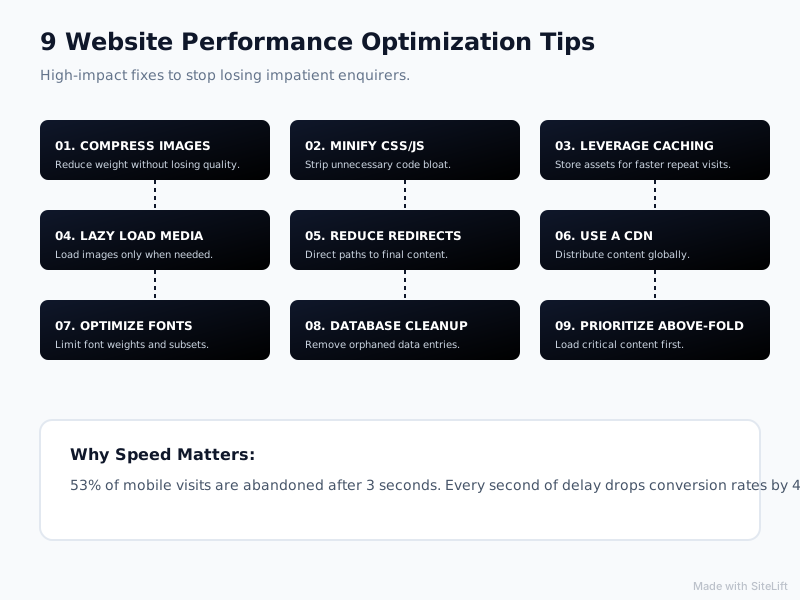
Infographic by SiteLift
| Tip | Effort | Enquiry Impact | Best For |
|---|---|---|---|
| 1. Image optimization | Low | High | Galleries, hero-heavy sites |
| 2. Caching + CDN | Low | High | Worldwide + repeat visitors |
| 3. Minify + remove bloat | Medium | High | Page-builder / WordPress sites |
| 4. Core Web Vitals (LCP, INP, CLS) | Medium | High | SEO-driven enquiry pages |
| 5. Mobile + click-to-call | Low | Very High | Phone-led services |
| 6. Hosting + TTFB | Medium | High | Slow shared hosting |
| 7. Lazy load video/maps | Low | Medium | Video + map embeds |
| 8. Audit third-party scripts | Medium | Medium | Tag-heavy marketing sites |
| 9. Lean enquiry flow | Low | Very High | Everyone with forms |
Your 7-day action plan:
- Day 1-2: Compress images, enable cache + CDN, fix mobile call button.
- Day 3-4: Minify code, lazy load maps/video, audit plugins.
- Day 5-7: Tighten Core Web Vitals, clean scripts, shorten forms.
My honest take after optimizing service sites for years: most owners overthink redesigns and underthink friction. You don’t need a prettier site. You need a fast loading service website where I can understand what you do in 5 seconds, trust you in 15, and contact you in 30. Speed plus clarity beats clever design every time.
If you want that lens on your own site, get a speed audit focused on enquiries, not just a green PageSpeed score. That’s what we do at growth-kings.com.
FAQs About Website Performance Optimization Tips for Service Businesses
What is website performance optimization for a service business website?
It’s making your site load fast, respond instantly, and make contacting you effortless. For service businesses, that means fast service pages, stable layouts, tap-friendly call buttons, and short forms — not just a high technical score.
How does website speed affect enquiries and conversions?
Slow pages increase bounce and erode trust right when someone is ready to enquire. Even small delays reduce form completions and calls, especially on mobile where most service searches happen.
What are Core Web Vitals for enquiry sites and what scores should I aim for?
LCP measures how fast main content appears (aim under 2.5s), INP measures how fast buttons/forms respond (aim under 200ms), and CLS measures visual stability (aim under 0.1). Check them in PageSpeed Insights and Search Console’s Core Web Vitals report.
What is a good page load time for a fast loading service website?
Aim for under 2.5 seconds on mobile 4G for your key enquiry pages, with under 3 seconds as a minimum bar. Under that, focus on time-to-enquiry: fewer fields, clear call options, and after-hours capture.
How can I test mobile performance and conversions on my site for free?
Use Google PageSpeed Insights for mobile scores and Core Web Vitals, GTmetrix for waterfall detail, and Search Console for real-world field data. Then test like a customer: on your phone, on 4G, try to request a quote in under 30 seconds.
— growth-kings.com
Want this working on your own site?
Tell us what’s working, what’s stuck and what you want to improve. We will reply personally.