404 Errors Are Silently Leaking Leads: Find, Fix and Turn Them Into Enquiries
Stop losing potential clients to dead ends. Learn how to identify 404 errors, execute 301 redirects, and build high-converting custom error pages.
By Growth Kings. Published . 15 min read.

404 Errors Are Silently Leaking Leads: Find, Fix and Turn Them Into Enquiries
Few things kill pipeline velocity quite like a broken webpage. When a prospective client searches for a specialized B2B partner, clicks a link from an industry publication, and meets a generic "Page Not Found" screen, they do not search your navigation bar to find where the article moved. They hit the back button and call your competitor.
Unaddressed 404 errors act as silent friction points across your domain. Every month, established service businesses lose high-intent buyers simply because legacy URLs were wiped out during a CMS migration, marketing campaign links contained typos, or deleted service offerings were abandoned without redirection.
This guide walks you step-by-step through discovering broken links, prioritizing them by real commercial impact, executing proper technical remediation, and converting stranded visitors into paying clients.
Prerequisites: What You Need Before Auditing 404 Errors
Before diving into URL diagnostics, gather administrative access and equip your toolkit. Running an audit without the right permissions is an exercise in frustration.
Essential Access and Permissions
To trace and resolve broken paths across your entire digital presence, make sure you have:
- Google Search Console (GSC): Full or delegated ownership access to inspect the Page Indexing report.
- CMS Administrative Rights: Editor or developer access to your content management platform (e.g., WordPress, Webflow, Shopify, or custom headless setups).
- DNS or Server Access: Credentials for your hosting provider, server configuration files (
.htaccess, Nginx config), or CDN routing layer (e.g., Cloudflare) if handling bulk redirects. - Web Analytics Access: Admin rights to your analytics suite (such as Google Analytics 4) to monitor real-time user landings.
Recommended 404 Error Monitoring Tools
Locating every dead end requires both active crawlers and passive reporting tools. We recommend:
- Screaming Frog SEO Spider to crawl internal links, media files, and script paths.
- Ahrefs or equivalent backlink audit software to surface external incoming links pointed at deleted pages.
- Specialized 404 error monitoring tools or uptime monitors that log live server errors as they occur.
Status Code Cheatsheet:
• 404 Not Found: Server reachable, but specific endpoint does not exist.
• Soft 404: Page displays missing content message, but returns a 200 OK server header.
• 410 Gone: Explicit signal that the asset was intentionally removed permanently.
• 500 / 502 / 503: Server-side crashes unrelated to missing URL routes.
Why 404 Errors and Broken Links Are Hurting Your SEO and Conversions
Most agencies treat missing pages as routine digital dust. That perspective misses the commercial reality entirely: broken links hurting seo and conversions represent lost revenue, wasted media spend, and squandered search equity.

The Direct Impact on Organic Search Visibility
According to Google Search Central documentation on HTTP network errors, standard 404 errors on non-existent URLs are a natural part of the web and will not trigger a manual site-wide penalty. However, that does not mean they are harmless.
When your internal site architecture is littered with dead ends, search engine bots waste allocated crawl resources on dead URLs rather than discovering new, commercial content. More critically, when an external website links to a URL on your site that now returns a 404 code, the ranking equity (PageRank) passing through that external backlink completely evaporates. Data published by Ahrefs in their study of link rot revealed that approximately 66.5% of links to websites created over the last decade have decayed or become broken. If your high-authority referring domains are pointing to dead air, your domain visibility declines over time.
If your broader architecture suffers from broken silos, you should review our guide on website structure optimization for service businesses to establish a more resilient content taxonomy.
The Silent Conversion Killer: User Drop-Off and Lost Enquiries
While search engines treat missing pages as routine, humans do not. Research by the Nielsen Norman Group shows that usability errors and missing pages cause immediate user frustration, with a significant majority of users leaving a website after encountering repeated navigation failures.
When an executive reads an article citing your proprietary methodology, clicks through, and meets a cold, unhelpful error code, trust breaks instantly. In professional services, where engagement sizes easily reach five or six figures, losing a single prospective client to a broken link wipes out substantial profit. If you are struggling with clicks but low conversion rates, broken landing paths are often the unmonitored leak.
Step 1: Uncover Every 404 Error Across Your Domain
Effective resolution begins with comprehensive discovery. You cannot fix what you cannot measure.
Discovery Workflow:
Google Search Console ──> Surface historical indexed URLs
Screaming Frog Crawl  ──> Surface internal broken links
Ahrefs Backlink Audit ──> Surface external incoming broken links
Server Access Logs    ──> Surface real-time missing asset requests
Finding Broken URLs in Google Search Console
Google Search Console logs every instance where Googlebot attempted to crawl a URL that returned a missing status code.
- Log into Google Search Console and select your domain property.
- Under the Indexing section in the left sidebar, click Pages.
- Scroll down to the table labeled "Why pages aren’t indexed".
- Identify two primary statuses: "Not found (404)" and "Soft 404".
- Click on each category to open the granular URL inspection list. Export the full table as a CSV or Google Sheet for triage.
Running Deep Site Crawls with Diagnostic Tools
GSC only shows pages Googlebot attempted to fetch. It will not always catch internal links buried deep in your navigation, orphaned media assets, or broken anchor tags in older blog posts.
- Launch Screaming Frog SEO Spider.
- Enter your primary domain URL and click Start.
- Once the crawl reaches 100%, navigate to the Response Codes tab.
- Set the filter drop-down to Client Error (4xx).
- Highlight any 404 row and click the Inlinks tab at the bottom of the interface. This reveals the exact source pages containing the broken link, along with the anchor text used.
Tracking Inbound Traffic Hitting Non-Existent Pages via Web Analytics
To capture errors encountered by human visitors in real time:
- Open Google Analytics 4.
- Navigate to Reports > Engagement > Pages and screens.
- Change the primary dimension to Page title.
- Filter by your custom 404 page title (e.g., "Page Not Found" or "Error 404").
- Add a secondary dimension for Page path + query string to see the exact URLs visitors tried to reach.
Pro Tip: Pay special attention to URL parameters in GA4. If you spot UTM tags attached to a 404 URL, you have an active advertising campaign, partner link, or email newsletter sending paid traffic into a dead end.
Step 2: Prioritise Broken URLs Based on Commercial Impact
Not every 404 error requires an immediate fix. Scraper bots routinely probe random endpoints on your domain (such as /wp-login.php, /backup/, or /test/). Diverting technical resources to fix fake URLs creates needless overhead. You must triage based on commercial and SEO value.
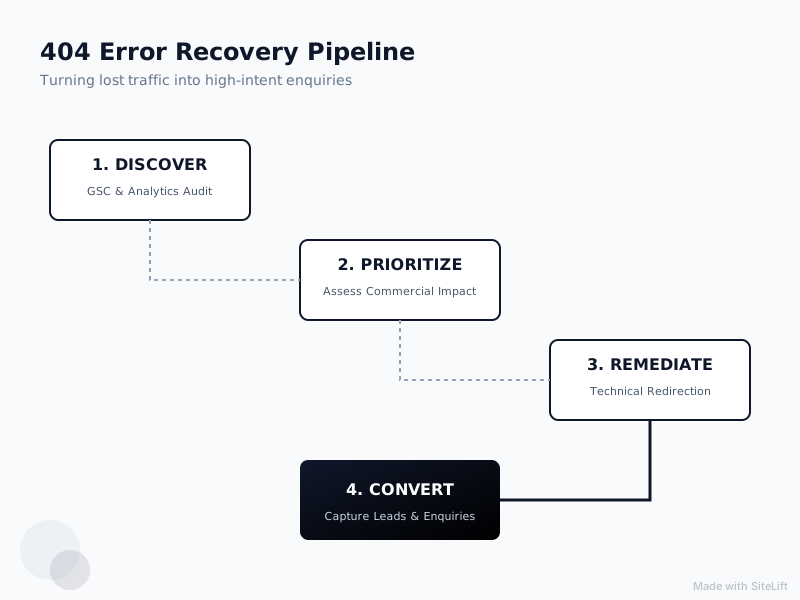
Infographic by SiteLift
| Priority Level | Category Criteria | Commercial Value | Action Required |
|---|---|---|---|
| P1 - Critical | Broken service pages, active ad landing pages, URLs with high referring domains | High revenue impact | Permanent 301 redirect mapped to nearest topical equivalent immediately |
| P2 - Medium | Legacy blog articles with moderate organic traffic or internal inlinks | Moderate authority impact | 301 redirect to relevant parent category or updated post |
| P3 - Low | Outdated press releases, discontinued legacy staff bios, zero backlinks | Negligible impact | Serve HTTP 410 Gone or leave as standard 404 |
| P4 - Ignore | Bot probes, non-existent CMS paths, spam queries | Zero impact | Leave as standard 404; monitor for volume spikes |
Categorising 404s: High-Value URLs vs. Low-Value Noise
Cross-reference your Screaming Frog crawl and GSC exports against historical analytics. Isolate any URL that received traffic over the previous 12 months or was historically associated with lead submissions. These are the leaks directly draining your funnel. Reviewing these drop-offs is a key part of resolving hidden funnel gaps draining service leads.
Mapping Backlink Equity to Preserve Authority
Run your exported 404 list through a backlink checker. Any URL retaining live inbound links from authoritative industry publications, news sites, or vendor partners must be earmarked for immediate preservation. Allowing external backlinks to terminate at a dead page discards valuable authority that should be passing to active commercial pages.
Step 3: Implement Proper Technical Fixes (How to Fix 404 Errors)
Once you have triaged your URL list, execute technical remediation. Understanding how to fix 404 errors correctly prevents downstream crawling errors and protects user experience.
Executing Surgical 301 Redirects to Relevant Alternatives
A 301 redirect is a permanent status code instructing browsers and search engine crawlers that an asset has moved permanently to a new location. It passes the vast majority of link equity to the destination URL.
Redirect Best Practice:
Broken: /services/b2b-lead-generation-2022/
Target: /services/b2b-lead-generation/           <-- MATCH (Topically Aligned)
Avoid:  /                                       <-- MISMATCH (Homepage Catch-All)
Rules for implementing 301 redirects:
- Never redirect all broken URLs to the homepage. Google classifies bulk homepage redirects as soft 404s, negating link equity and disorienting human visitors.
- Match topical intent directly. If
/services/cloud-migration/is deleted, redirect it to/services/infrastructure-consulting/, not to an unrelated article about company culture. - Keep redirect chains singular. Ensure URL A redirects directly to URL B. Avoid chains where URL A points to B, which then redirects to C.
Correcting Internal Broken Hyperlinks at the Source
Redirects are a safety net, not an architectural substitute for clean code. Relying entirely on 301 redirects for internal navigation introduces unnecessary server latency.
- Take the Inlinks export from Screaming Frog.
- Open your CMS backend.
- Locate the source pages housing the broken hyperlinks.
- Manually update the anchor links to point directly to the new, live destination.
- Clear page and edge caches to ensure visitors and crawlers receive the clean URL structure.
When to Keep a Legitimate 410 Gone Status
Not every deleted page warrants a redirect. If you retired a discontinued service that has no direct modern equivalent, receives zero inbound organic visits, and holds no valuable external backlinks, serving an HTTP 410 Gone header is often the cleanest choice.
A 410 status tells search engines that the page was intentionally removed and will never return. Googlebot processes 410 headers faster than standard 404s, removing dead URLs from the search index more efficiently.
Step 4: Design a High-Converting Custom 404 Page for Service Businesses
No matter how pristine your redirect mapping is, typos and broken third-party links will still occur. When a visitor lands on an unmapped broken URL, your 404 page template must function as a high-converting safety net rather than an apology.
404 Page Best Practices for Services
Standard 404 templates provided by basic website themes are bare and impersonal. Implementing 404 page best practices for services involves designing an intentional, conversion-focused layout that reassures visitors:
- Human, Plain-English Messaging: Avoid jargon. State clearly: "The resource you are looking for has been updated or moved."
- Persistent Primary Navigation: Retain your global header and footer so visitors can navigate elsewhere with one click.
- Search Functionality: Include a search bar with auto-suggestions to help prospects locate related case studies or services.
- Featured Alternatives: Display links to your three most popular service pillars or high-converting client case studies.
Integrating Interactive Lead Capture and AI Assistants
Why make a stranded visitor hunt for answers? Deploying an intelligent conversational assistant directly on your 404 error template bridges the gap between frustration and engagement.
An AI-powered conversational assistant can actively engage visitors with contextual prompts:
"Looking for a specific service or case study? Tell me what you need, and I'll direct you to the right team member."
For service businesses operating internationally across multiple time zones, this turns dead traffic into qualified enquiries after hours. While your human team is asleep, an integrated AI assistant can qualify intent, collect project requirements, and schedule discovery calls directly from the error page.
Step 5: Set Up Automated 404 Error Monitoring and Alerting
Resolving broken links is an ongoing operational standard, not a one-time project. New content launches, CMS plugin updates, and menu restructuring can introduce new errors overnight.
Configuring Real-Time Uptime and Link Monitoring
Deploy passive 404 error monitoring tools to notify your engineering or marketing teams before broken links impact pipeline:
- Set Up Google Analytics Alerts: Create a custom alert in GA4 triggered when pageviews for your custom 404 page title increase by more than 20% week-over-week.
- Install CMS Broken Link Listeners: If using WordPress or Webflow, leverage monitoring plugins or webhooks that log every 404 request to an internal dashboard.
- Configure CDN-Level Logging: Use edge log analyzers (e.g., Cloudflare Logpush) to monitor 4xx spikes across global server endpoints in real time.
Scheduling Recurring Crawls to Catch Regressions
Establish a monthly automated audit schedule using Screaming Frog or cloud-based crawling tools. Run a recurring crawl on the first Monday of every month, comparing the findings against the previous crawl to catch regressions before they linger.
Pro Tip: Always schedule a full-site crawl immediately following any core CMS update, site migration, or redesign. The majority of catastrophic broken link spikes occur during site launches when legacy URL taxonomies are overlooked.
Troubleshooting Common 404 Errors and Redirect Pitfalls
When managing site health, simple oversights can compromise search indexation and user trust. Here is how to navigate common pitfalls:
The Danger of Blanket Redirecting All 404s to the Homepage
Many webmasters set up automated wildcards directing any 404 error straight to the homepage. This is bad practice for two reasons:
- Soft 404 Penalisation: Google's search algorithms recognize when an error page redirects to a homepage without resolving the user's topical request. They will flag these as Soft 404s, refusing to pass any accumulated backlink authority.
- User Disorientation: When a visitor clicks a link for an executive pricing guide and abruptly lands on an uncontextualized homepage, they assume the site is broken and leave.
Resolving Infinite Redirect Loops and Soft 404 Warnings
A redirect loop occurs when URL A redirects to URL B, but URL B redirects back to URL A (or through an intermediary path). Browsers will throw an ERR_TOO_MANY_REDIRECTS error, rendering the site inaccessible.
- The Fix: Inspect your server redirect rules. Ensure rules do not have conflicting regex patterns or duplicate definitions across both your CMS database and your server configuration files (
.htaccess/Nginx). - Soft 404 Resolution: If GSC flags a page as a Soft 404, verify whether the page displays substantive, helpful content. If the page is legitimately empty or out of stock, configure the server to return a genuine 404 or 410 header rather than a 200 OK.
Expected Outcomes: Reclaimed Authority and Recovered Leads
Addressing technical debt on your website delivers measurable operational and commercial returns. Within 30 to 60 days of resolving broken links and rolling out an optimized error-handling funnel, you should expect:
- Improved Crawl Efficiency: A clean internal link architecture allows search bots to discover and index your commercial service pages faster.
- Preserved Domain Authority: Reclaimed external backlink equity boosts the search visibility of target landing pages.
- Higher Inquiry Capture Rates: Converting error pages into interactive conversion funnels captures leads that would otherwise bounce.
At growth-kings.com, we focus on turning website visits into qualified, high-value inquiries. Rather than prescribing expensive, unnecessary full-site rebuilds, our approach centers on eliminating conversion bottlenecks, optimizing your site architecture for search visibility and trust, and deploying intelligent conversational assistants that capture leads around the clock.
If you suspect technical errors and silent drop-offs are leaking prospective clients from your pipeline, systematically auditing your endpoints is one of the highest-ROI improvements you can make this quarter.
— growth-kings.com
FAQ: Managing 404 Errors and Preserving Leads
Do 404 errors directly penalise my website's Google rankings?
No, 404 errors on missing or obsolete URLs will not cause Google to issue a sitewide algorithmic or manual ranking penalty. Google views 404s as a natural byproduct of web evolution. However, if broken internal links prevent search engine bots from navigating your pages, or if valuable external backlinks lead to dead URLs, your crawl efficiency and organic visibility will suffer indirectly.
Should I redirect every 404 error straight to my homepage?
No. Blanket-redirecting all 404 errors to your homepage creates poor user experiences and triggers "Soft 404" classifications in Google Search Console. Google treats irrelevant homepage redirects as non-indexed errors, which neutralizes any equity the link originally held. Always redirect broken URLs to the closest topical equivalent, or serve an informative custom 404 page if no direct alternative exists.
What is the difference between a hard 404 error and a soft 404 error?
A hard 404 occurs when a server returns an explicit 404 Not Found (or 410 Gone) HTTP status response header to the visiting browser or crawler. A soft 404 occurs when a page returns a successful 200 OK status code, but the visible content consists of a missing-item warning, a blank template, or an irrelevant redirect. Search engines flag soft 404s because they waste crawling resources on empty pages masquerading as valid content.
How does a custom 404 page generate enquiries for a service company?
A strategic custom 404 page acknowledges the missing URL while guiding visitors toward relevant solutions. By adding clear navigation links, case study showcases, and an interactive AI conversational assistant, you provide an immediate next step for high-intent visitors. This captures prospects who would otherwise abandon the page and contact a competitor.
How often should a business run an audit to find broken links?
Established service businesses should review their Google Search Console Indexing reports weekly and execute a full automated site crawl using Screaming Frog at least once a month. Additionally, always conduct an immediate broken-link audit following any site redesign, CMS migration, URL taxonomy update, or major content purge.
Want this working on your own site?
Tell us what’s working, what’s stuck and what you want to improve. We will reply personally.