AI Sales Assistant for Service Businesses: Capture, Qualify and Book Enquiries 24/7
Deploy an AI sales assistant for your service business. Capture after-hours enquiries, qualify leads, and book consultations directly into your calendar 24/7.
By Growth Kings. Published , updated . 17 min read.

AI Sales Assistant for Service Businesses: Capture, Qualify and Book Enquiries 24/7
If your service business relies on web forms and manual callback lists, you are losing high-value clients to faster competitors every single week. Implementing an ai sales assistant transforms your website from a passive digital brochure into an active revenue engine that engages visitors, vets project scopes, and books consultations around the clock.
Most service firms—from commercial contractors and legal consultancies to specialized agencies—suffer from the same operational bottleneck: prospects browse after business hours, submit a generic enquiry form, and wait days for a response. By the time someone reaches out, that lead has already hired another firm.
Here is how modern conversational AI bridges that gap, keeps your pipeline full, and frees your team from administrative phone tag.
What Is an AI Sales Assistant (and How Does It Differ from Traditional Chatbots)?
An ai sales assistant is an autonomous, conversational agent engineered to engage website visitors, understand nuanced service requests, qualify project intent against strict business criteria, and take decisive actions such as booking calls or updating CRM records.
Unlike customer support tools designed solely to deflect support tickets, a sales assistant operates with commercial intent: its primary metric of success is generating pipeline revenue.
Conversational Intelligence vs. Rigid Rule-Based Chatbots
We have all encountered legacy rule-based chatbots. They present users with clunky, nested decision trees ("Click 1 for Pricing, Click 2 for Locations") and inevitably deliver a frustrating "Sorry, I don't understand that" the moment someone types an unscripted question.
Modern conversational AI systems leverage Large Language Models (LLMs) trained specifically on your service offerings, case studies, and qualification guidelines. They understand natural, messy human dialogue:
- Context retention: If a prospect says, "We need a commercial fit-out for a 400-sqm office, but we haven't secured council approval yet," the assistant tracks both project scale and regulatory roadblocks throughout the dialogue.
- Semantic comprehension: It detects subtle buying signals, urgency, and underlying scope without forcing the prospect to navigate a rigid menu.
- Autonomous task execution: Instead of just spitting out pre-written answers, it verifies calendar availability, cross-references location limits, and logs enriched data directly into your sales pipeline.
For a deeper breakdown of system features, review this buyer's checklist for selecting an enquiry assistant before investing in software.
The Death of Static Web Forms for High-Value Services
Static contact forms are where high-intent service leads go to die. Asking a busy executive or property manager to fill out eight fields—only to receive an automated "Thanks, someone will get back to you within 48 business hours"—creates unnecessary friction.
High-value clients expect immediate validation. When an enterprise prospect reaches out, they want to know whether your firm handles their specific industry, what typical engagement timeframes look like, and when they can speak with a senior specialist. An interactive dialogue captures this information organically while answering the prospect's immediate questions in real time.
How Modern AI Understands Context, Intent, and Qualification Criteria
A properly configured assistant does not merely dump every visitor into your calendar. It applies conversational qualification parameters tailored to your firm's commercial requirements:
Website Visitor: "Hi, do you offer emergency HVAC repairs for industrial cold storage units?"
AI Sales Assistant: "Yes, we handle industrial cold-storage systems across the Greater Metro area. Are you currently experiencing a complete system failure, or is this for scheduled preventative maintenance?"
Visitor: "Complete failure at our warehouse. We have product at risk."
AI Sales Assistant: "Understood—that qualifies for our priority emergency dispatch. What is your site address and direct phone number so our on-call engineering lead can ring you within 15 minutes?"
The system recognizes intent, validates the operational match, identifies urgency, and routes the lead according to internal protocols—all in seconds.
Why Service Businesses Need an After-Hours AI Sales Agent to Protect Revenue
Most commercial and professional service enquiries do not happen when your front desk is staffed. Business owners, facility managers, and corporate buyers spend their working days handling internal fires; they sit down to source new vendors, compare agencies, and submit proposals during evenings and weekends.
Deploying an after-hours ai sales agent ensures your firm never goes dark when your target market is actively looking to buy.
Capitalising on the 5-Minute Lead Response Window
Speed to lead is the single most decisive factor in winning service contracts. According to landmark research published in the Harvard Business Review study The Short Life of Online Sales Leads, companies that contact potential leads within an hour are nearly 7 times more likely to qualify the lead than those who wait even an hour longer.
Data compiled in the Lead Response Management Study by InsideSales reveals an even starker reality: responding to a web enquiry within 5 minutes makes a sales team 21 times more likely to enter the sales cycle compared to waiting 30 minutes.
Every minute a web lead sits untouched in an inbox, buyer intent decays. An after-hours agent collapses your response latency from hours down to zero seconds, locking in buyer attention before they tab over to your competitors.

Capturing After-Hours Enquiries When Competitors Are Offline
When an urgent requirement strikes at 8:30 PM on a Thursday, the prospective client searches Google, opens three or four service providers in separate browser tabs, and checks their offerings.
- Firm A has an outdated form promising a response in two business days.
- Firm B displays an office phone number that redirects to an unmanned voicemail.
- Your Firm features an intelligent conversational assistant that greets them immediately, confirms your capabilities for their project, and books a discovery call directly onto your calendar for 9:00 AM the next morning.
Your competitors might provide an identical quality of service on the job site, but you win the contract simply because your firm was accessible when the client needed answers. For businesses evaluating this setup, learn more about how to turn after-hours website traffic into pre-qualified enquiries without expanding headcount.
Preventing Phone-Tag and Lost Enquiries in Service Workflows
Manual follow-up workflows are inefficient and expensive. A prospect submits a request, your coordinator calls them back the next morning, hits voicemail, and leaves a message. The prospect calls back while your coordinator is on another line.
This administrative dance often drags on for days until the lead goes cold. An AI agent bypasses phone-tag entirely by securing direct calendar commitments while prospect intent is at its peak.
Pro Tip: Never configure your assistant to collect lead information without offering an immediate next step. If a lead meets your qualification criteria, always prompt them to pick a concrete meeting time or service window on the spot.
How an AI Lead Qualification Assistant Vets and Schedules Prospects
Not all inbound traffic is worth your time. If your senior consultants or estimators spend half their workweek talking to tire-kickers who lack budget or fall outside your geographic radius, your sales process is broken.
An ai lead qualification assistant acts as an objective, tireless gatekeeper that screens visitors against your Ideal Customer Profile (ICP).
Establishing Intelligent Qualification Guardrails and ICP Filters
To protect your sales team's calendar, you must define clear parameters for who gets access to your schedule. Effective qualification filters include:
- Geographic service areas: Ensuring the project site or business registration falls within your operational zone.
- Scope and capability match: Verifying that the prospect requires services you actually offer, rather than edge cases you refer out.
- Budget thresholds: Discreetly confirming that the client has realistic capital expectations before scheduling an estimator.
- Decision-making authority and timeline: Establishing whether the visitor is ready to engage or merely conducting preliminary market research.
Dynamic Information Gathering Without the Interrogation Vibe
No prospective client wants to face a cold, ten-question interrogation. Intelligent assistants use progressive profiling—gathering essential project parameters through a natural, reciprocal conversation.
| Stage | Bad Static Approach | Conversational AI Approach |
|---|---|---|
| Budget | Dropdown field: Select Budget Range (often skipped or falsified) | "To make sure we pair you with the right specialist, what ballpark investment are you planning for this renovation?" |
| Timeline | Required radio button: Immediately / 1-3 Months / Later | "When are you hoping to have the new system fully commissioned and operational?" |
| Location | Open text field: Full Street Address | "Which commercial district or facility is this installation for?" |
By providing helpful context before asking for specifics, the assistant builds trust and achieves significantly higher completion rates than traditional forms.
Frictionless Calendar Integration and Appointment Booking
Once a visitor passes your qualification thresholds, the assistant should guide them directly into your workflow.
By integrating with platforms like Google Calendar, Microsoft Outlook, HubSpot Meetings, or Calendly, the assistant checks live availability and presents convenient booking slots directly inside the chat interface. It captures the prospect's email and phone number, sends calendar invites with video conference or phone details, and writes the entire chat transcript to your pipeline.
To see how to configure these integrations from start to finish, read our complete guide on AI appointment booking bot setup for service firms.
Solving the Follow-Up Bottleneck: Using an AI Assistant for Quote Follow-Up
The sales cycle in high-ticket service industries rarely closes on the initial call. It stalls after the proposal goes out.
Estimators and account managers spend hours building custom estimates, email them to prospects, and then get sucked back into daily operations. An ai assistant for quote follow-up eliminates this pipeline leakage by automating thoughtful, personalized post-quote nurturing.
Automated Multi-Touch Cadences Across Email and SMS
Research from the official Salesforce State of Sales Report shows that sales teams spend less than a third of their time actually selling, with administrative tasks and manual follow-ups consuming the bulk of their workweek.
When you connect conversational AI to your CRM, you can trigger automated, multi-channel check-ins based on proposal milestones:
- Day 2 post-quote: A brief SMS confirming receipt and asking if the technical specifications matched expectations.
- Day 5 post-quote: An email offering to clarify scope details or adjust project phases to meet specific budget targets.
- Day 10 post-quote: A direct prompt checking whether stakeholder review has concluded or if an executive briefing is needed.
Proactively Handling Objections and Answering Scope Queries
Unlike traditional email drip sequences that blast one-way marketing copy, an AI assistant invites dynamic responses. If a prospect replies, "The quote looks higher than anticipated for Phase 2," the assistant does not let the message sit in an unmonitored inbox.
It reads the reply, references the original proposal data, and responds intelligently:
"Thanks for raising that, David. Phase 2 includes full structural certification and council permits, which often accounts for that variance. Would you like our senior estimator to review an option that unbundles the permit administration so you can handle that internally?"
This rapid, constructive objection handling preserves deal momentum and keeps negotiations moving forward without manual intervention.
Reactivating Stalled Deals and Cold Enquiries Automatically
Every service firm sits on a goldmine of dead pipeline—proposals delivered six months ago that went dark due to timing or lost momentum. Generative AI allows you to systematically re-engage this archive.
The system can scan dormant CRM deals and generate personalized, contextual re-activation messages: "Hi Sarah, we spoke back in October regarding your commercial fleet maintenance. With the new financial year approaching, are you still planning to review vendor agreements for Q3?" This strategy routinely recovers high-margin contracts without spending an additional dollar on paid advertising.
Step-by-Step Implementation: Deploying an AI Enquiry Assistant for Services
Deploying an ai enquiry assistant for services does not require a risky, multi-month website overhaul. It can be integrated into your existing web architecture as an agile, high-impact layer.
+-----------------------------------------------------------+
| 1. AUDIT HISTORIC CONVERSIONS & KNOWLEDGE BASES           |
|    Map FAQs, scope parameters, pricing logic, & red flags |
+-----------------------------+-----------------------------+
                              |
                              v
+-----------------------------------------------------------+
| 2. CONNECT PIPELINE & CALENDAR INFRASTRUCTURE             |
|    Integrate CRM (HubSpot/Salesforce), calendars, & SMS   |
+-----------------------------+-----------------------------+
                              |
                              v
+-----------------------------------------------------------+
| 3. ESTABLISH BRAND GUARDRAILS & HUMAN HANDOFF             |
|    Set strict scope limits, tone rules, & escalation paths|
+-----------------------------------------------------------+
1. Auditing Common Customer Queries and Historic Friction Points
Before configuring your assistant, gather your operational knowledge assets:
- Your service rate card or pricing parameters: General ballpark ranges, project minimums, and engagement structures.
- Top 20 pre-sales questions: Historic queries your sales team answers repeatedly regarding timelines, guarantees, licensing, and insurance.
- Disqualification criteria: Clear boundaries detailing jobs you do not take (e.g., residential work if you are purely B2B, or projects under a specific revenue floor).
2. Integrating with Your CRM, Dispatch, and Communication Stack
Your conversational assistant must communicate bi-directionally with your single source of truth.
- CRM Synchronization: Connect the assistant to your CRM (such as HubSpot, Salesforce, or industry-specific field management software) so new leads, qualified tags, and complete conversation transcripts map cleanly to contact records.
- Instant Dispatch Notifications: Configure immediate Slack, Microsoft Teams, or SMS alerts for internal staff when an ultra-high-value lead or emergency enquiry is identified.
3. Setting Guardrails, Tone of Voice, and Human Handoff Protocols
Brand safety is non-negotiable. An enterprise service firm cannot afford a tool that hallucinates non-existent capabilities or misquotes legally binding rates.
- Set strict knowledge bounds: Instruct the AI to pull answers exclusively from your verified documentation. If an inquiry falls outside its knowledge base, the system should candidly state: "I want to ensure you get precise technical details on that. Let me grab your email so our senior engineering director can review the specifications and reply directly."
- Tone calibration: Match your industry expectations. A commercial litigation firm requires an authoritative, discreet, and polished demeanor; a boutique creative consultancy might opt for an approachable, upbeat tone.
- Emergency escalation paths: Provide instant human routing for urgent operational issues or accounts that demand white-glove treatment.
Pro Tip: Once your assistant is live, schedule regular performance reviews to inspect unanswered questions, update service documentation, and refine prompt guardrails.
Measuring the ROI of an AI Sales Assistant: Key Metrics to Track
According to predictions published in the Gartner Report on Generative AI Use Cases in Sales, by 2026, 30% of outbound marketing and sales messages from large organizations will be synthetically generated by conversational and generative AI systems. To ensure your deployment drives real financial returns, monitor three core commercial metrics.
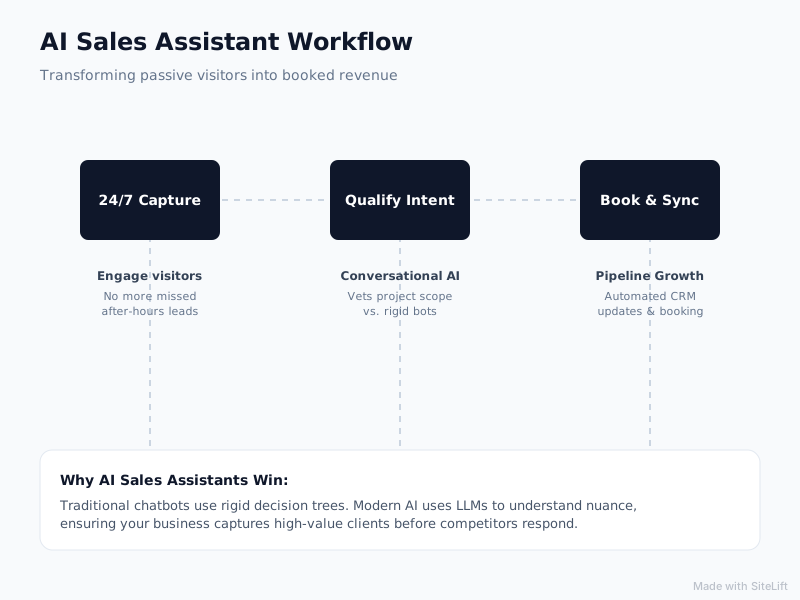
Infographic by SiteLift
Speed-to-Lead and Visitor-to-Enquiry Conversion Rates
Track the percentage of unique website visitors who engage with the conversational interface versus those who historically filled out a static form. Service firms typically experience an immediate lift in total captured leads within the first 30 days of implementation, primarily driven by after-hours engagement.
Monitor your average response time—which should drop from several hours down to under 10 seconds across all digital touchpoints.
Cost per Qualified Lead (CPQL) vs. Extra Sales Headcount
Calculate your true acquisition expenses. Hiring full-time, round-the-clock Sales Development Representatives (SDRs) or after-hours call center dispatchers introduces massive payroll overhead, management drag, and variable quality.
A conversational AI assistant operates 24/7/365 at a tiny fraction of the cost of a single full-time employee. By dividing your total conversational software investment by the number of vetted, sales-ready meetings booked, you will establish a baseline CPQL that demonstrates clear operational efficiency.
Shortening Sales Cycles and Increasing Pipeline Velocity
Pipeline velocity measures how quickly a lead moves from initial contact to a paid invoice. By vetting project scope instantly, securing calendar commitments on the first visit, and automating quote follow-up sequences, your average sales cycle can shrink significantly. Shorter deal cycles free up your technical team to focus on project delivery rather than chasing signatures.
Key Takeaways: Deploying AI in Your Sales Pipeline
| Strategic Dimension | Traditional Web Form Workflow | Modern AI Sales Assistant Workflow |
|---|---|---|
| Response Latency | 4 to 24+ business hours | Instant (Under 10 seconds), 24/7/365 |
| Lead Qualification | Manual inspection of form fields by sales reps | Autonomous conversational vetting against custom ICP filters |
| Appointment Booking | 3-5 rounds of manual phone-tag or email back-and-forth | Direct, frictionless self-scheduling within chat dialogue |
| After-Hours Conversion | Low; visitors bounce to active competitors | High; captures high-intent traffic during peak research windows |
| Post-Quote Follow-Up | Irregular manual check-ins; deals easily stall | Structured, multi-touch automated follow-up cadences |
| CRM Integration | Often delayed or requiring manual data entry | Real-time bi-directional sync with enriched lead transcripts |
Editorial Opinion: Why Pragmatic AI Upgrades Beat Costly Website Redesigns
When service businesses suffer from declining inbound leads, their default impulse is to call a creative agency and spend $25,000 to $50,000 on a complete website redesign.
Six months and dozens of design committee meetings later, they launch a slick new site—only to discover that their conversion rates remain essentially unchanged.
The problem is rarely the typography, the brand palette, or the hero photography. The problem is friction. Prospective buyers do not need more visual flair; they need immediate answers, clarity on pricing and capabilities, and a straightforward way to book time with an expert.
Pouring marketing budget into a full rebuild when your lead capture mechanism is broken is like installing a high-performance engine in a car that has square wheels.
Implementing an intelligent sales assistant addresses the exact point of failure without disrupting your existing web infrastructure. It meets buyers where they are, respects their time, and turns your current web traffic into profitable commercial relationships. Stop redesigning pages that visitors barely read and start answering the enquiries they are actively trying to make.
— growth-kings.com
Scale Your Service Pipeline with Growth Kings
If your service business is generating web traffic that fails to convert into booked consultations, you do not need an expensive digital rebrand. You need practical, high-impact conversion infrastructure.
At growth-kings.com, we help established service providers implement bespoke AI sales assistants that capture after-hours leads, filter out unqualified enquiries, and book appointments directly into your calendar. We specialize in non-disruptive website optimization, enhancing clarity, trust, and responsiveness so you extract maximum revenue from the traffic you already have.
Schedule a consultation with our digital growth team to see how a custom conversational assistant can protect your pipeline around the clock.
Frequently Asked Questions About AI Sales Assistants
Will an AI sales assistant sound robotic or alienate high-value clients?
Modern conversational AI assistants utilize advanced language models configured to match your brand's natural tone of voice. When trained specifically on your service offerings, case studies, and industry terminology, the assistant delivers articulate, polished, and context-aware responses. It operates with the professional demeanor of a knowledgeable front-office coordinator, ensuring premium clients receive immediate and accurate attention.
How does an AI lead qualification assistant integrate with our existing CRM and calendar?
The assistant connects natively or through API webhooks to standard commercial CRMs (such as HubSpot, Salesforce, Zoho, and Pipedrive) and calendar scheduling tools (such as Google Calendar, Microsoft Outlook, and Calendly). When an enquiry is qualified, the assistant creates or updates the contact record, attaches the full conversation transcript, maps custom property fields, and books the consultation directly into your team's schedule.
What happens when a prospect asks a complex or off-script question?
Brand-safe AI assistants operate under strict knowledge parameters. If a prospect asks an overly complex, legal, or unverified question that falls outside the system's training data, the assistant executes a graceful human handoff. It explains that the inquiry requires a specialist's eye, collects the user's preferred contact details, and routes an urgent alert along with the chat context to your senior team.
How much setup time is required before the AI enquiry assistant can go live?
A standard implementation typically takes between one and two weeks. This window includes auditing your historic FAQs and service documentation, building custom qualification logic, integrating your calendar and CRM, establishing brand guardrails, and conducting rigorous quality assurance testing before publishing the assistant to your live website.
Can the AI assistant handle post-quote follow-up and contract check-ins automatically?
Yes. By linking your assistant to your CRM deal stages, you can automate multi-touch follow-up cadences via SMS and email once an estimate or proposal is sent. The assistant proactively checks in, answers scope clarifications, addresses basic pricing objections, and alerts your sales representatives the moment a prospect shows buying signals or requests contract adjustments.
Want this working on your own site?
Tell us what’s working, what’s stuck and what you want to improve. We will reply personally.