AI Appointment Booking Bot Setup: From After-Hours Chat to Filled Calendar
Learn how to complete an AI appointment booking bot setup. Screen after-hours leads, sync your calendar, and automate bookings for your service business.
By Growth Kings. Published . 18 min read.

AI Appointment Booking Bot Setup: From After-Hours Chat to Filled Calendar
Your highest-intent prospects rarely browse your website between 9:00 AM and 5:00 PM. They visit at 8:45 PM after putting their kids to bed, or on a Sunday morning while reviewing operational bottlenecks. If they hit a generic "Contact Us" form that promises a reply in 24 to 48 hours, they bounce straight to your competitor.
Completing an ai appointment booking bot setup bridges that revenue leak. Instead of letting late-night traffic cool off, an intelligent conversational agent screens visitors, verifies project fit, and places confirmed meetings straight onto your team’s schedule.
According to Harvard Business Review, firms that contact potential customers within an hour of receiving an inquiry are nearly 7 times more likely to have meaningful conversations with key decision-makers than those who wait even an hour longer. When your office is closed, automated scheduling is the only mechanism that reliably beats that clock.
Here is your complete blueprint to build, integrate, and launch an after-hours booking assistant that protects your calendar from junk leads and fills your pipeline with ready-to-buy clients.
Why an AI Appointment Booking Bot Setup Matters for After-Hours Inquiries
Most service websites treat after-hours visitors like second-class citizens. You leave a static form, ask for an email address, and cross your fingers. But modern buyer psychology has shifted: immediacy is no longer a perk; it is the baseline expectation.
The Cost of Delayed Responses in Service Businesses
When a high-value prospect has an acute problem, their motivation peaks while they are actively searching your site. If they submit a contact form at night, their momentum stalls. By the time your sales representative reviews the ticket at 10:00 AM the next morning, the prospect has already spoken to a competitor or postponed the initiative entirely.
A study by Drift revealed that over 50% of consumers expect an immediate response when engaging via conversational messaging platforms, particularly during non-business hours. When your site goes silent after hours, your acquisition costs climb because your conversion window snaps shut the moment the visitor closes their browser tab.
How Automated Appointment Scheduling Captures High-Intent Prospects
Deploying an ai booking assistant for service business growth fundamentally changes this dynamic. Rather than acting as a passive lead inbox, the assistant engages visitors dynamically.
Research published by Gartner indicates that conversational AI deployments reduce customer response times and drive automated self-service resolutions in up to 30% of standard customer interactions.
By applying automated appointment scheduling directly inside conversational workflows, your business secures direct calendar commitments while intent is highest. The prospect answers three or four targeted questions, picks an available slot, receives an invite, and goes to sleep knowing their problem is scheduled for a solution.
Prerequisites: What You Need Before Setting Up Your AI Booking Bot
Before touching any software, you need clear operational rules. An AI bot without strict parameters will gladly schedule meetings during your lunch break, double-book team members across conflicting projects, or fill your week with tyre-kickers who lack the budget to hire you.
AI Booking Bot Setup Stack
├── Primary Calendar: Google Workspace or Microsoft Outlook
├── Scheduling Engine: Native AI calendar tool or Cal.com / Calendly
├── Automation / Middleware: Zapier or Make
├── CRM: HubSpot, ActiveCampaign, or Pipedrive
└── Conversational Interface: AI Web Chat Widget
1. Tools and Technical Access
- Calendar System: Administrator access to your primary team calendars via Google Workspace or Microsoft 365.
- Scheduling Engine or Native API: Accounts with an API-ready booking engine (e.g., Cal.com, Calendly) or an integrated conversational AI platform that connects directly via OAuth.
- CRM Platform: Access to tools like HubSpot or your existing database to map incoming contact fields.
- Integration Middleware: An active account on Zapier or Make to route webhooks and trigger notifications.
- Website CMS Access: Administrative access to insert chat scripts into your site's header or tag manager (e.g., WordPress, Webflow, Shopify).
2. Operational Rules & Buffer Times
- Meeting Durations: Exact call lengths (e.g., 20-minute discovery call, 45-minute technical audit).
- Buffer Windows: Strict rules preventing back-to-back bookings (e.g., 15 minutes before and after every meeting).
- Notice Period: Minimum advance notice (e.g., no bookings within 12 hours) so your team never wakes up to a meeting starting in 15 minutes.
- Availability Windows: Clear weekly booking windows dedicated exclusively to inbound discovery calls.
3. Lead Qualification Thresholds
Identify your non-negotiables before configuring conversation flows. For established service businesses, this typically includes:
- Minimum project budget or annual company revenue.
- Geographic service area (or target country).
- Specific service category (filtering out requests for services you do not provide).
- Timeline for project kickoff.

Step 1: Define Conversation Flows and Screening Criteria
The fatal mistake most agencies make is treating an AI assistant like an open booking link. If your bot offers a calendar link to every person who says "hello," your calendar will be quickly overwhelmed by vendors pitching software, students doing research, and low-budget inquiries.
The goal of this step is to build an intelligent filter that qualifies prospects before revealing open time slots.
Visitor Enters Chat (After-Hours)
              │
              ▼
   Transparent AI Greeting
              │
              ▼
   Identify Core Need / Service
              │
   Does inquiry match services?
         ├── No  ──► Polite Redirection / FAQ
         └── Yes ──► Ask Budget & Timeline
                           │
             Meets qualification threshold?
                   ├── No  ──► Route to Resource / Contact Form
                   └── Yes ──► Trigger Step 2: Present Live Calendar Slots
Crafting Natural Greeting Prompts for After-Hours Visitors
Never pretend your AI is a human named "Sarah" sitting in an office at 2:00 AM. Modern buyers appreciate transparency and speed. Build greetings that state the assistant's purpose and acknowledge the time of day.
- Sample After-Hours Greeting:
"Hi there! Our office is currently closed, but I am our 24/7 booking assistant. I can answer questions about our services or help you schedule a 20-minute strategy call with our team for later this week. What brings you by tonight?"
This prompt sets expectations immediately. It communicates that the bot has authority to book time, while acknowledging human staff are offline.
Setting Up Disqualification Pathways to Protect Your Calendar
To protect your team's time, your bot must ask between two and four gating questions before touching your calendar:
- Project Scope: "Which of our core services are you looking for help with?"
- Budget Fit: "To ensure we match you with the right specialist, what is your anticipated budget range for this project?"
- Timeline: "When are you aiming to have this work completed?"
If the visitor selects a budget below your minimum engagement threshold, trigger a graceful exit workflow:
- Disqualification Response:
"Thanks for sharing those details. Based on your current timeline and budget, our dedicated consulting packages might not be the most cost-effective fit right now. However, you can review our free implementation guides [here], or leave your email address and our team will send over our starter resources."
By implementing this logic, you build what we call an intelligent firewall around your calendar. For a deeper breakdown of conversation logic, review our guide on how AI chatbots qualify leads while you sleep.
Pro Tip: Never use open-ended text fields for budget questions in chat bots. Provide 3–4 clickable buttons with predefined ranges (e.g., "$3k–$5k", "$5k–$10k", "$10k+"). Button selectors increase mobile completion rates dramatically.
- Expected Result: An automated screening tree that filters out 60–80% of unqualified inquiries without human intervention.
- Mistake to Avoid: Asking for an email address before establishing fit. If you ask for personal data in the very first message, conversational drop-off rates spike.
Step 2: Configure Calendar Integration for AI Assistant
Once a lead is qualified, the assistant must pull live calendar availability directly into the chat interface. A clunky redirect to an external scheduling link breaks the conversational flow and causes drop-offs. The entire booking must happen natively inside the chat window.
Enabling Real-Time Two-Way Sync to Avoid Double Booking
A reliable calendar integration for ai assistant setups requires true two-way synchronization.
- Authorize Calendar Permissions: Connect your conversational engine to Google Calendar or Microsoft Outlook using secure OAuth 2.0 authentication.
- Select Target Calendars: Choose the specific calendar where new appointments should populate.
- Enable Conflict Checking: Ensure the integration checks across all relevant calendars (personal, administrative, and team schedules) to prevent double-booking. If your team has internal placeholder holds, your AI scheduler must recognize those as unavailable.
- Configure Round-Robin Distribution: If you have multiple sales consultants or account directors, configure round-robin logic based on availability, territory, or deal size.
Bot checks availability across:
[Primary Sales Calendar] + [Executive Sync Calendar] + [Personal Out-of-Office]
                            │
                            ▼
Determines true availability -> Displays 3 next-available dates in chat
Handling Time Zone Conversions and Meeting Buffers Automatically
Timezone discrepancies cause missed meetings and administrative confusion. If your prospect is in London and your team is in Sydney, manual scheduling errors are almost guaranteed.
Browser Detection: Ensure your booking bot automatically reads the prospect's browser timezone (e.g.,
Intl.DateTimeFormat().resolvedOptions().timeZone) and displays available slots in their local time.Timezone Confirmation: Include an explicit confirmation bubble: "I have these times available on Thursday in your local time (EDT). Does 2:30 PM EDT work for you?"
Hard Buffer Rules: Enforce minimum 15-minute buffers before and after every booked session. This protects your team from context-switching fatigue and ensures client meetings do not run into one another.
Expected Result: The visitor selects an appointment time from dynamically populated buttons, locking the slot in real time.
Mistake to Avoid: Failing to set maximum booking horizons. Never let an AI assistant book meetings further out than 10 to 14 days; show-up rates drop sharply when bookings are scheduled weeks in advance.
Step 3: Connect CRM and Automated Confirmation Sequences
Booking the appointment is only half the battle. If that appointment data lives isolated inside your chat tool, your sales team lacks context, and no-shows will plague your pipeline.
Pushing Qualified Contact Details into Your CRM
Use native integrations or middleware like Zapier to push all collected information into your CRM immediately after the visitor confirms a time slot.
Chat Completed -> Webhook Triggered -> Zapier / Make
                                          │
    ┌─────────────────────────────────────┴─────────────────────────────────────┐
    ▼                                                                           ▼
Update CRM Record (HubSpot)                                   Send Immediate Multi-Channel Confirmations
- Full Name, Work Email, Phone                                - Google Calendar / Outlook ICS Invite
- Budget & Project Scope                                      - Immediate SMS confirmation
- Full Transcript attached to Deal                            - Email with agenda & rescheduling link
Map these critical data properties:
- First & Last Name
- Work Email Address & Mobile Phone
- Selected Service Category
- Budget Range and Project Timeline
- Complete Conversation Transcript (stored as an internal note on the CRM contact card)
When your sales representative opens the contact record prior to the call, they have immediate access to the prospect's exact words, challenges, and objectives. If your team handles complex inquiries requiring personal attention during office hours, make sure your setup integrates with an AI chat human handoff protocol.
Automating Instant Calendar Invites, Email, and SMS Reminders
Service industry no-show rates can climb as high as 25–30% without proactive communication. An automated multi-channel sequence brings that rate down below 10%.
Immediate (Minute 0): Send a calendar invite (.ics) via Google Calendar or Outlook with video conference credentials (Zoom or Google Meet) automatically generated.
24 Hours Prior: Trigger an automated email confirming the agenda and providing an easy "Reschedule" link so prospects can change their slot without ghosting you.
1 Hour Prior: Send a concise SMS reminder: "Hi [Name], look forward to our call in 60 mins. Here is your direct link: [Meeting URL]. Reply RESCHEDULE if your plans changed."
Expected Result: A synced CRM record containing complete lead intelligence, paired with an automated multi-step reminder cadence.
Mistake to Avoid: Failing to include dynamic video conference links in the initial calendar invite. Forcing prospects to search their inbox for a separate meeting link moments before the call increases no-shows.
Step 4: Embed, Test, and Optimize the Assistant on Your Site
Where and how your AI booking assistant appears determines whether visitors interact with it or close it as visual noise.
Deploying Conditional Triggers Based on Visitor Behavior
Do not assault every visitor with a chat pop-up the second they land on your homepage. Bombarding visitors immediately drives high bounce rates and degrades your site's user experience. Instead, use behavioral triggers:
| Target Page Type | Trigger Condition | Bot Prompt Strategy |
|---|---|---|
| Pricing / Packages Page | 15 seconds dwell time OR 50% scroll depth | "Reviewing our tiers? I can help clarify pricing or check our team's calendar for a quick consultation." |
| Core Service Landing Pages | Exit intent (mouse moves toward address bar on desktop) | "Have questions about our implementation timeline? Schedule a quick call before you head out." |
| Contact Page | Immediate (3-second delay) | "Skip the waiting game. Pick an open time slot on our calendar right now." |
| General Blog Posts | 45 seconds dwell time | Inactive / Subtle floating launcher icon only |
Simulating Edge Cases and Edge-Question Escalation
Before putting the assistant in front of actual visitors, thoroughly test edge cases:
- The "Can I call you right now?" test: How does the assistant react when a visitor demands an immediate phone call at midnight? It should politely explain office hours and offer the next morning's first opening.
- The Unqualified Pushback: If a visitor refuses to state a budget or selects "Just curious," ensure the bot does not expose the scheduling calendar.
- The Conflicting Availability Test: Ask for times on weekends or bank holidays to confirm blackout rules function without error.
Pro Tip: Run at least 20 test conversations across desktop, iOS Safari, and Android Chrome. Over 60% of after-hours traffic occurs on mobile devices; if the date picker fails on small viewports, your conversion rate drops.
- Expected Result: A smoothly embedded widget that initiates conversations contextually based on user intent and gracefully handles conversational edge cases.
- Mistake to Avoid: Activating audio notifications for late-night chat triggers. Sudden ping noises on mobile devices late at night irritate users and increase immediate page exits.
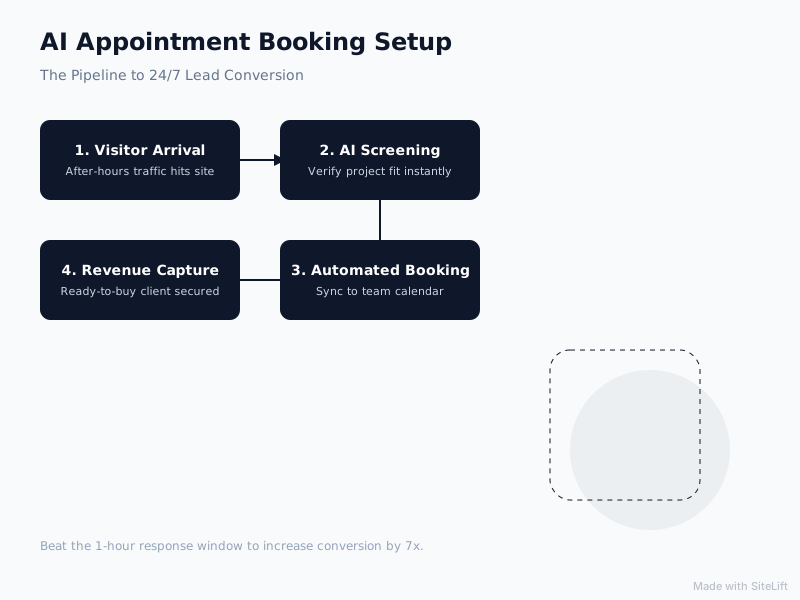
Infographic by SiteLift
Open Calendar vs. AI-Screened Booking Flow
Giving unqualified visitors direct access to your calendar is a recipe for operational chaos. Here is how an AI-screened booking flow compares to standard scheduling approaches:
| Feature / Metric | Direct Calendly/Cal.com Link | Traditional Web Form | AI-Screened Booking Assistant |
|---|---|---|---|
| Response Time | Instant | 12 to 48 Hours | Instant (< 3 seconds) |
| Lead Screening | Weak (easily bypassed forms) | Moderate (manual review required) | Strict (conversational logic branches) |
| After-Hours Conversion | Moderate | Very Low | High (captures peak intent) |
| Calendar Hygiene | Poor (cluttered with low-intent leads) | High (staff controls calendar) | High (only qualified leads get slots) |
| Context Extraction | Minimal (short form answers) | Moderate | Rich (full interactive transcript) |
| Friction Level | Low | High | Low to Moderate |
Troubleshooting Common Pitfalls in AI Appointment Booking Bot Setup
Even carefully configured setups can hit operational hitches. Address these common vulnerabilities during your implementation phase.
Preventing Calendar Spam and False Bookings
Automated bots crawl the web, identifying chat scripts and submitting false contact details to flood calendars. If malicious bots target your booking engine, your sales team loses valuable prospecting hours.
- Implement Hidden Honeypots: Ensure your form fields use conversational honeypot techniques that identify automated inputs.
- One-Time Passcode (OTP) or Email Verification: Require visitors to click a quick 4-digit code sent to their work email or SMS before the calendar slot locks into your system. This immediately weeds out fake email addresses (
asdf@gmail.com). - Domain Filtering: If you operate strictly B2B, configure the assistant to reject free email domains (Gmail, Yahoo, Hotmail) and request a corporate email address.
Handling Complex Queries Beyond the Bot's Scope
Large Language Models (LLMs) can occasionally hallucinate pricing, promise impossible deliverables, or give confusing answers when asked technical questions.
- Knowledge Guardrails: Explicitly instruct your system prompt: "Only answer questions based on the provided company documentation. If an answer cannot be verified with certainty, state that our senior engineers will cover that during the discovery call."
- Fallback Fallback Logic: When sentiment detection notes frustration, or if the user asks a question the bot fails to resolve twice, divert to an asynchronous contact ticket:
"I want to make sure you get an exact answer on that technical specification. Let me pass your question directly to our technical lead, and they will follow up via email first thing tomorrow morning."
Why Restricting Calendar Access Is Underrated
A prevalent misconception in modern marketing suggests removing all friction from the conversion process. Growth teams often recommend putting an open scheduling calendar on every page of your site.
In our experience working with established service providers, that advice often backfires.
Unfettered calendar access devalues your time. When any casual visitor can book 30 minutes of your time with zero vetting, you spend your working hours fielding sales pitches, speaking with prospects who cannot afford your fees, or dealing with no-shows.
Friction is not your enemy—irrelevant friction is. Asking a prospect to wait 24 hours for an email reply is irrelevant friction. But asking a prospect three pointed qualification questions in real time builds authority.
When your AI assistant professionally screens a lead before granting calendar availability, your perceived expertise increases. The prospect recognizes that your calendar is valuable, which directly leads to higher show-up rates and better discovery conversations.
— growth-kings.com
Expected Results: How to Measure Booking Bot ROI
Once your booking assistant goes live, run weekly performance reviews. Avoid focusing solely on vanity metrics like total messages sent; evaluate financial pipeline impact.
Total Chats Started
       │
       ▼
% Reaching Screening Step (Engagement Quality)
       │
       ▼
% Successfully Qualified (Target Market Fit)
       │
       ▼
% Completing Booking (Conversion Rate)
       │
       ▼
Actual Show-Up Rate (Calendar Integrity)
Key Metrics to Audit
- Chat Engagement Rate: The percentage of visitors on targeted pages who interact with the bot (benchmark: 3% to 7%).
- Qualification Rate: The proportion of engaged visitors who meet your budget and timeline thresholds (benchmark: 20% to 35%).
- Booking Completion Rate: The percentage of qualified leads who select a calendar slot (benchmark: 40% to 60%).
- Show-Up Ratio: Confirmed attendees divided by total booked appointments (target: >85%).
Refining Prompts Based on Drop-Off Analysis
Examine conversation logs once a week to spot where prospects abandon the chat.
- If users leave when the budget question appears, adjust the copy to explain why you are asking: "To ensure we don't waste your time and can pair you with the right specialist..."
- If users select a time but fail to confirm their contact info, simplify the final step by asking only for a name and work email.
Turn Your Website's Quiet Hours Into a Predictable Growth Channel
Setting up an intelligent appointment booking flow stops the silent revenue drain happening across your website every evening and weekend. By combining natural conversational prompts, strict lead qualification filters, real-time calendar syncing, and automated reminders, you transform passive midnight visits into confirmed sales appointments.
At growth-kings.com, we specialize in helping established service businesses turn website traffic into qualified enquiries without complex rebuilds or empty traffic gimmicks. If you want to deploy proven AI enquiry assistants with human handoff built specifically around your qualification criteria and sales processes, our team can help you design and deploy your custom system.
FAQ
How does an AI booking assistant prevent double-bookings across different team calendars?
The bot connects directly to your calendar engine via API (such as Google Calendar or Microsoft Outlook). Before presenting available time slots to a website visitor, the system cross-references all configured calendars in real time. If a team member schedules an internal meeting, blocks out an out-of-office period, or takes a call on another system, those slots are automatically excluded from the bot's availability list.
Can the AI appointment bot qualify leads before offering available time slots?
Yes, and for service businesses, it should always be configured this way. You can set conditional logic within the conversation design so that available time slots are only revealed after the prospect answers key qualification questions (such as budget, project scope, and timeline). If a prospect does not meet your minimum criteria, the bot can route them to self-service resources or an asynchronous contact form instead.
What happens if a prospect asks a question the AI assistant cannot answer?
When the assistant encounters an ambiguous question or a query not covered in its reference documentation, it triggers a fallback protocol. Rather than guessing or hallucinating answers, it acknowledges the limitation, collects the visitor's contact information, and logs the question as an internal task or email for your team to address manually during regular business hours.
Do I need coding experience to complete an AI appointment booking bot setup?
No. Modern conversational platforms and integration tools (like Zapier, Make, and native calendar APIs) allow you to configure conversation flows, lead qualification gates, and two-way calendar sync through no-code visual builders. The only technical step involves pasting a short JavaScript snippet into the <head> or tag manager of your website CMS.
How do automated appointment scheduling bots handle prospects in different time zones?
The booking assistant reads the visitor's local timezone automatically through their web browser. When displaying available consultation times, it converts your team's working hours into the visitor's local time zone in the chat window, preventing confusion and eliminating missed appointments caused by manual timezone calculations.
Want this working on your own site?
Tell us what’s working, what’s stuck and what you want to improve. We will reply personally.