AI Lead Capture Assistant Setup for Accountants: Never Miss Another Tax-Season Enquiry
Learn how to complete an AI lead capture assistant setup for accountants. Qualify after-hours leads, schedule clients, and streamline tax season traffic.
By Growth Kings. Published , updated . 13 min read.

AI Lead Capture Assistant Setup for Accountants: Never Miss Another Tax-Season Enquiry
During peak tax season, your accounting firm's website experiences a massive surge in traffic. Business owners searching for immediate filing assistance, high-net-worth individuals seeking wealth structuring, and personal filers looking for help visit your pages after normal business hours. If your lead capture relies solely on static contact forms, you are losing high-value clients to faster-responding competitors.
Executing a dedicated ai lead capture assistant setup for accountants bridges the gap between client interest and firm capacity. Instead of waking up to unvetted contact form submissions or missing late-night phone calls, an automated assistant screens visitors, answers operational questions, and routes qualified leads directly to your calendar.
In this step-by-step guide, I will walk you through setting up an accountant appointment booking bot and conversational assistant designed specifically for peak tax-season workflows.
What You Need Before Beginning
Before diving into the technical setup, gather these operational requirements to ensure a seamless build:
- Estimated Setup Time: 3 to 5 hours.
- Required Tools: An AI conversational platform (e.g., Voiceflow, Chatbase, or custom OpenAI Assistants API), your practice management CRM (HubSpot, Practice Ignition, or Karbon), and a scheduling tool (Calendly or Acuity Scheduling).
- Firm Data Required: Standard fee sheets, client onboarding checklists, target client revenue thresholds, and answers to your firm's top 10 most common tax season queries.
- Technical Skill Level: Intermediate. No deep coding is required, but you should be comfortable configuring webhooks, API keys, and website embed codes.
Prerequisites Before Setting Up Your AI Lead Capture Assistant
Before writing a single line of conversational dialogue or training your assistant, you must audit your digital touchpoints and clarify your firm's qualification boundaries.
       High-Traffic Web Touchpoints (Tax Pages, Services, Fees)
                                 │
                                 ▼
         Audit Top FAQs & Common Operational Inquiries
                                 │
                                 ▼
      Define Qualification Guardrails (Revenue, Entity Type)
                                 │
                                 ▼
             Deploy AI Lead Capture Assistant Workflow
Audit Existing Enquiry Channels and Frequently Asked Questions
Review your firm’s inbox, contact page analytics, and front-desk call logs from the previous tax season. Identify the high-traffic pages where potential clients evaluate your services—typically your individual tax preparation, corporate tax advisory, and pricing pages.
Next, compile a list of recurring pre-engagement questions:
- "What documents do I need to bring for an initial tax review?"
- "Do you work with S-Corporations or multi-state LLCs?"
- "What are your starting fees for corporate tax returns?"
- "What is your turn-around time close to filing deadlines?"
Building answers to these operational queries directly into your assistant's core memory ensures high-intent prospects get instant responses when evaluating your practice.
Define Clear Qualification Criteria for Prospective Clients
Not every website visitor is a fit for your practice. A major objective of accounting firm lead qualification is separating high-margin advisory and business clients from low-fee personal filers if your firm specializes in commercial accounts.
Establish firm metrics for the assistant to check:
- Entity Type: Sole proprietor, Partnership, S-Corp, C-Corp, or Individual.
- Annual Revenue / Volume: Does the prospect meet your minimum fee thresholds?
- Primary Need: Routine tax filing, tax strategy/advisory, back taxes, or bookkeeping integration.
Clear rules prevent your senior partners' calendars from getting flooded with brief consultations that do not match your ideal client profile.
Step 1: Define Your Lead Qualification Logic and Conversational Workflow
With your audit complete, map out the conversational path your assistant will follow when a prospect lands on your website.
Structuring the Initial Greeting for Tax Season
Your greeting should immediately acknowledge the client's current situation while establishing an open channel for support. Avoid generic welcomes like "Hello, how can I help you today?"
Instead, use contextual prompts suited to the season:
"Welcome to [Firm Name]. Are you looking for help with your upcoming tax filing, or do you need ongoing business advisory support?"
This immediately prompts the visitor to select a path, allowing the assistant to tailor subsequent questions based on their intent.
Designing Branching Logic for Individual vs. Business Clients
Once the user selects their category, implement short, conversational qualification logic:
- For Business Enquiries: Ask for entity structure, annual revenue range, and current accounting software (e.g., QuickBooks Online, Xero).
- For Individual Enquiries: Ask whether they have complex tax needs (e.g., real estate investments, stock options, multi-state filing) or standard single-state filings.
Research published by HubSpot shows that responding to incoming leads within the first 5 minutes increases conversion odds by up to 9 times. Immediate interactive screening keeps prospects engaged on your site long enough to book a consultation rather than bouncing to another practice.
Pro Tip: Keep your initial qualification sequence to 3 or 4 simple choices. If a prospect feels like they are taking a 20-minute survey, drop-off rates will spike.
Step 2: Prerequisites for AI Lead Capture Assistant Setup for Accountants
Training your AI model requires clear rules, safe guardrails, and precise documentation about your services.

Uploading Firm Policy and Service Information
Feed your AI knowledge base structured documents that reflect your firm's operational procedures. Key documents include:
- Service Menu & Pricing Guidelines: Outline starting rates, standard retainers, and scope boundaries.
- Onboarding Checklists: List what clients must provide prior to their first consultation.
- Filing Deadlines & Key Dates: Detail tax extensions, quarterly payment dates, and document submission cutoffs.
If your firm requires a custom engagement setup, you can learn more about configuring structured intake steps in our guide on AI sales assistant setup for service businesses.
Setting Safe Boundaries for Financial Advice
Accounting practices must maintain strict legal and professional standards. Your AI assistant should capture leads and answer administrative questions—it must never deliver specific tax or legal advice.
Incorporate explicit prompt rules into the AI's system message:
SYSTEM INSTRUCTION: You are an administrative intake assistant for [Firm Name].
You assist prospective clients by answering questions regarding our services, fees, office hours, and booking procedures.
DO NOT provide tax advice, interpret tax code, or evaluate financial positions.
If a user asks for specific tax advice, state: "I am an administrative setup assistant and cannot provide tax or accounting advice. I can, however, schedule a consultation with one of our CPAs to review your situation."
Setting firm operational guardrails eliminates compliance risk while reinforcing the necessity of booking a formal consultation.
Step 3: Integrate Calendar Booking and Accounting Practice Software
A lead capture bot is only as effective as the actions it takes. Direct integration converts conversation directly into booked business.
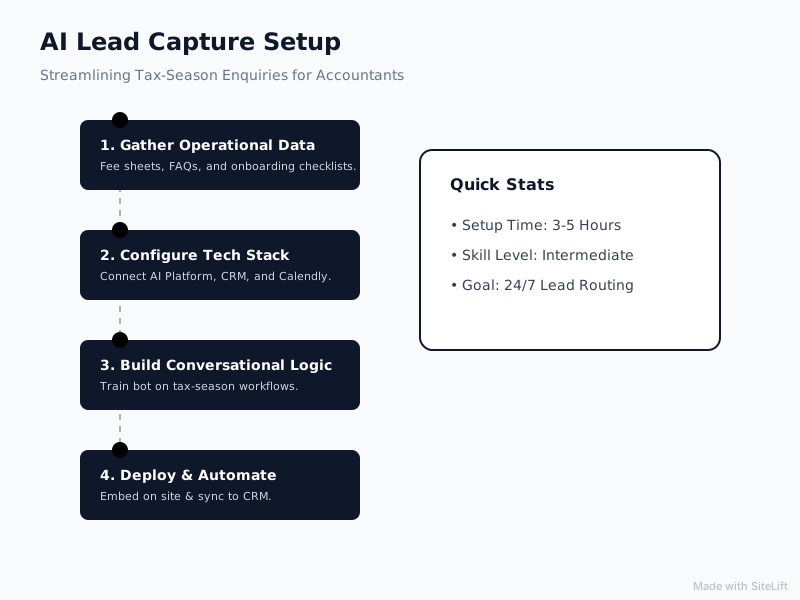
Infographic by SiteLift
Connecting Real-Time Availability to Scheduling Tools
Connect your AI system directly to calendar tools such as Calendly, Acuity, or Google Calendar using native integrations or Zapier webhooks.
When an after-hours enquiry capture accounting session yields a qualified prospect:
- The assistant verifies that the prospect meets your revenue or service criteria.
- It dynamically displays available booking slots directly inside the chat window.
- The prospect picks a time, pays a consultation deposit (if applicable), and receives a calendar invite automatically.
If you want a detailed look at setting up automated scheduling pipelines, check our full breakdown on AI appointment booking bot setup.
| Lead Intake Method | Average Response Time | Qualification Efficiency | After-Hours Booking Capability |
|---|---|---|---|
| Standard Web Contact Form | 12 to 48 Hours | Low (Manual Review) | No |
| Basic Live Chat | 5 to 30 Minutes (Office Hours Only) | Medium | No |
| AI Lead Capture Assistant | Instant (< 5 Seconds) | High (Automated Branching) | Yes (24/7/365) |
Routing Qualified Leads to Your Practice CRM
Never let lead data remain trapped inside your chat history. Map your assistant's data output fields directly into your practice management tool or CRM (e.g., HubSpot, Practice Ignition, or Canopy).
Ensure the following fields pass through on every booking:
- Contact Information: Full name, email address, direct phone number.
- Business Profile: Entity type, industry, estimated annual revenue.
- Tax Situation Details: Summary of pain points or filing requirements.
- Full Transcript Link: A direct link to the chat conversation history.
Step 4: Embed the AI Assistant and Configure After-Hours Rules
With your assistant trained and integrated, deploy the conversational widget across strategic conversion points on your firm's site.
                  [ Visitor Lands on Website ]
                               │
               ┌───────────────┴───────────────┐
               ▼                               ▼
       [ Standard Hours ]             [ After-Hours / Peak ]
               │                               │
       Conversational Intake          Instant Qualification &
       & Fast Consultation             24/7 Direct Calendar
            Booking                          Booking
Installing the Chat Widget on Key Website Pages
Avoid displaying the chat widget everywhere indiscriminately. Target pages where intent is highest:
- Tax Preparation & Business Advisory Pages: Target visitors actively evaluating your primary offerings.
- Contact & Fee Schedule Pages: Engage prospects who are close to making a buying decision.
- Seasonal Tax Landing Pages: Capture campaign-driven traffic from Google Ads or local SEO initiatives.
For technical deployment, copy the script snippet provided by your bot builder platform and insert it before the closing </head> tag of your website.
Setting Up After-Hours Instant Qualification Protocols
Data published by Salesforce indicates that 58% of customers prefer self-service channels like AI bots for quick service inquiries. When prospects search for accounting assistance outside office hours, quick responses keep them from moving to a competitor.
Configure your assistant to adapt its language depending on the time of day:
- During Business Hours: Offers booking slots or offers to transfer high-priority prospects directly to an available front-desk coordinator.
- After Hours: Reassures prospects that their information is captured, answers basic operational questions, and secures an appointment on your team's calendar for the next available slot.
Step 5: Test, Refine, and Optimize Conversational Flow
Before launching your assistant to live traffic during a tax rush, put the system through rigorous testing.
Simulating High-Volume Tax Season Scenarios
Run test scenarios representing your common prospective client profiles:
- Scenario A: A sole proprietor who needs to file three years of back taxes quickly.
- Scenario B: A growing corporate business looking for monthly bookkeeping plus corporate tax filing.
- Scenario C: A single individual asking detailed, out-of-scope tax strategy questions.
Verify that the assistant successfully guides Scenarios A and B toward calendar booking, while properly enforcing advice disclaimers and offering consultation options for Scenario C.
Monitoring Escalation Triggers for Urgent Enquiries
Establish escalation triggers for high-value prospects or urgent cases. If a prospective corporate client indicates annual revenue over $5M, the assistant should immediately trigger an urgent SMS or Slack notification to your managing partner alongside normal calendar booking options.
Why Guardrails Matter Most in AI Lead Capture Assistant Setup for Accountants
Many agency owners recommend loading every possible piece of tax knowledge into an AI model. In my experience with professional service firms, over-training your assistant on complex tax regulations is a mistake.
An AI lead capture assistant is an intake specialist, not a certified public accountant. Trying to make an AI answer obscure tax code queries opens your firm up to misunderstandings, sets incorrect client expectations, and draws out the conversational path.
The most effective assistants focus on qualifying intent, answering administrative questions, and securing booked consultations. Keep the intake direct, keep the guardrails strict, and let your human experts deliver the actual accounting advice during paid consultations.
If you are calculating the potential setup and maintenance investment for automated chat systems, review our complete pricing breakdown on AI chatbot setup costs for services.
Common Pitfalls When Deploying AI Assistants for Accounting Firms
Avoid these common operational mistakes when deploying an AI chatbot for accountants:
Over-Complicating the Initial Questionnaire
If your assistant asks prospective clients for extensive financial figures or historical documentation during their first chat interaction, most visitors will drop off. Collect only the essential contact and qualification data needed to confirm fit and schedule a call.
Failing to Update Seasonal Information Post-Tax Deadline
Tax deadlines shift, temporary filing extensions end, and firm focus rotates throughout the year. Leaving tax-season greetings active in mid-July makes your practice appear out-of-date.
Schedule calendar reminders to update your assistant's prompts immediately following tax deadlines:
- Tax Season Mode (Jan–April): Primary focus on tax return intake, extensions, and immediate filing deadlines.
- Off-Peak Advisory Mode (May–Dec): Primary focus on tax planning, bookkeeping, corporate structuring, and year-round advisory services.
Expected Outcomes After Implementation
When you complete an ai lead capture assistant setup for accountants, your practice will see immediate improvements across key operating metrics.
Increased After-Hours Conversion Rates
Industry metrics compiled by Gartner reveal that organizations implementing conversational AI experience up to a 30% reduction in operational costs while improving customer resolution speeds.
By capturing night and weekend traffic, accounting firms routinely capture 30% to 40% more prospective client enquiries during peak tax months compared to relying on standard static web forms.
Reduction in Administrative Workload During Peak Season
Your front-desk and administrative staff waste hours answering repetitive questions regarding filing dates, accepted software, and basic consultation pricing. Automating these early queries frees up your team to focus on document collection, client onboarding, and direct tax preparation.
Streamline Your Firm's Intake Today
Setting up an AI lead capture assistant eliminates the trade-off between responding to prospective clients quickly and staying focused on client billables during busy seasons.
At growth-kings.com, we build custom conversational lead engines designed specifically for service firms. Instead of forcing your firm through disruptive website overhauls, we layer practical conversational intelligence over your existing web pages to convert off-hours visitors into scheduled, pre-qualified appointments.
If you want to capture every high-value enquiry this tax season without adding administrative overhead, explore our tailored intake solutions at growth-kings.com.
— growth-kings.com
Frequently Asked Questions
Can an AI lead capture assistant handle complex tax questions from prospective clients?
An AI lead capture assistant can identify complex tax topics and provide general administrative guidance, but it should not give specific tax advice. Instead, it informs the prospective client that their scenario requires expert evaluation and directs them to schedule a formal consultation with your firm's accountants.
Is an AI chatbot compliant with privacy regulations for financial and accounting firms?
Yes, provided you choose an enterprise-ready AI builder or platform that adheres to standard encryption protocols (SSL/TLS in transit and AES-256 at rest) and compliance standards like GDPR or CCPA. Always ensure your assistant does not request sensitive identifiers like Social Security Numbers or bank account details during the initial web chat.
Can an AI lead capture assistant connect directly with tools like HubSpot or Calendly?
Yes. Modern AI conversation builders connect natively or via API and integration tools like Zapier to apps like Calendly, Acuity, HubSpot, Practice Ignition, and Salesforce. This enables automatic lead logging and real-time appointment scheduling without manual data entry.
How quickly can an accounting firm set up an AI lead capture bot before tax season?
A basic AI lead capture assistant trained on firm FAQs and connected to a calendar tool can be configured, tested, and embedded on your website in 3 to 5 hours. More complex custom integrations involving multi-crm routing usually take between 1 and 2 weeks to test and launch.
Want this working on your own site?
Tell us what’s working, what’s stuck and what you want to improve. We will reply personally.