The 24/7 Salesperson: How AI Chatbots Qualify Leads While You Sleep
Learn how to build an AI lead qualification chatbot that qualifies leads, books meetings & handles after-hours enquiries while you sleep.
By Growth Kings. Published , updated . 13 min read.

The 24/7 Salesperson: How AI Chatbots Qualify Leads While You Sleep
If your best enquiries arrive at 10pm on a Sunday, a contact form won't close them. An AI lead qualification chatbot will. In this guide, I'll show you exactly how to build one that asks the right questions, filters out tyre-kickers, and books qualified calls straight to your calendar — all while you sleep.
You’ll go from a passive form to an automated lead generation assistant that handles after hours enquiry handling, routes hot leads to sales, and gives your team mornings free of junk follow-up.
What You Need Before Building an AI Lead Qualification Chatbot
Don't buy software yet. The bot is only as good as the sales logic behind it.
Tools you’ll need:
- A conversational platform built for service businesses (Intercom, Drift, Tidio, or a custom GPT assistant)
- A CRM with webhooks or native integration — HubSpot, Salesforce, ActiveCampaign, or Pipedrive
- A scheduling tool — Calendly, Cal.com, or HubSpot Meetings
- 2-3 hours for setup, plus 30 minutes per week for review
Skills required: No code. You need to know who your ideal client is and what makes a bad-fit lead.
Start by auditing your last 20 closed and lost enquiries. What three answers would have told you instantly if they were worth a call? For most service companies, it’s budget, scope, and timeline.
Define it in plain language:
- Qualified: Right service area + realistic budget + decision-maker + need within 90 days
- Nurture: Right problem, wrong timing or unclear budget
- Disqualified: Out of area, DIY budget, or needs a service you don’t offer
Pro Tip: Write your disqualification rules first. It’s easier to agree on who you don’t want than who you do, and it prevents your calendar filling with polite but pointless calls.
If your CRM and calendar don’t support webhooks or direct integrations, fix that before you launch. Without it, you just have a chat widget, not a salesperson.
Step 1: Map Your AI Lead Qualification Chatbot Conversation Flow
This is where most builds go wrong. People automate their 12-field contact form. Don’t.
Designing Branching Logic for Service Enquiries
Static forms ask everything at once and convert poorly. Conversational AI earns each answer one at a time.
Keep your qualification sequence to 3-5 impactful questions:
- Intent: “What are you looking to get help with?”
- Scope: “Is this for [Service A / Service B / Something else]?”
- Urgency: “When do you need this done?”
- Fit filter: “Have you worked with a [your trade] before, and do you have a rough budget range in mind?”
- Next step: “Want me to check availability for a quick scoping call?”
Branch from there. If someone picks “emergency repair” and “this week,” skip budget and go straight to booking. If they pick “just researching” and “3+ months,” route to a helpful guide, not your calendar.
Expected result: A flow diagram you could explain to a new receptionist in two minutes.
Common mistake to avoid: Asking for email first. Earn it after you’ve shown value.
Balancing Automated Efficiency with Conversational Tone
Your bot should sound like your best front-desk person, not a survey.
Compare:
| Static Lead Form | AI Lead Qualification Chatbot |
|---|---|
| 10 required fields, zero context | One question at a time, adapts to answers |
| “Submit and we’ll be in touch in 1-2 business days” | Instant answers + calendar booking in under 60 seconds |
| Same experience at 2pm Tuesday and 2am Sunday | Special after hours enquiry handling with tailored greetings |
| No filtering, sales sorts it Monday | Pre-qualifies on budget, scope, timeline automatically |
Draft fallback responses for weird inputs. People will type “how much for ???” or “are you human lol”. Give the bot a graceful out: “Good question — I can give you our typical range, but for exact pricing Dave will need to see photos. Want me to pass this to him?”
Incorporate your brand voice. If you’re a friendly plumbing firm, be friendly. If you’re a B2B agency, be direct and clear. Trust comes from clarity, not cleverness.
Step 2: Train Your Conversational AI on Business Knowledge
A generic bot hallucinates. A trained conversational AI for service companies deflects, educates, and qualifies.
Ingesting FAQ Data, Pricing Structures, and Service Scopes
Feed the bot only approved sources:
- Your top 5 service pages (full URL content)
- Your FAQ page and top 10 support emails
- Pricing ranges, service areas, lead times, and what’s not included
- Your standard terms or service agreement
Don’t upload 50 PDFs. Start with the 20 questions prospects always ask. For a law firm, that’s fees, timelines, and “do you handle X?” For a home services company, it’s pricing, availability, and warranty.
Expected result: The bot can answer “How much does this usually cost?” and “Do you serve my area?” without guessing.
Common mistake to avoid: Letting it invent prices or promise outcomes. Train it to give ranges, not quotes.
Setting Guardrails to Prevent AI Hallucinations
This is non-negotiable, especially when real-time staff support is unavailable overnight.
Set hard rules:
- Can say: typical price ranges, process steps, opening hours, what to prepare for a call
- Must defer: final quotes, legal/medical/financial advice, guarantees, complaints
- Default deferral line: “I don’t want to give you the wrong info on that — I’ve saved your question for [Name] who’ll confirm first thing in the morning. Can I book you in?”
If you want a practical checklist for this, this buyer’s guide is excellent: Do You Need an AI Enquiry Assistant? Nine Things It Should Handle Before You Buy One.
Pro Tip: Review the first 50 conversations manually. You’ll spot 90% of hallucinations and gaps in that first batch.

Step 3: Connect Your AI Lead Qualification Chatbot to CRM and Calendar Tools
This step turns conversation into revenue. Without it, you have engagement. With it, you have an automated lead generation assistant.
Automating Direct Calendar Booking for Hot Leads
Only offer instant booking to qualified visitors. Here’s the logic I use for clients:
- IF service = in-scope AND timeline = <30 days AND budget = fit THEN show calendar
- ELSE offer “leave your details for a tailored quote”
Connect Calendly or HubSpot Meetings directly in the chat. Don’t send a link and hope. Embed two or three available slots: “I’ve got Tuesday at 10:30 or Thursday at 2pm with Sarah — which works?”
Tag the booking source as “AI-qualified” so sales knows the context before the call.
Routing Unqualified Enquiries to Nurture Sequences
Not everyone is ready tonight, and that’s fine. Don’t waste a sales call on them.
Automatically tag leads in your CRM based on chatbot answers:
hot-after-hours→ SMS + email alert to on-call repnurture-future→ add to 5-email educational sequenceout-of-scope→ polite decline + referral partner resource
Trigger an instant SMS or Slack alert when a high-value prospect engages. According to Harvard Business Review, companies that attempt to contact potential leads within 5 minutes are nearly 7 times more likely to qualify the prospect than those who wait an hour. Read the Harvard Business Review analysis of online sales lead response times to see why speed matters so much.
Expected result: Hot leads wake up to a booked meeting. Everyone else wakes up to a helpful follow-up, not silence.
Common mistake to avoid: Syncing only name and email. Sync the answers — budget, timeline, service needed — into custom CRM fields. That’s what makes the morning call 10x easier.
For a real-world example of this handoff done well, look at this breakdown: Case Study: AI Sales and Service Assistant for Bernardi Volvo Cars Natick. It answers enquiries, helps arrange test drives and service requests, and hands over to staff instead of pretending to be human.
Step 4: Deploy and Optimize After-Hours Prompt Triggers
Don’t put the same “Hi! How can I help?” on every page. That’s invisible.
Triggering Custom Greetings Based on User Behavior
Configure triggers on your money pages — pricing, services, contact, and case studies.
My baseline setup:
- Time on page >25 seconds: “Still comparing options? I can give you a typical price range in 30 seconds.”
- Exit intent: “Before you go — want me to check if your project fits our scope?”
- After 6pm / weekends: “We’re closed now, but I can qualify your enquiry and hold a callback slot for tomorrow morning. What do you need help with?”
That last one is the core of after hours enquiry handling. Research from Salesforce shows that 77% of customers say AI chatbots transform their expectations of business availability. See more in Salesforce research on how chatbots are changing service expectations. People don’t expect you to be awake — they expect an instant, useful response.
A/B Testing Conversational Hook Copy
Test one thing at a time for two weeks.
Test open-ended vs. multiple-choice openers:
- A: “How can I help tonight?”
- B: “Are you looking for [a quote / availability / advice on scope]?”
For service businesses, B almost always wins. It lowers friction and guides the AI chatbot for small business sales toward qualification faster.
Also test your value hook: “Get an instant estimate” vs. “Check morning availability.” Track click-through to first answer, not just chat opens.
Expected result: 15-30% chat engagement on high-intent pages after hours, with clear data on which greeting drives bookings.
Common mistake to avoid: Triggering the bot immediately on page load. Give people 20 seconds to read first.
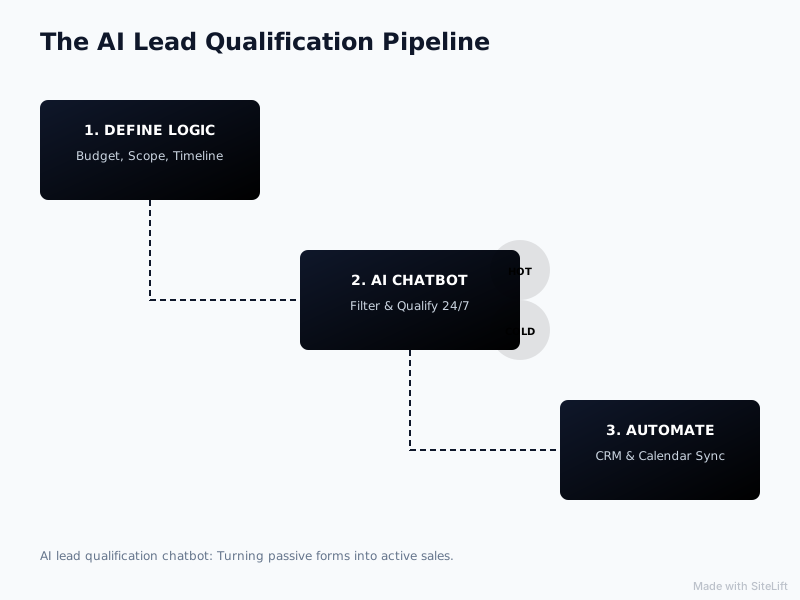
Infographic by SiteLift
How Do You Avoid Common AI Chatbot Implementation Pitfalls?
I’ve audited dozens of bots that technically work but kill conversions. Here’s how to dodge the usual traps.
Over-Complicating the Initial Question Flow
If your flow feels like an interrogation, people bounce. According to Drift, 55% of businesses using conversational AI generate a higher volume of high-quality leads — but only when the flow stays short. You can explore the data in Drift's conversational marketing benchmarks on lead quality.
Fix it with these rules:
- Never ask more than 2 questions in a row without giving value (an answer, a range, a link)
- Allow “skip” on budget questions: “No worries if you’re not sure yet — roughly, are we talking under $1k or over $5k?”
- Regularly review conversation logs to find drop-off points. If 40% quit at question 4, rewrite or remove it.
Failing to Provide an Easy Escalation Route to Humans
Automation without escape hatches destroys trust.
Always include:
- A persistent “Talk to a human” button
- A “Leave a message for the morning team” option after two failed bot answers
- Clear language: “I’m the AI assistant — I’ll get you sorted or pass you to the team.”
People don’t mind bots. They mind being trapped with one. The best setups, like proper AI Enquiry Assistants with human handoff, give approved answers, qualify and route enquiries, and hand over to a person when needed.
What Results Should You Expect After Deploying Your AI Salesperson?
Let’s be practical. You won’t 10x overnight, but you will see three shifts fast.
Key Metrics to Monitor (Speed-to-Lead, Qualification Rate, Booking Rate)
Track weekly for the first 60 days:
- Speed-to-lead: From hours to under 60 seconds for overnight enquiries
- Qualification rate: % of chats marked qualified vs. total chats (aim for 20-35% for service traffic)
- Booking rate: % of qualified chats that book a meeting (aim for 40%+ with embedded calendar)
- No-show rate and sales feedback: Are AI-booked calls actually good?
Long-term Impact on Sales Team Efficiency
The real win isn’t more leads. It’s fewer bad calls. You eliminate low-budget or out-of-scope meetings from your calendar and increase total monthly qualified enquiries without increasing ad spend.
Your morning changes from sorting 15 cold form fills to calling 4 warm, context-rich prospects who already know your range and process.
My Take: Why Less Interrogation Means More Bookings
I’ll be blunt: most AI lead qualification chatbot builds I see are too aggressive.
Founders want to filter hard, so they program five knockout questions up front. It feels efficient, but it reads as cold. I’ve found the opposite works — give a little before you ask a lot.
Answer one pricing question generously, show one relevant result, acknowledge their timeline. Then ask about budget. When the visitor feels helped, they volunteer honest answers. When they feel screened, they lie or leave.
My rule is simple: your bot should earn the right to qualify. Be useful for 30 seconds first, then be direct. That balance is what turns website visits into qualified enquiries without a full rebuild, which is exactly what we focus on at Growth Kings.
You don’t need a perfect AI. You need a clear, trustworthy assistant that respects people’s time at midnight as much as you do at midday.
Need Help Turning Night Traffic Into Booked Calls?
If you’re getting traffic but losing enquiries after hours, you don’t need a new website. You need clearer messaging and a smart assistant to act on it.
At Growth Kings, we help established service businesses turn visits into qualified enquiries with practical website improvements and AI assistants that hand over to humans. Start with our practical articles on website conversion and AI assistants to tighten your offer first.
What you’ve just built: a 3-5 question qualification flow, trained on your real FAQs and guardrailed against hallucinations, wired to your CRM and calendar, with after-hours triggers that book while you sleep.
FAQ
How does an AI lead qualification chatbot differ from traditional website forms?
Forms collect data passively and make you wait. An AI lead qualification chatbot holds a two-way conversation — it answers pricing or scope questions instantly, asks follow-ups based on your replies, and decides in real time whether to offer a booking link or a nurture resource. That back-and-forth is why it converts after-hours traffic that forms lose.
Can an AI chatbot integrate directly with CRMs like HubSpot, Salesforce, or ActiveCampaign?
Yes. Most modern platforms offer native integrations or webhooks. You can push name, email, transcript summary, and custom fields like budget range and urgency directly into the contact record, tag the lead source, and trigger workflows. Just make sure you map those custom fields before launch, not after.
How do you prevent an AI chatbot from booking calendar slots with unqualified leads?
Use conditional booking logic. Only show the calendar if the visitor meets your rules for service type, location, timeline, and budget fit. Everyone else gets a “request callback” or downloadable guide. Also, sync the chat answers to the calendar event description so your team can spot and reschedule poor fits quickly.
What happens when a prospect asks a question the AI lead qualification chatbot cannot answer?
A well-built bot admits the limit and escalates. It should say it doesn’t want to guess, save the exact question to the CRM, and offer a human callback first thing in the morning. Set this as a fallback after one failed attempt — never let it loop or invent an answer.
Is conversational AI suitable for small service companies with low monthly traffic?
Often it’s more valuable. With low traffic, you can’t afford to waste a single good enquiry. An AI chatbot for small business sales ensures the 30 visitors you get at night still get instant help and a path to book. Keep the build lean — one flow, two key pages, and manual log review — and it pays for itself with one saved job per month.
— growth-kings.com
Want this working on your own site?
Tell us what’s working, what’s stuck and what you want to improve. We will reply personally.