How to Do SEO for Your Service Website Without Jargon or Empty Promises
Learn how to do search engine optimization for website enquiries: clear pages, local SEO & tracking. Actionable steps for services.
By Growth Kings. Published , updated . 16 min read.

How to Do SEO for Your Service Website Without Jargon or Empty Promises
If you're running a service business, learning how to do search engine optimization for website enquiries shouldn't require a marketing degree. You want the phone to ring, the form to fill, and the right customers to find you first.
That's exactly what this guide does. I'll walk you through service business seo basics in plain English, step by step, so you end up with clear service pages, better local visibility, and a simple way to track enquiries. No tricks, no guaranteed #1 rankings, just practical work that compounds.
BrightEdge reports that 53% of all website traffic comes from organic search, which is why showing up when someone needs your service matters so much.
What Search Engine Optimization for a Service Website Really Means
Forget the acronym for a second. For a service website, optimization means helping the right people find you, trust you, and contact you.
Google doesn't send you enquiries because you "do SEO." It sends them because your page is the clearest, most helpful answer to what someone typed.
Why service business SEO basics are different from e-commerce or blogging
An online shop wants clicks that turn into cart checkouts. A blog wants pageviews and ad clicks. You want something else: qualified enquiries.
That changes everything. You don't need 200 blog posts or 10,000 visitors. You need 50 of the right visitors who have a problem you solve, live in your service area, and can afford you.
How Google decides which service pages deserve enquiries
Google looks at three things, as outlined in Google's official SEO Starter Guide:
- Can it understand you? Clear titles, headings, and text about one specific service.
- Do you look trustworthy? Real reviews, real team, real address, helpful detail.
- Do searchers seem satisfied? People click, stay, call, and don't bounce straight back.
Search intent is the key. Someone searching "how to unclog a drain" wants DIY advice. Someone searching "emergency plumber in Austin" or "B2B accounting firm for startups" wants to hire now. Your money pages should target that second group.
Visibility + clarity = enquiries. Rankings alone pay no bills.
What You Need Before You Start Optimizing Your Website
You don't need expensive software to start. You need access, focus, and a baseline.
Essential tools and access checklist
Gather this before you touch anything:
- Google Search Console access - free, shows what queries you show up for
- Google Business Profile access - critical for local calls
- Website CMS login - WordPress, Webflow, Squarespace, whatever you use
- Analytics + enquiry tracking - GA4 plus form notifications and a call tracking number if possible
- 1-2 hours per week - consistency beats intensity
For technical checks and algorithm updates, bookmark Google Search Central documentation. It's the source of truth when advice conflicts.
How to define your core services and enquiry goal
List your 3-5 most profitable services and where you actually want work. Not everything you could do, just what you want more of.
Example:
- Emergency plumbing repair - Austin metro
- Water heater installation - Austin + Round Rock
- Drain camera inspection - Travis County
Then define one primary goal per page: call, quote form, or booking. If everything is a priority, nothing is.
Pro Tip: Check last 90 days in Search Console and your inbox. Which 2 pages already get impressions or enquiries? Start there instead of starting from zero.
Step 1: How to Make Your Services Crystal Clear for Visitors and Google
Website clarity for conversions is the most underrated SEO lever. Google rewards pages people understand, and people contact businesses they understand.
How to structure one clear page per core service
Don't lump everything on a "Services" page. Create one dedicated page per core service.
Each page needs:
- Clear H1: What + who + where. Example: "Water Heater Installation in Austin for Busy Homeowners"
- First paragraph: Who it's for, what problem you solve, service area
- What's included: 4-6 bullet deliverables, timeline, pricing signals
- Proof: 2-3 testimonials, photos of real work, credentials
- Next step: One obvious call-to-action above the fold and at the bottom
Use customer language. "Blocked drain fixed same-day" beats "comprehensive drainage solutions."
What good clarity looks like in practice
- Short paragraphs, scannable H2s, tap-to-call button on mobile
- Real photos, not stock handshakes
- Honest pricing ranges: "Most installs run $1,800-$3,200 depending on..."
- After-hours answer: form + chat + clear response time. Missed calls after 6pm are lost jobs.
According to Google via Think with Google, 53% of mobile site visits are abandoned if a page takes longer than 3 seconds to load. Speed is clarity.
Expected result: Higher time on page, more calls, better rankings because Google sees satisfied clicks.
Common mistake to avoid: Jargon headlines like "Holistic Business Solutions." No one searches for that.

Step 2: How Do You Find What Your Ideal Customers Actually Search For?
You don't need Ahrefs on day one. You need to listen like your customer talks.
Simple keyword research without expensive tools
Do this 45-minute exercise:
- Google Autocomplete: Type your service + city and write down suggestions. Try "electrician austin...", "accountant for..."
- People Also Ask: Note the 3-4 questions under your main search. Those are FAQ gold.
- Search Console > Performance: Filter by impressions. Look for queries where you're position 8-25. Those are near-wins.
- Google Business Profile queries: Check Insights for terms people used to find you.
- Sales calls: Write down the exact 10 phrases prospects say. That's your copy.
If you want background on how crawling and ranking works, Moz's beginner's guide to how search engines work explains it without hype.
Prioritize long-tail service + location intent: "emergency plumber in Austin," "family lawyer free consultation Dallas," "commercial cleaning for medical offices Chicago."
| Search Type | Example | What to Do |
|---|---|---|
| Ready to enquire | "boiler repair near me open now" | Target with main service page + Google Business Profile |
| Comparing options | "tank vs tankless water heater cost Austin" | Target with detailed FAQ / guide that links to service page |
| DIY / informational | "how to pilot light water heater" | Only create if it leads naturally to "when to call a pro" |
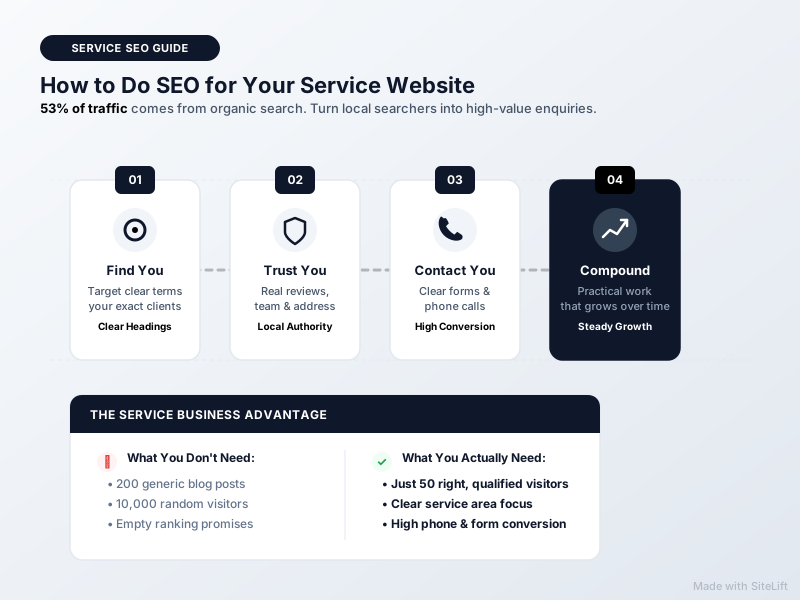
Infographic by SiteLift
How to match keywords to enquiry-ready pages
One primary topic per page. Don't target "plumber Austin" on five pages or they'll cannibalize each other.
Simple map:
- /water-heater-installation-austin/ -> water heater installation Austin
- /emergency-plumber-austin/ -> emergency plumber Austin
- /blog/tank-vs-tankless-cost/ -> comparison query, links to installation page
Expected result: Fewer wasted pages, faster wins on terms that actually convert.
Common mistake to avoid: Chasing high-volume national keywords like "plumbing tips" when you need local jobs.
Step 3: How to Do Search Engine Optimization for Website Pages That Earn Clicks and Calls
This is on-page seo for enquiry websites in practice: titles, headings, and helpful content that earns the click and the contact.
Title tags, meta descriptions, and headings that earn clicks
Think of your title as a mini-ad. Formula: [Service] in [Location] | [Benefit]
- Good:
Emergency Plumber in Austin | Same-Day Repair, Upfront Pricing - Bad:
Home | ABC Services LLC
Meta description (around 150 characters): include service, location, and why choose you. It doesn't directly rank you, but it lifts click-through rate.
Use H2s/H3s as an outline:
- H1: one per page, the main promise
- H2s: What's included, Pricing, Our process, Reviews, Service area, FAQs
- H3s: details under each
Add descriptive alt text to real photos: "technician installing tankless water heater in Austin attic" not "IMG_4231."
Helpful content, FAQs, and internal linking that builds confidence
Answer pre-sales objections before they have to ask:
- How fast can you come?
- What does it cost?
- Are you licensed and insured?
- What happens during the visit?
- What if I'm not happy?
Add a 4-6 question FAQ on each service page using real People Also Ask phrasing. Add process steps: Step 1 Call, Step 2 Upfront quote, Step 3 Fix + cleanup.
Then link internally: every blog post should link to its relevant money page with natural anchor text like "book a water heater installation in Austin" not "click here."
Pro Tip: Add one original photo or 60-second video per service page. Phone-shot proof of your team on a real job beats 500 words of polished copy for trust.
Expected result: Higher click-through rate from Google, longer visits, more form fills.
Common mistake to avoid: Keyword stuffing footers with 30 cities you don't serve. It reads as spam and erodes trust.
Step 4: How to Improve Local Search Visibility for Services
For most service businesses, local search visibility for services drives more enquiries than national rankings. BrightLocal found that 98% of consumers used the internet to find information about a local business, and Google via Think with Google found that 76% of people who search on their smartphones for something nearby visit a business within a day.
That's your opportunity.
How to optimize your Google Business Profile for calls
Your profile often gets seen before your website. Complete it like a second homepage:
- Correct primary category + 3-5 secondary categories
- Full service list with descriptions and prices where possible
- Accurate hours, including holiday and emergency hours
- 15+ real photos: team, vans, office, before/after
- Q&A: pre-add "Do you offer free estimates?" and answer it
- Weekly posts: recent job, offer, or tip
- Call tracking number as primary, with consistent NAP (Name, Address, Phone) everywhere
For ideas on consumer behavior and mobile search trends, browse Google research on local consumer behavior.
How to earn reviews and consistent local citations
Reviews are local SEO fuel and conversion fuel.
Simple system:
- Text a direct review link within 24 hours of job completion
- Ask for specifics: "What problem did we solve?"
- Respond to every review in 48 hours, using service + city naturally: "Thanks for trusting us with your water heater install in Round Rock!"
- Showcase best reviews on matching service pages
Keep citations consistent on Yelp, Facebook, Apple Maps, Bing, and industry directories. You don't need 200 directories. You need 20-30 accurate ones.
Only create location-specific pages if you genuinely serve that area and can add unique proof: local photos, testimonials from that suburb, parking / travel info. Ten thin "City + Service" doorway pages will hurt you.
Expected result: More map-pack calls, direction requests, and branded searches.
Common mistake to avoid: Using a fake address or stuffing keywords into your business name. It risks suspension.
Step 5: How to Do Search Engine Optimization for Website Trust Without Spammy Tactics
Google calls it E-E-A-T: Experience, Expertise, Authoritativeness, Trust. For services, it just means: prove you're real and good.
What is E-E-A-T for service businesses in practice?
- Experience: Case studies with before/after, job timelines, lessons learned
- Expertise: Licenses, certifications, training, years in business, team bios with real faces
- Authoritativeness: Mentions from local press, trade associations, suppliers
- Trust: Physical address, clear guarantees, transparent pricing policy, easy contact, HTTPS
Add an About page people actually believe, link author bios to service content, and publish your guarantee: "If you're not happy in 30 days, we come back free."
Practical ways to earn quality mentions and links
Forget buying links. Earn them:
- Sponsor a local youth team and get a partner page link
- Join your trade association and chamber with a profile link
- Give testimonials to suppliers - they often link back
- Publish one genuinely useful local guide: "2026 Cost of Water Heater Replacement in Austin [With 14 Real Invoices]"
- Pitch one local journalist with data from your jobs
Fix technical basics at the same time:
- HTTPS everywhere, no mixed content
- Mobile-friendly layout, tappable buttons
- Under 3-second load on 4G - compress images, remove unused plugins
- Fix broken links, submit clean sitemap in Search Console
If you're thinking beyond classic Google into AI answers, this practical guide on how to get recommended by AI search breaks down how ChatGPT, AI Overviews and Perplexity pick sources.
Expected result: Steadier rankings that survive updates because they're built on real reputation.
Common mistake to avoid: Paying for 500 directory links or guest-post farms. One real local mention beats 100 fake ones.
Step 6: How to Do Search Engine Optimization for Website Tracking That Proves ROI
If you can't tie traffic to enquiries, you'll quit too early or invest in the wrong pages.
Which metrics matter: rankings vs. calls and qualified leads
Track enquiries first, rankings second.
Set up:
- Search Console: impressions, average position, CTR by query and page
- GA4 events: form_submit, click_to_call, booking_confirmed marked as conversions
- Call tracking: separate number for website vs. Google Business Profile
- Simple CRM tag: qualified vs. tire-kicker, job value, close rate
| Metric to Watch | Where to Find It | What Good Looks Like |
|---|---|---|
| Impressions for service + city | Search Console | Steady climb month over month |
| Average position 3-10 | Search Console | Near-win pages to improve |
| CTR below 3% on page 1 | Search Console | Rewrite title + meta |
| Calls + forms from organic | GA4 + call tracker | Tied to revenue, not just traffic |
| Close rate by source | CRM / spreadsheet | SEO leads close better than cold leads? |
Simple monthly SEO checkup routine
60 minutes a month:
- Check enquiries: up, down, from which pages?
- Find 3 low-CTR pages on page 1 - rewrite titles
- Find 3 position 8-20 queries - add FAQ section answering them
- Add 1 new review to each top service page
- Fix any 404s or speed warnings in Search Console
- Prune or merge thin blog posts with zero visits in 6 months
Expected result: You know exactly what's working and what to do next.
Common mistake to avoid: Celebrating traffic spikes from irrelevant blog posts while money pages starve.
Troubleshooting: Common SEO Mistakes Service Businesses Should Avoid
Traffic without enquiries usually isn't a Google problem. It's a clarity problem. I go deeper on this in 11 reasons your website isn't converting enquiries into clients.
Watch for these empty promises and shortcuts:
- Guaranteed #1 rankings in 30 days - no one can guarantee this
- Keyword stuffing and hidden text - easy penalty
- Duplicate doorway pages for 50 cities - thin and risky
- Buying links in bulk - will backfire
- Unnecessary full rebuild pitched as "required for SEO" - most sites need clarity and speed fixes, not a $20k rebuild
Quick diagnosis:
- No traffic at all? Check indexing in Search Console, title quality, and whether you target terms with local intent.
- Traffic but no enquiries? Check speed on mobile, confusing offer, hidden phone number, no pricing signals, no reviews above the fold, weak call-to-action.
- Enquiries but bad fits? Tighten copy: who you're for, starting prices, service area map. You'll get fewer but better leads.
My take: Why I think clarity beats cleverness every time
I've reviewed dozens of service sites that spend months chasing blogs and backlinks while their main headline still says "Welcome to Our Website." In my experience, the fastest SEO win is almost never technical wizardry. It's rewriting the H1 so a tired homeowner at 10pm instantly gets: what you do, where, how fast, and how to contact you. When you nail website clarity for conversions, every other tactic - keywords, local, links - suddenly works twice as hard. Clever doesn't convert. Clear does.
What Results Should You Expect and What Comes Next?
Learning how to do search engine optimization for website growth is a compounding investment, not a slot machine.
Realistic timeline:
- Days 1-30: Quick wins - titles, Google Business Profile, speed, reviews, clear CTAs. Expect more calls from existing traffic.
- Days 31-60: Expand near-win pages, publish FAQs, earn 2-3 local mentions.
- Days 61-90: Double down on what Search Console shows is working. Prune what isn't.
- Months 3-6: Competitive service terms start to stick, especially in local map + organic. Evergreen service pages keep bringing enquiries without ad spend.
Your 30-60-90 day checklist lives above. Start with clarity, then local authority, then depth.
Turning visits into enquiries without the hype
You don't need to do this alone, and you don't need a rebuild to get results. At growth-kings.com, we help established service businesses tighten messaging, improve search visibility, and capture after-hours demand with AI assistants that qualify leads while you work.
If you want search that actually turns into booked jobs, explore our search and AI visibility for established service businesses - it's built specifically for enquiry-driven sites, not e-commerce.
FAQ
What is search engine optimization for a website in simple terms?
It's making it easy for the right people to find you on Google, trust you quickly, and contact you. Technically that means clear pages, fast mobile experience, relevant titles and content, local reviews, and links from reputable sites. Practically, for services, it means more qualified calls and forms, not just more traffic.
How long does SEO take to work for a service business website?
Expect small wins in 30 days from title fixes, Google Business Profile improvements, and clearer calls-to-action. Competitive service + city terms typically take 3-6 months to move consistently, because Google needs time to recrawl, test clicks, and trust new signals. Evergreen service pages then compound.
Do I need to rebuild my website to do SEO properly?
Usually no. Most service sites need better clarity, speed, titles, internal links, and proof - not a full rebuild. Rebuild only if your site isn't mobile-friendly, is painfully slow, can't be edited, or has major security issues. Fix conversion blockers first; it's cheaper and faster.
How does local search visibility help service businesses get more enquiries?
Local search visibility for services puts you in front of nearby customers ready to hire - in Google Maps, the local pack, and "near me" results. A complete Google Business Profile, consistent contact details, and steady reviews drive calls, direction requests, and quote forms from people who can actually book you.
Can I do SEO for my service website myself or should I hire help?
You can handle service business seo basics yourself: one page per service, helpful FAQs, reviews, and monthly tracking in Search Console. Hire help when you're in a competitive market, lack time, have technical issues, or get traffic but no enquiries. Avoid anyone promising guaranteed rankings or pushing an instant rebuild.
— growth-kings.com
Want this working on your own site?
Tell us what’s working, what’s stuck and what you want to improve. We will reply personally.