AI Sales Assistant CRM Integration Services: Turn Every Chat Into Pipeline Without Leaks
Eliminate lost leads and dirty data. Discover how professional AI sales assistant CRM integration services turn web chats into clean pipeline.
By Growth Kings. Published , updated . 15 min read.

AI Sales Assistant CRM Integration Services: Turn Every Chat Into Pipeline Without Leaks
You launch a conversational agent on your website, watch it engage dozens of after-hours prospects, and feel great about your pipeline—until you log into your CRM on Monday morning. The leads are missing, customer records are duplicated, or critical context is buried inside an unread chat transcript.
Deploying ai sales assistant crm integration services is the difference between an AI tool that acts as an isolated novelty and an automated revenue engine that systematically routes revenue-ready prospects into your sales pipeline. Without custom engineering between your conversational front end and your core sales architecture, high-intent buyers inevitably slip through the cracks.
Below, we break down why traditional connections fail, what professional integration delivers, and how to build a leak-free chat-to-pipeline ecosystem that drives measurable pipeline velocity.
Key Takeaways
| Feature / Challenge | Generic Marketplace Connectors | Professional CRM Integration Services |
|---|---|---|
| Data Synchronization | One-way payload push (creates basic contact) | Bi-directional sync (reads historical deals, updates stages) |
| Deduplication | Overwrites or creates duplicate records | Identity resolution via email, phone, and company domain |
| Field Mapping | Standard fields only (Name, Email, Phone) | Deep custom property extraction (BANT, MEDDIC, intent tags) |
| Routing & Handoff | Generic team email notification | Real-time SLA task creation, calendar booking, Slack/Teams alerts |
| Data Governance | High risk of dirty data polluting the CRM | Strict validation schemas, GDPR/CCPA sanitization before write |
Why Native "Plug-and-Play" Connectors Are the Silent Killer of Sales Pipelines
I have audited dozens of sales tech stacks for commercial service firms, and the story is almost always the same. A business signs up for a modern conversational platform, clicks the "Install CRM Plugin" button in the marketplace, and assumes their pipeline automation is solved.
Three months later, the sales director complains that the leads coming from the chat widget are "low quality."
When you dig into the database, the problem is never the conversations themselves. The problem is that the integration is dumb. Standard integrations dump raw text snippets into a generic "Notes" box on a newly created contact. Your sales reps do not have time to read a 40-line chat log to figure out that a prospect has a $50,000 budget and needs an onboarding call by Thursday.
When you treat conversational AI as a standalone communication silo rather than an active data-collection extension of your CRM, you force human reps to do manual data entry. That friction kills momentum. To scale deal flow, you have to treat conversational data as structured pipeline assets.
Why Do AI Conversational Assistants Leak Revenue Without Deep CRM Integration?
To fix pipeline leakage, you have to understand the architectural failure points where prospective buyers drop off between your website and your CRM.
The Hidden Cost of Siloed Chat Logs and Orphaned Prospects
When an AI sales assistant captures a visitor's contact information, that data often remains marooned inside the assistant's proprietary backend dashboard. If an account executive must leave their core CRM interface, open a secondary software tab, and manually copy-paste interaction history, follow-up delays skyrocket.
According to research published by Harvard Business Review, companies that attempt to contact prospective leads within one hour are nearly 7 times more likely to qualify the prospect than those who try even an hour later. If your conversational logs take hours to export or land in an unmonitored inbox, that critical speed-to-lead window evaporates.
How Incomplete Lead Enrichment Stalls Sales Follow-Up Velocity
A form or basic chat widget collects superficial attributes: first name, last name, and email address. An intelligent AI sales assistant for service businesses, however, uncovers deep qualifying signals during a conversation:
- Specific operational pain points
- Target budget thresholds
- Project timelines and urgency
- Incumbent solutions currently in use
Without specialized integration, these nuanced data points remain unstructured. Instead of populating discrete CRM properties like Estimated Deal Value or Current Vendor, they disappear into bulk conversation logs. Reps enter discovery calls blind, repeating questions the AI already answered, frustrating high-intent buyers.
The Failure Points of Fragile Webhooks and Generic Automation Connectors
Many mid-market companies attempt a DIY solution using generic automation tools like Zapier or basic webhooks. While useful for simple tasks, these workflows break under enterprise edge cases:
- A user enters an alternative corporate email during the chat, spawning a duplicate account.
- The webhook payload fails to parse special characters, dropping the prospect entirely.
- API rate limits during traffic spikes cause silent synchronization failures without error logs.
When your pipeline relies on brittle, unsupported webhook chains, revenue leaks are inevitable and difficult to diagnose until revenue is already lost.

What Do Professional AI Sales Assistant CRM Integration Services Actually Deliver?
Specialized ai sales assistant crm integration services move your business away from fragile middleware toward resilient, bi-directional infrastructure that aligns marketing, chat, and deal pipelines.
+-----------------------------------------------------------------------------------+
|                            CONVERSATIONAL INTERFACE                               |
|              Website Visitor engages AI Sales Assistant (24/7)                    |
+------------------------------------------+----------------------------------------+
                                           |
                                           v
+-----------------------------------------------------------------------------------+
|                        INTELLIGENT INTEGRATION LAYER                              |
|   1. Entity Extraction: Parses BANT / MEDDIC parameters into JSON schema          |
|   2. Identity Resolution: Queries CRM API to identify existing vs new contacts    |
|   3. Enrichment & Validation: Standardizes fields, sanitizes phone/email strings  |
+------------------------------------------+----------------------------------------+
                                           |
                                           v
+-----------------------------------------------------------------------------------+
|                           TARGET CRM ARCHITECTURE                                 |
|   - Contact Record Updated/Created (Zero Duplication)                             |
|   - Opportunity/Deal Created with Stage, Value, and Target Close Date             |
|   - High-Priority Alert triggered to assigned rep via Slack/Teams/SMS             |
|   - Real-time SLA task assigned with calendar booking context                     |
+-----------------------------------------------------------------------------------+
Bi-Directional AI Sales Assistant Lead Sync and Data Hygiene
A true enterprise connection is not a one-way street. Professional integration creates a continuous, bi-directional loop:
- Inbound Context: The AI checks your CRM before replying. If a returning client or active deal enters a chat, the AI recognizes them, pulls the account owner’s name, and adjusts its conversational behavior rather than treating them like a cold visitor.
- Outbound Sync: Conversational milestones write directly back into the CRM, updating contact lifecycles, deal stages, and custom objects in real time.
Data hygiene protocols guarantee that phone numbers format into standard E.164 notation, company domains clean automatically, and lead source tracking tags (UTMs) map accurately to pipeline attribution fields.
Dynamic Qualification Logic and Custom Field Attribute Mapping
Every service firm runs on specific qualification criteria—whether you use BANT (Budget, Authority, Need, Timeline), MEDDIC, or an internal framework. Specialized engineers construct natural language processing (NLP) parsers that extract specific criteria from organic conversation and map them directly to CRM properties.
If a prospect tells the assistant, "We are spending about $15,000 monthly with our current agency, but we need to switch before Q3," the integration layer automatically updates:
Current Monthly Spend: $15,000Contract End Date: June 30Primary Churn Reason: Vendor dissatisfaction
Your account executives can immediately filter, view, and prioritize these qualified prospects inside customized CRM views.
Frictionless Chat to CRM Handoff with Real-Time Routing Protocols
Timing determines conversion rates. When an AI chat reaches an inflection point—such as an explicit request for pricing or a confirmed meeting booking—the system must execute a seamless chat to CRM handoff protocol.
Professional integrations handle this by:
- Evaluating geographic, vertical, or deal-size routing rules via API.
- Assigning lead ownership instantly through existing round-robin schedules.
- Creating time-stamped SLA tasks within the CRM that trigger push notifications via Slack, Microsoft Teams, or SMS to the assigned rep.
Pro Tip: Never route AI leads to a shared inbox. Configure your integration to assign records directly to individual rep queues with a strict 15-minute SLA task trigger.
Which Ecosystems Benefit Most from CRM Pipeline Automation Services?
The technical architecture of your integration depends heavily on your database structure. Enterprise platforms handle schema modifications, permission tiers, and automated triggers differently.
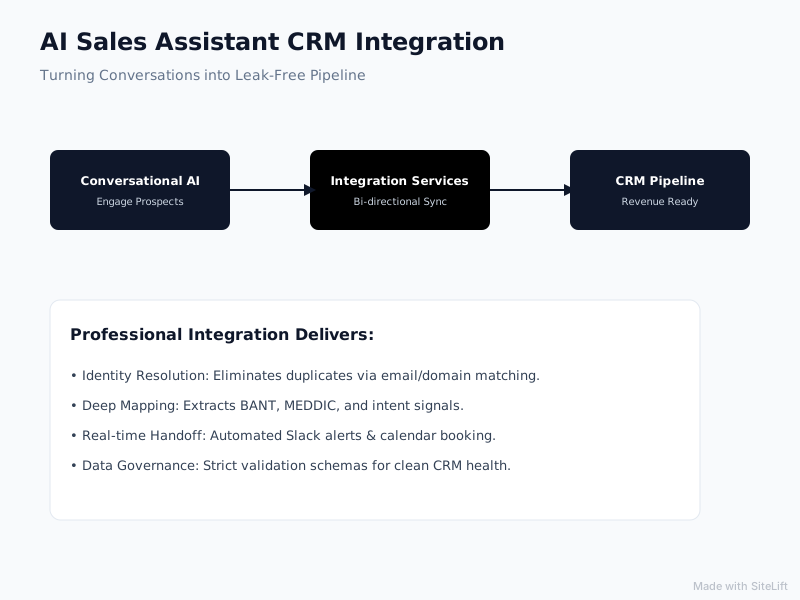
Infographic by SiteLift
HubSpot Sales Hub: Deal Creation, Timeline Events, and Automated Sequences
Integrating conversational AI with HubSpot provides powerful native marketing-to-sales handoffs. A custom integration uses HubSpot’s Timeline API to log conversational milestones directly onto the contact’s activity feed alongside page views and marketing email clicks.
// Example: Custom Event Payload for HubSpot Timeline API
{
  "eventTemplateId": "1048291",
  "objectId": "contact_982341",
  "tokens": {
    "qualificationScore": "Tier 1 Enterprise",
    "budgetIdentified": "$50,000+",
    "targetLaunchQuarter": "Q4"
  }
}
This granular timeline data enables dynamic list segmentation and automatically enrolls cold prospects into personalized HubSpot email sequences if they drop out of a chat session before booking a call.
Salesforce Sales Cloud: Custom Object Mapping and Strict Enterprise Governance
For large enterprises operating on Salesforce, data governance is critical. Off-the-shelf connectors frequently fail here because they lack permission to create custom objects or bypass validation rules.
Research from Salesforce shows that high-performing sales teams are 2.8 times more likely to use AI in their workflows than underperforming teams. To unlock this advantage, professional integration services build custom Apex triggers or leverage Salesforce REST APIs to:
- Cross-reference inbound chats against Accounts, Contacts, and Leads simultaneously.
- Enforce field-level security so conversational data respects internal visibility policies.
- Populate custom objects without triggering validation rule crashes or record-locking conflicts.
Modern SMB CRMs: Pipedrive, Close, and Zoho Pipeline Synchronization
Mid-market service businesses often rely on agile CRMs like Pipedrive, Close, or Zoho. In these platforms, visual deal stages are essential.
Professional CRM pipeline automation services ensure that the instant an AI assistant books an enquiry or validates budget parameters, a new deal card appears in the correct pipeline stage (e.g., "AI Qualified - Demo Scheduled") with the full conversation summary attached to the deal profile.
How Professional Integration Services Build a Leak-Free Chat-to-Pipeline Workflow
Building an enterprise-ready pipeline sync is a deliberate, systematic engineering process. Here is how specialized technical consultants execute the implementation.
       [ PHASE 1: DISCOVERY ]
                 |
                 v
   Map custom properties & schema
   Audit validation rules & drop-offs
                 |
                 v
     [ PHASE 2: DEDUPLICATION ]
                 |
                 v
   Implement multi-key identity resolution
   Configure cross-object matching
                 |
                 v
       [ PHASE 3: EXECUTION ]
                 |
                 v
   Deploy secure, bi-directional REST APIs
   Build SLA notifications & rep triggers
Step 1: Technical Schema Discovery and Lead Entity Mapping
The process begins with an audit of your CRM's data model. The engineering team maps the conversational assistant’s conversational outputs against your existing CRM properties:
- Analyzing mandatory fields to ensure no automated push throws a 400 Bad Request error.
- Defining how custom conversation attributes map to dropdown selections, text fields, or numeric values.
- Auditing lead-to-deal conversion paths to determine whether the AI should generate a Lead, a Contact, or a Contact attached to an active Deal/Opportunity.
Step 2: Intelligent Deduplication and Identity Resolution Configuration
One of the fastest ways to frustrate an account executive is to clutter their database with duplicate contacts. Simple systems rely solely on exact email matches. If a prospect starts a chat anonymously and later supplies a phone number, naive systems create two disconnected records.
Consultative integration services build multi-key identity resolution logic:
- The assistant queries the CRM API using browser cookie data, company IP, or email addresses.
- If a matching record exists, the system updates the existing contact history.
- If no match is found, the system checks for existing company domains to attach the new contact to an established Parent Account automatically.
Step 3: Trigger Automation, Notification SLAs, and Rep Enablement
A synced record is useless if your sales reps do not act on it immediately. The final stage sets up down-funnel automations that turn CRM updates into human action.
According to research from Gartner, 60% of B2B sales organizations will transition from intuition-based selling to data-driven selling by integrating their conversational AI and CRM data. This transition requires operationalizing the data:
- Setting up automated internal Slack or Teams webhooks that ping the deal owner the moment an AI chat books an appointment.
- Injecting calendar invitations and Google Meet/Zoom links directly into the CRM deal record.
- Setting a 15-minute SLA timer: if the assigned rep does not log an activity or accept the lead within the window, the system automatically escalates the deal to a secondary rep.
Pro Tip: Integrate AI-generated qualification summaries into your automated calendar invites. When both the prospect and your rep see the agreed-upon priorities in the calendar invite, show-up rates increase significantly.
How to Choose the Right AI Chatbot CRM Integration Partner for Your Business
Selecting a partner to configure your conversational pipeline is a critical operational decision. You are giving a technical provider direct access to your company's most sensitive commercial asset: your customer database.
Technical Competence: Native API Engineering vs. Superficial Plugin Setups
Many digital agencies claim to offer AI chatbot CRM integration, but their execution is limited to setting up basic Zapier connections or enabling generic app store toggles.
When interviewing potential service providers, ask targeted architectural questions:
- Do you engineer directly against our CRM's native REST/GraphQL APIs?
- How do you handle API rate limits during unexpected website traffic spikes?
- What is your protocol for handling validation errors when a lead record fails to sync?
A capable partner writes clean, monitored integration scripts with automated error alerting, ensuring that failed sync attempts retry automatically rather than vanishing into thin air.
Data Compliance, Privacy, and Regional Governance (GDPR, CCPA, SOC 2)
Customer chat logs frequently contain personal identifiable information (PII). Inadvertently passing sensitive customer information across unsecured webhooks can expose your business to severe compliance liabilities.
Your integration partner must implement strict data-cleaning protocols:
- Stripping out sensitive payment or identification numbers before transmitting chat payloads to the CRM.
- Ensuring all data in transit is encrypted using TLS 1.3 standards.
- Aligning data retention policies with GDPR (right to be forgotten) and CCPA requirements so chat transcripts stored inside the CRM can be purged on demand.
Measurable Success Metrics: Time-to-Contact, Conversion Lift, and Pipeline Velocity
A technical integration should produce clear, measurable commercial outcomes. Before commissioning an integration project, establish your baseline metrics and track improvements over the first 90 days.
+--------------------------------------------------------------------------+
|                  INTEGRATION SUCCESS SCORECARD (90 DAYS)                 |
+--------------------------+-----------------------+-----------------------+
| Metric                   | Before Deep Sync      | Post-Integration Sync |
+--------------------------+-----------------------+-----------------------+
| Average Speed-to-Lead    | 4.5 Hours             | < 3 Minutes           |
| Duplicate Record Rate    | 12-18%                | < 0.5%                |
| CRM Field Completeness   | ~40% (Manual Entry)   | > 95% (Automated)     |
| Discovery Conversion     | 18%                   | 34%                   |
+--------------------------+-----------------------+-----------------------+
Review our detailed breakdown of AI chatbot setup costs for services to understand realistic budgets and scope considerations before hiring an engineering partner.
Turn Your Conversational AI Into an Automated Revenue Driver
Building an effective conversational sales channel requires more than installing a chat widget on your homepage. It requires connecting front-end conversations directly to back-end pipeline architecture so that every high-intent interaction produces structured, actionable sales opportunities.
At growth-kings.com, we focus on high-impact website optimizations and intelligent pipeline workflows for established service firms. Rather than pushing full, disruptive software rebuilds, our team engineers practical data bridges between modern conversational AI assistants and your existing CRM.
By eliminating manual lead entry, preventing duplicate records, and automating speed-to-lead routing, we help service businesses turn after-hours website traffic into high-value pipeline without operational drag.
— growth-kings.com
Frequently Asked Questions
What is the difference between a native chatbot plugin and professional CRM integration services?
A native chatbot plugin is an out-of-the-box software connector built to work across thousands of generic businesses. It typically supports only standard fields (name, email, message) and pushes one-way data into basic contact records, often creating duplicates or messy notes. Professional integration services engineer custom, bi-directional API workflows tailored to your company's unique CRM schema, custom properties, deduplication rules, and sales pipeline stages.
How does deep CRM integration prevent duplicate contact records from AI chat conversations?
Professional integration services use multi-key identity resolution protocols. Instead of creating a new contact each time a visitor chats, the system searches your CRM API across multiple parameters—including existing cookies, email addresses, phone numbers, and company web domains. If an entity exists, the integration updates the existing record with new timeline events; if not, it provisions a clean record and associates it with the appropriate parent company account.
Can an AI sales assistant update existing deal stages or only create new contacts?
Yes, a properly engineered integration can update existing deals. When an existing client or qualified prospect engages with your AI assistant, bi-directional sync logic can identify open opportunities associated with that record and advance the deal stage (e.g., from "Attempted Contact" to "Meeting Scheduled") while updating expected deal values and close dates based on the conversation.
How quickly can a dedicated integration service sync AI chat data into our CRM?
Custom API-driven integrations operate in near real-time, typically synchronizing data within 1 to 5 seconds of a conversational milestone or chat completion. This instant handoff allows automated routing protocols to notify sales reps immediately via Slack, Teams, or SMS while the prospect is still actively engaged on your website.
Do AI sales assistant CRM integrations work with custom fields and unique sales processes?
Yes. Professional integration services specialize in custom field mapping. Whether your sales team uses BANT, MEDDIC, or a bespoke industry qualification framework, the engineering process configures natural language processing parsers to extract those exact data points from conversational dialogue and write them to your CRM's specific custom properties.
Want this working on your own site?
Tell us what’s working, what’s stuck and what you want to improve. We will reply personally.