One Page, More Enquiries: Single-Page Website SEO That Actually Ranks
Learn how to optimize a single-page website to rank on Google. Step-by-step guide on anchor links, schema, speed, and conversion design.
By Growth Kings. Published , updated . 13 min read.

One Page, More Enquiries: Single-Page Website SEO That Actually Ranks
Many marketing agencies will tell you that a one-page site is an SEO dead end. They claim you need dozens of blog posts, complex site structures, and a massive footprint to rank on Google. But for local service businesses, a highly focused, high-converting landing page is often the fastest route to capturing search demand.
With the right approach to single page website seo optimization, you can absolutely secure top-tier rankings while driving consistent leads. You do not need a bloated 50-page site to win local searches; you need a single page that answers search intent better than any competitor.
This guide will show you how to turn a simple one-pager into an enquiry-generating machine, step-by-step.
What Prerequisites Do You Need Before Single Page Website SEO Optimization?
Before you touch a line of code or write a single header, you must lay the groundwork. A single-page site has only one shot at making a first impression on both search engines and human visitors.
Defining Your Primary Core Keyword and Secondary Target Intent
Unlike multi-page sites that can target different keywords on different pages, a single-page site must focus on one primary commercial concept. If you are an emergency plumber in Melbourne, your primary keyword is "emergency plumber Melbourne." Do not dilute your page's focus by trying to rank for "how to fix a leaky tap" on the same page. Identify your primary high-intent keyword and a tight cluster of secondary variations that support it.
Establishing Clear Conversion Goals and Enquiry Pathways
Traffic is vanity; enquiries are sanity. Before optimizing, map out how a user will contact you. Will they call directly, fill out a short form, or use an interactive chat? According to research from the Stanford Web Credibility Project, 75% of users admit to making judgments about a company's credibility based on their website design. Your layout must instantly build trust and direct users toward a clear action.
Auditing Your Baseline Loading Speed and UX Design
Because all your content lives on one URL, single-page sites can easily become bloated with heavy images and interactive scripts. Run a baseline test on PageSpeed Insights before making changes. You need to know your starting point so you can measure how your optimization efforts impact performance.
| Tool / Resource | Purpose | Time Required |
|---|---|---|
| Keyword Planner / Ahrefs | Identify primary commercial keywords | 1 hour |
| PageSpeed Insights | Benchmark loading speed and Core Web Vitals | 15 minutes |
| Google Search Console | Track indexing and organic search impressions | 15 minutes |
Step 1: Structure Your One-Pager with Logical ID Anchors and Deep Linking
Search engine crawlers need structure to understand what your page is about. Since you do not have individual pages for your services, about section, or reviews, you must use HTML ID attributes to create distinct sections.
Mapping Section IDs to Distinct User Sub-Intents
Divide your single-page layout into logical content blocks. Assign each block a clear, descriptive HTML ID. For example:
<section id="services"><section id="reviews"><section id="about"><section id="contact">
This structure helps search engines segment your page and index individual sections as if they were separate pages.
Creating Smooth-Scrolling Anchor Navigation for Crawlers and Users
Create a sticky header menu that links directly to these section IDs:
<nav>
  <a href="#services">Our Services</a>
  <a href="#reviews">Reviews</a>
  <a href="#about">About Us</a>
  <a href="#contact">Get a Quote</a>
</nav>
When users click these links, they should glide smoothly down the page. More importantly, search engines like Google can read these anchor links. According to Google Search Central guidelines, search crawlers can use these fragment identifiers to generate "Jump to" links directly in search engine results pages (SERPs), giving you a larger, more clickable presence.
Leveraging URL Fragment Identifiers for Direct Section Sharing
Using clean fragment identifiers (e.g., yourdomain.com/#services) allows you to link directly to specific parts of your page from external sources. If you are running a local ad targeting a specific service, you can send traffic directly to that section rather than making users scroll from the top.
Step 2: Strategic On-Page SEO for Single Page Website SEO Optimization
On-page SEO for a one-pager requires extreme discipline. You cannot afford to confuse search engines with mixed signals.
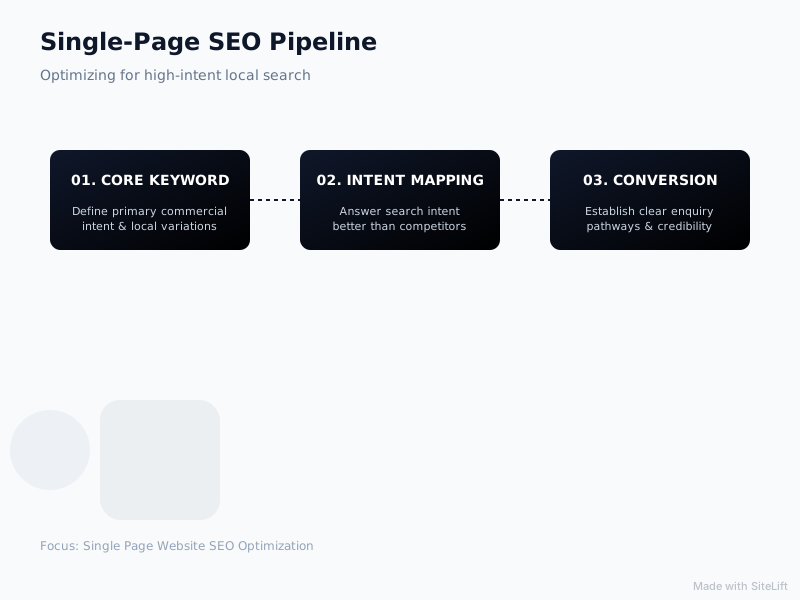
Infographic by SiteLift
Crafting a Focused Title Tag and Meta Description for High CTR
Your title tag is your most powerful on-page asset. It must include your primary keyword and your location. Keep it under 60 characters to prevent truncation.
- Good Title: Emergency Plumber Melbourne | 24/7 Rapid Response
- Good Meta Description: Need an emergency plumber in Melbourne? We arrive within 1 hour. No hidden fees. Call now for fast, reliable service.
Structuring a Single H1 with Logical H2 and H3 Hierarchy
You must only use one H1 tag on your page. This H1 should state exactly what you do and where you do it, incorporating your main keyword.
Use H2 tags for your main sections, and H3 tags for sub-points within those sections. This creates a clean hierarchical outline that search crawlers love:
<h1>Emergency Plumber in Melbourne</h1><h2>Our Rapid Response Plumbing Services</h2>(Targeting one page service website ranking)<h3>Burst Pipe Repairs</h3><h3>Hot Water System Replacement</h3>
<h2>Why Melbourne Homeowners Trust Us</h2><h2>Frequently Asked Questions</h2>
Balancing Keyword Density Across Visual Content Sections
Avoid keyword stuffing at all costs. Instead, focus on natural language and semantic variations. If your primary keyword is "single page website seo optimization", weave in related concepts like "on-page seo for one-pager" and "single page site for lead generation" within your body copy and image alt text.
| Element | Multi-Page Site Approach | Single-Page Site Approach |
|---|---|---|
| H1 Tags | One per page (dozens across the site) | Exactly one for the entire site |
| Internal Links | Links between separate pages | Anchor links pointing to HTML IDs |
| Content Focus | Broad topics split across pages | Highly focused, structured single page |
| Keyword Strategy | Different keyword groups per page | One primary keyword + supporting LSI terms |
Pro Tip: Treat your H2 sections as individual "mini-pages." Each H2 should address a specific user search intent, backed by 150–300 words of highly relevant copy.
Step 3: Implement Technical SEO and Schema Markup for One-Page Sites
Because single-page sites have less content depth than large portals, technical excellence is non-negotiable. You must make it incredibly easy for search engines to read and trust your site.
Adding LocalBusiness and Service Schema Markup
Schema markup is code that you add to your website to help search engines return more informative results for users. For a single-page site, structured data is your secret weapon. It explicitly tells Google who you are, what services you offer, and where you operate.
Use JSON-LD to implement LocalBusiness and Service schema. You can reference official specifications directly on Schema.org.
{
  "@context": "https://schema.org",
  "@type": "PlumbingService",
  "name": "Melbourne Rapid Plumbing",
  "image": "https://yourdomain.com/assets/hero.jpg",
  "telePhone": "+61 3 9000 0000",
  "address": {
    "@type": "PostalAddress",
    "streetAddress": "123 Collins Street",
    "addressLocality": "Melbourne",
    "addressRegion": "VIC",
    "postalCode": "3000",
    "addressCountry": "AU"
  },
  "geo": {
    "@type": "GeoCoordinates",
    "latitude": -37.8136,
    "longitude": 144.9631
  },
  "url": "https://yourdomain.com"
}
Optimizing Page Speed and Core Web Vitals for Heavy Single-Page Layouts
A slow website will destroy your rankings and your conversion rates. According to data published by Think with Google, as page load time goes from 1 second to 3 seconds, the probability of a bounce increases by 32%.
To keep your one-pager lightning fast:
- Compress all images: Use modern formats like WebP or AVIF.
- Implement lazy loading: Only load images and heavy maps when the user scrolls down to those sections.
- Minify code: Clean up unnecessary CSS and JavaScript execution that delays the first contentful paint (FCP).

Ensuring Seamless Mobile Responsiveness and Touch Target Sizes
Most local searches happen on mobile devices. Your single-page site must look and function flawlessly on smartphones. Ensure your buttons are large enough to tap easily (at least 48x48 pixels) and that forms do not require complex zooming to fill out.
Step 4: Turn Visitors Into Enquiries with High-Converting Landing Page Design
Ranking on Google is only half the battle. Once visitors land on your page, you need to convert them into paying clients. This is where service business landing page enquiries live or die.
Positioning Trust Signals and Social Proof Above and Below the Fold
Do not make users search for proof that you are good at what you do. Place high-quality trust signals—such as five-star rating badges, local awards, or association logos—right in your hero section (above the fold). Follow this up with real, written customer reviews further down the page.
Integrating Friction-Free Enquiry Forms and AI Assistants
If your contact form has ten fields, people will leave. Keep it simple. According to conversion data compiled by HubSpot, reducing form fields from 4 to 3 can increase conversion rates by up to 50% on landing pages.
To capture leads after hours, consider integrating an AI-powered conversational assistant. These assistants can qualify leads, answer basic questions, and book appointments while you sleep, ensuring you never miss a hot prospect.
At Growth Kings, we specialize in building conversion-focused websites for service businesses that combine clean layouts with smart automation to maximize your conversion rates.
Using Sticky CTAs for Continuous Lead Capture Opportunity
As users scroll through your single-page site, your call-to-action (CTA) should remain accessible. A sticky header button or a floating "Call Now" button on mobile ensures that the moment a prospect decides to hire you, the pathway to contact is right at their fingertips.
Step 5: Build Authority and Off-Page Signals for Single-Page Service Websites
Because a single-page site lacks internal linking depth, external authority signals carry significantly more weight. You must build a strong digital footprint around your single URL.
Optimizing Your Google Business Profile for Single-Page Local Ranking
Your Google Business Profile (GBP) is the single most important asset for local search visibility. Link your GBP directly to your single-page website. Ensure your business name, address, and phone number (NAP) match your website exactly. Regularly post updates, upload photos, and gather reviews on your GBP to boost your local map pack rankings.
Acquiring High-Quality, Relevant Backlinks to a Single URL
On a traditional site, link authority is split across many pages. On a single-page site, every single backlink you earn points to your homepage, concentrating your domain authority. Focus on earning links from:
- Local business directories (Yelp, Yellow Pages)
- Industry-specific associations
- Local news outlets and blogs
Earning Local Citations and Brand Mentions
Consistent citations across the web signal to search engines that your business is legitimate and active. If you want to dive deeper into how modern search engines and AI assistants evaluate business credibility, check out our insights on Search and AI Visibility for Service Businesses.
Why Single-Page Sites Are Underrated for Local Service Businesses
In my experience, the SEO industry is obsessed with scale. Agencies love selling massive content retainers because it justifies ongoing monthly fees. But let’s be honest: does a local carpet cleaner or roof tiler really need a 100-page blog about "the history of synthetic fibers" to rank?
No. They need a fast, authoritative, clear page that proves they are local, trustworthy, and ready to do the job.
Single-page websites are incredibly efficient. They concentrate all your link equity onto one URL, they are easier to optimize for speed, and they offer a highly controlled user journey. Instead of forcing users to click through multiple pages to find your pricing, reviews, and contact form, you lay everything out in a logical, persuasive sequence. It is a streamlined approach that respects the user's time and drives higher conversion rates.
Pro Tip: If you offer multiple highly distinct services (e.g., commercial plumbing vs. residential plumbing), you may eventually need dedicated pages. But if you focus on one core service area, a single, perfectly optimized page is your most cost-effective weapon.
What Are the Most Common Single-Page SEO Pitfalls to Avoid?
While single-page sites are powerful, they are easy to mess up. Avoid these common mistakes to keep your rankings on track:
Trying to Rank for Multiple Unrelated Services on One Page
If you offer home renovations, landscaping, and accounting, do not try to put them all on one page. Search engines will struggle to understand your primary intent, and you will end up ranking for nothing. Keep your one-pager focused on a single, cohesive business concept.
Bloating the Site with Heavy Animations and Uncompressed Images
Fancy parallax scrolling and heavy video backgrounds look cool, but they destroy page speed. Prioritize performance over visual flair. Every second of delay costs you conversions.
Neglecting Semantic Heading Structure
Do not use heading tags (<h1>, <h2>) for styling purposes (e.g., making text larger). Use CSS for styling, and keep your heading tags strictly reserved for structuring your content hierarchically.
What Expected Outcomes Should You Track After Single-Page Optimization?
Once your optimizations are live, you need to monitor performance to see what is working.
Monitoring Impression Growth and Keyword Positions in Search Console
Don't just look at rankings. Watch your total impressions in Google Search Console. An upward trend in impressions means Google is indexing your sections and showing your site for a wider variety of long-tail search queries.
Tracking Lead Form Conversions and Call Clicks in Google Analytics 4
Set up custom event tracking in Google Analytics 4 (GA4) to measure click-to-call actions and successful form submissions. Your ultimate metric of success is your conversion rate:
$$\text{Conversion Rate} = \left( \frac{\text{Total Enquiries}}{\text{Total Unique Visitors}} \right) \times 100$$
If your traffic increases but your enquiries remain flat, you need to refine your layout, trust signals, or copy clarity.
At Growth Kings, we don't believe in empty ranking promises or forcing you into expensive, unnecessary site rebuilds. We focus on practical, high-impact improvements that make your business easier to find and easier to trust. If you are ready to turn your website visits into qualified local enquiries, explore our services or read more about AI Search Visibility to see how we can help your business grow.
— growth-kings.com
Frequently Asked Questions
Can a single-page website rank on the first page of Google?
Yes. For local service searches and highly focused commercial keywords, single-page websites can and do rank on the first page of Google. By concentrating all your domain authority, backlinks, and on-page signals onto a single URL, you can often outrank larger sites that have thin or poorly structured content.
How do I target multiple keywords on a single-page website?
You should target one primary commercial keyword (e.g., "roof repair Sydney") and use your H2 and H3 sections to target closely related secondary keywords and long-tail queries (e.g., "emergency tile replacement," "metal roof patching," "how much does roof repair cost"). Do not try to target unrelated services on the same page.
Is a single-page website good for local service businesses?
Absolutely. Single-page sites are ideal for local service businesses like plumbers, electricians, beauty salons, and local consultants. These businesses usually have a single primary conversion goal (getting the user to call or fill out a form) and benefit from a streamlined, high-converting layout.
What is the biggest downside of single-page website SEO?
The main downside is limited keyword scaling. Because you only have one URL, you cannot target a vast array of unrelated keywords or run a large-scale content marketing campaign. If your business expands to offer multiple distinct services or target multiple different cities, you will eventually need to transition to a multi-page structure.
Want this working on your own site?
Tell us what’s working, what’s stuck and what you want to improve. We will reply personally.